时间管理

现实工作中,大家都会觉得工作压力非常大,尤其大公司要面对许多部门的协作,效率更是被降低了很多,往往是一堆事情需处理,最终每天堆着加班都干不完的活。时间长了,自然觉得幸福感非常低,生活也非常累,工作中毫无乐趣可言。

记得刚工作那会,新人都是负责登录值班旺旺,处理各种日常的事情。每天IM上排队等着我处理事情的人都很多,并发度经常大于10个,上个厕所回来未接电话都有好几个。新人最大的苦难其实在于自身对业务不是太熟悉,人不熟,遇到问题troubleshooting的思路也不够成熟,很多事情拖着还没有搞定又一堆新的活来了。这样的处境困扰了我大概半年左右。被折腾了半年左右后有所好转。主要因为:
(1) 业务上的东西比较熟练了,绝大部分日常问题能很快解决,单个事情的处理时间缩短了很多;
(2) 人际关系慢慢建立起来了,也学会了寻求帮助,总的来说是能帮别人把问题搞好;
(3) 通过不断的积累,个人基础技能得到了提升,troubleshooting比较顺手。

不过实际上自己还是处于每天忙碌的状态,非常累。尤其是后来慢慢接管了很多线上的维护工作,压力比之前更大。每天依旧是忙忙碌碌,似乎在血汗工厂中完全迷失了自己。以前的众多爱好也慢慢都因为没时间逐渐忘记。

还好在公司内认识的人比较多,我也比较乐于向很多人请教。开始是有人推荐了一本番茄工作法图解。本来我是不太习惯看这类书的,因为一直觉得很多东西还是要靠自己的实践,别人的经验很多时候没有啥意义。不过看了之后自己做了一些调整,感觉工作上的节奏把握稍微有些改善。简单说一下我自己看了之后的收获:

(1) 我们的大脑实际是不擅长多线程的,如果一次只做一件事情,更容易集中精力,提升效率。如果日常工作不断被人打断,自己每次扔下做了一半的事情又去做另外的一个事情,如此循环,最终只是未完成的事情越来越多。所以要学会把后面来的需求放到队列里,自己去安排好优先级,要学会让人等待。其实绝大部分事情不是非常紧急的,反正不急那几分钟。要把随机来的需求队列化。

(2) 要能在一个适当的时间段(20-30分钟)内集中精力做一件事情,没过一段时间稍微放松休息一下。这样不会造成一天一直处于疲惫的状态。在这段时间内,一定要能做到心无杂念地去思考,工作。在嘈杂的环境下需要慢慢培养自己集中精力的能力。

(3) 每天要大致规划一下需要做的事情,做一下todolist,自己根据实际的优先级进行粗步的时间安排。保证每天能做完觉大部分需要做的事情。这样每天都能有做完大部分事情,工作上也能得到绝大部分人的认可,自己也能有点成就感,而且不会被搞马拉松式的工作累死。对于有的工作量大一点的事情,每天更新一下进度情况,保证每天能有一点的进展,只要保证整体的工期OK,自己灵活安排好。

(4) 想好要做的事情,不要拖延。拖延的原因往往是心里没有把握,或者觉得不急。可以让自己做事更积极主动,这样自己对所有事情的掌控力也会好些,能推动事情往往给人的感觉也会好些。

(5) 或许我们每天的工作是平谈无奇,但是要能做工作中找点兴趣点,找到自己工作的价值。这样才不会觉得工作就是无聊的谋生手段。

(6) 学会跟进自己的身体情况,调整工作的节奏,健康第一。

另外就是在大公司,和其他团队的协助也是比较重要的。要逐渐在协作中了解彼此的工作,相互理解。只有相互有信任之后,别人才会真把你的事情当成他自己的事情一样重要来处理,当你有求于人的时候别人也会主动帮忙。

发表在 杂谈 | 留下评论

小型高可用NAT网关设计

小企业内,很多都是直接拿1台Linux服务器用iptables做NAT,给内部服务器提供上网的需求。但是这样的NAT网关实际很容易成为单点。所以在设计的时候最好还是需要做一下HA。简单的考虑小规模场景,可以2个服务器起一个keepalived跑VRRP,把网关的IP和SNAT的IP都做浮动IP。这样单机挂掉的时候能自动进行切换。

如果公网地址足够,最好是需用一个段做SNAT地址池。比如64个地址的话就ifcfg-eth0:1~ifcfg-eth0:64,每个配置文件把公网地址配置上去


DEVICE="eth0.X:Y"
BOOTPROTO="static"
ONBOOT="yes"
TYPE="ethernet"
IPADDR=aa.aa.aa.Y
NETMASK=255.255.255.0
VLAN=yes
PEERDNS=no

/etc/sysctl.conf记得配置net.ipv4.ip_forward = 1。

iptables规则如下


<br />*filter
:INPUT ACCEPT [3:309]
:FORWARD ACCEPT [0:0]
:OUTPUT ACCEPT [518:57577]
-A INPUT -m state --state RELATED,ESTABLISHED,UNTRACKED -j ACCEPT
-A INPUT -d a.a.a.0/255.255.255.0 -i eth0.X -p tcp -j DROP
-A INPUT -d a.a.a.0/255.255.255.0 -i eth0.X -p udp -j DROP
COMMIT
# Completed on Tue Apr 15 18:21:48 2014

*nat
:PREROUTING ACCEPT [6778:567991]
:POSTROUTING ACCEPT [41:3373]
:OUTPUT ACCEPT [41:3373]

-A POSTROUTING -s 10.10.0.0/16 -o eth0.X-j SNAT --to-source aa.aa.aa.1-aa.aa.aa.64
COMMIT
发表在 net | 留下评论

开放的BGP路由器

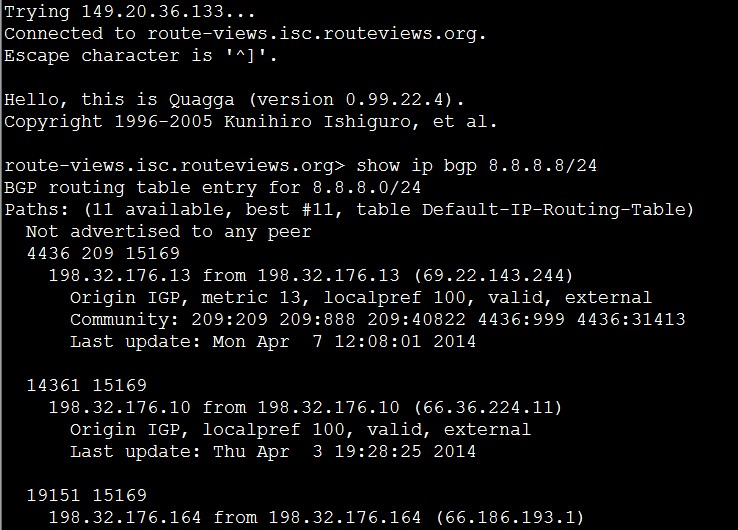
有时需要能查一些BGP的AS PATH信息,有一个“Route Views Project”项目。可以直接登录到一些zebra上直接查一下。
bgp_view
bgp的命令可以参考quagga的手册,简单的比如:
1. 查看某个网段的bgp信息


show ip bgp 8.8.8.8/24

route-views.isc.routeviews.org&gt; show ip bgp 8.8.8.8/24  
BGP routing table entry for 8.8.8.0/24
Paths: (11 available, best #11, table Default-IP-Routing-Table)
  Not advertised to any peer
  4436 209 15169
    198.32.176.13 from 198.32.176.13 (69.22.143.244)
      Origin IGP, metric 13, localpref 100, valid, external
      Community: 209:209 209:888 209:40822 4436:999 4436:31413
      Last update: Mon Apr  7 12:08:01 2014

  14361 15169
    198.32.176.10 from 198.32.176.10 (66.36.224.11)
      Origin IGP, localpref 100, valid, external
      Last update: Thu Apr  3 19:28:25 2014

  19151 15169
    198.32.176.164 from 198.32.176.164 (66.186.193.1)
      Origin IGP, metric 0, localpref 100, valid, external
      Community: 19151:3000 19151:63003 19151:65040
      Last update: Fri Mar 21 21:18:48 2014

  2914 15169
    198.32.176.14 from 198.32.176.14 (129.250.0.5)
      Origin IGP, metric 4, localpref 100, valid, external
      Community: 2914:420 2914:1008 2914:2000 2914:3000
      Last update: Fri Mar 21 21:16:04 2014
  1. 从as-path中过滤特定as的路由

show  ip bgp regexp 15169$

route-views.isc.routeviews.org&gt; show  ip bgp regexp 15169$
BGP table version is 0, local router ID is 198.32.176.5
Status codes: s suppressed, d damped, h history, * valid, &gt; best, i - internal,
              r RIB-failure, S Stale, R Removed
Origin codes: i - IGP, e - EGP, ? - incomplete

   Network          Next Hop            Metric LocPrf Weight Path
*  1.0.0.0/24       198.32.176.13           13             0 4436 209 15169 i
*                   198.32.176.10                          0 14361 15169 i
*                   198.32.176.164           0             0 19151 15169 i
*                   198.32.176.14           94             0 2914 15169 i
*                   198.32.176.20                          0 6939 15169 i
*                   198.32.176.177                         0 7575 15169 i
*                   198.32.176.24                          0 2497 15169 i
*                   198.32.176.95            0             0 8218 15169 i
*                   198.32.176.206                         0 5580 15169 i
*                   198.32.176.134           0             0 4826 15169 i
*&gt;                  198.32.176.207                         0 36351 15169 i
*  1.1.1.0/24       198.32.176.13           13             0 4436 209 15169 i
*                   198.32.176.10                          0 14361 15169 i
*                   198.32.176.164           0             0 19151 15169 i
*                   198.32.176.14           94             0 2914 15169 i
*                   198.32.176.20                          0 6939 15169 i
*                   198.32.176.177                         0 7575 15169 i
*                   198.32.176.24                          0 2497 15169 i
*                   198.32.176.95            0             0 8218 15169 i
*                   198.32.176.206                         0 5580 15169 i
*                   198.32.176.134           0             0 4826 15169 i
*&gt;                  198.32.176.207                         0 36351 15169 i
*  1.2.3.0/24       198.32.176.13           13             0 4436 209 15169 i
*                   198.32.176.10                          0 14361 15169 i
*                   198.32.176.164           0             0 19151 15169 i
*                   198.32.176.14           94             0 2914 15169 i
*                   198.32.176.20                          0 6939 15169 i
*                   198.32.176.177                         0 7575 15169 i
*                   198.32.176.24                          0 2497 15169 i
*                   198.32.176.95            0             0 8218 15169 i
*                   198.32.176.206                         0 5580 15169 i
*                   198.32.176.134           0             0 4826 15169 i
*&gt;                  198.32.176.207                         0 36351 15169 i
*  8.8.4.0/24       198.32.176.13           13             0 4436 209 15169 i
*                   198.32.176.10                          0 14361 15169 i
*                   198.32.176.164           0             0 19151 15169 i
*                   198.32.176.14            4             0 2914 15169 i
*                   198.32.176.20                          0 6939 15169 i
*                   198.32.176.177                         0 7575 15169 i
*                   198.32.176.24                          0 2497 15169 i
*                   198.32.176.95            0             0 8218 15169 i
*                   198.32.176.206                         0 5580 15169 i
*                   198.32.176.207                         0 36351 15169 i
*&gt;                  198.32.176.134           0             0 4826 15169 i
*  8.8.8.0/24       198.32.176.13           13             0 4436 209 15169 i
*                   198.32.176.10                          0 14361 15169 i
*                   198.32.176.164           0             0 19151 15169 i
*                   198.32.176.14            4             0 2914 15169 i
*                   198.32.176.20                          0 6939 15169 i
*                   198.32.176.177                         0 7575 15169 i
*                   198.32.176.24                          0 2497 15169 i
*                   198.32.176.95            0             0 8218 15169 i
*                   198.32.176.206                         0 5580 15169 i
*                   198.32.176.207                         0 36351 15169 i
*&gt;                  198.32.176.134           0             0 4826 15169 i
发表在 net | 留下评论

bind多个view的主备同步

上一篇blog简单写了一下使用nsupdate动态更新DNS记录。今天再写一下在多个view的时候如何设置主备的自动同步。
多个view的主备同步主要是是主备之间每个view都使用共享key进行消息的签名。master的配置和之前的稍微有点小的改动


include "/opt/bind/etc/rndc.key";
include "/opt/bind/etc/views.key";
//
controls {
    inet 127.0.0.1 port 953
    allow { 127.0.0.1; } keys { "rndc-key"; };
};
//
acl test1 {
    10.201.0.0/16;
};
acl test2 {
    192.0.0.0/8;
};
acl slavedns {  
        10.144.149.61;
        127.0.0.1;
};
options {
     listen-on port 53 { any; };
     listen-on-v6  { none; };
     directory      "/opt/bind/etc/";
     dump-file      "/opt/bind/var/named/data/cache_dump.db";
     statistics-file "/opt/bind/var/named/data/named_stats.txt";
     memstatistics-file "/opt/bind/var/named/data/named_mem_stats.txt";
     zone-statistics yes;
     allow-query     { any; };
# recursion config
     recursion yes;
     max-ncache-ttl 60;
     recursive-clients 2000;
# dnssec config
     dnssec-enable yes;
     dnssec-validation yes;
     dnssec-lookaside auto;
# rrt config
     rate-limit {
        responses-per-second 20;
        qps-scale  1000;
        window 4;
        slip 2;
        ipv4-prefix-length 32;
    };
# rpz config
    response-policy {
        zone "rpz.zone"  policy given;
   };
# log query
      querylog yes;
#define version
      version "GNUer's dns 2.0";
## transfer config
      notify explicit;
      tcp-clients 2000;
      transfers-out 100;
      allow-transfer {  slavedns; 127.0.0.1;};
      also-notify { 10.144.149.61; };
     /* Path to ISC DLV key */
     #bindkeys-file "/opt/bind/etc/named.iscdlv.key";
};

logging {
  channel default_syslog { file "/opt/bind/var/log/named.syslog" versions 5 size 100m; severity dynamic; print-time yes;};
  channel default_debug { file "/opt/bind/var/log/named.run" versions 5 size 100m; severity dynamic; print-time yes;};
  channel default_stderr { stderr; severity info; };
  channel null { null; };
  channel general_debug { file "/opt/bind/var/log/named.general" versions 3 size 100m; severity dynamic; print-time yes;};
  channel database_debug { file "/opt/bind/var/log/named.database" versions 3 size 100m; severity dynamic; print-time yes;};
  channel query_log { file "/opt/bind/var/log/named.query" versions 3 size 100m; severity dynamic; print-time yes;print-severity yes; print-category yes;};
  channel resolver_log { file "/opt/bind/var/log/named.resolver" versions 3 size 100m; severity dynamic; print-time yes;};
  channel security_log { file "/opt/bind/var/log/named.security" versions 3 size 100m; severity dynamic; print-time yes;};
  channel notify_log { file "/opt/bind/var/log/named.notify" versions 3 size 100m; severity dynamic; print-time yes;};
  channel rrt_log { file "/opt/bind/var/log/named.rrt" versions 3 size 100m; severity dynamic; print-time yes;};
  channel rpz_log { file "/opt/bind/var/log/named.rpz" versions 3 size 100m; severity dynamic; print-time yes;};
  category default {null; };
  category queries { query_log; };
  category resolver { resolver_log; };
  category security { security_log; };
  category notify { notify_log; };
  category xfer-in { notify_log; };
  category xfer-out { notify_log; };
  category update { notify_log; };
  category unmatched {default_syslog; };
  category rate-limit {rrt_log;};
  category rpz {rpz_log;};
};
view "test1" {
    recursion yes;
    allow-query { any; };
    match-clients {test1; key test1;};
    allow-update { key test1; };
    server 10.144.149.61 {keys  test1;};
  //  also-notify { 10.144.149.61; };
    zone "test.org" {
        type master;
        file "master/test.org.view1";
    };      
    zone "rpz.zone" {
       type master;
       file "master/rpz.zone";
       allow-update {none;};
   };
   zone "."{
     type hint;
     file "named.root";
   };
};

view "test2" {
    recursion yes;
    allow-query { any; };
    server 10.144.149.61 {keys  test2;};
    match-clients {test2; key test2;};
    allow-update { key test2; };
   // also-notify { 10.144.149.61; };
    zone "test.org" {
        type master;
        file "master/test.org.view2";
    };      
    zone "rpz.zone" {
       type master;
       file "master/rpz.zone";
       allow-update {none;};
   };
   zone "."{
     type hint;
     file "named.root";
   };
};
view "default" {
    recursion yes;
    allow-query { any; };
    server 10.144.149.61 {keys  default;};
    match-clients {any;key default; };
    allow-update { key default; };
   // also-notify { 10.144.149.61; };
    zone "test.org" {
        type master;
        file "master/test.org.default";
    };      
    zone "rpz.zone" {
       type master;
       file "master/rpz.zone";
       allow-update {none;};
   };
   zone "."{
     type hint;
     file "named.root";
   };
};

master中的注意事项是:
1. also-notify 可以不用每个view都写一遍,在options里把slave都写全也行(也得跟进实际的安全需求来)
2. 每个view内用allow-update设置只允许响应的key进行更新。
3. 需要使用server来指定和对端机器通信的共享密钥。

slave的配置


include "/opt/bind/etc/rndc.key";
include "/opt/bind/etc/views.key";
//
controls {
    inet 127.0.0.1 port 953
    allow { 127.0.0.1; } keys { "rndc-key"; };
};
//
acl test1 {
    10.161.65.8;
};
acl test2 {
    192.0.0.0/8;
};

options {
     listen-on port 53 { any; };
     listen-on-v6  { none; };
     directory      "/opt/bind/etc/";
     dump-file      "/opt/bind/var/named/data/cache_dump.db";
     statistics-file "/opt/bind/var/named/data/named_stats.txt";
     memstatistics-file "/opt/bind/var/named/data/named_mem_stats.txt";
     masterfile-format text;
     zone-statistics yes;
     allow-query     { any; };
# recursion config
     recursion yes;
     max-ncache-ttl 60;
     recursive-clients 2000;
# dnssec config
     dnssec-enable yes;
     dnssec-validation yes;
     dnssec-lookaside auto;
# rrt config
     rate-limit {
        responses-per-second 20;
        qps-scale  1000;
        window 4;
        slip 2;
        ipv4-prefix-length 32;
    };
# rpz config
    response-policy {
        zone "rpz.zone"  policy given;
   };
# log query
      querylog yes;
#define version
      version "GNUer's dns 2.0";
## transfer config
      notify explicit;
      tcp-clients 2000;
      transfers-out 100;

     /* Path to ISC DLV key */
     #bindkeys-file "/opt/bind/etc/named.iscdlv.key";
};

logging {
  channel default_syslog { file "/opt/bind/var/log/named.syslog" versions 5 size 100m; severity dynamic; print-time yes;};
  channel default_debug { file "/opt/bind/var/log/named.run" versions 5 size 100m; severity dynamic; print-time yes;};
  channel default_stderr { stderr; severity info; };
  channel null { null; };
  channel general_debug { file "/opt/bind/var/log/named.general" versions 3 size 100m; severity dynamic; print-time yes;};
  channel database_debug { file "/opt/bind/var/log/named.database" versions 3 size 100m; severity dynamic; print-time yes;};
  channel query_log { file "/opt/bind/var/log/named.query" versions 3 size 100m; severity dynamic; print-time yes;print-severity yes; print-category yes;};
  channel resolver_log { file "/opt/bind/var/log/named.resolver" versions 3 size 100m; severity dynamic; print-time yes;};
  channel security_log { file "/opt/bind/var/log/named.security" versions 3 size 100m; severity dynamic; print-time yes;};
  channel notify_log { file "/opt/bind/var/log/named.notify" versions 3 size 100m; severity dynamic; print-time yes;};
  channel rrt_log { file "/opt/bind/var/log/named.rrt" versions 3 size 100m; severity dynamic; print-time yes;};
  channel rpz_log { file "/opt/bind/var/log/named.rpz" versions 3 size 100m; severity dynamic; print-time yes;};
  category default {null; };
  category queries { query_log; };
  category resolver { resolver_log; };
  category security { security_log; };
  category notify { notify_log; };
  category xfer-in { notify_log; };
  category xfer-out { notify_log; };
  category update { notify_log; };
  category unmatched {default_syslog; };
  category rate-limit {rrt_log;};
  category rpz {rpz_log;};
};
view "test1" {
    recursion yes;
    server 10.161.64.97 {keys test1; };
    allow-query { any; };
    match-clients {test1; key test1;};
    allow-update { key test1; };
    zone "test.org" {
        type slave;
        file "master/test.org.view1";
    masters { 10.161.64.97; } ;
    };      
    zone "rpz.zone" {
       type master;
       file "master/rpz.zone";
       allow-update {none;};
   };
   zone "."{
     type hint;
     file "named.root";
   };
};

view "test2" {
    recursion yes;
    allow-query { any; };
    match-clients {test2; key test2;};
    server 10.161.64.97 {keys test2; };
    allow-update { key test2; };
    zone "test.org" {
        type slave;
    file "master/test.org.view2";
    masters { 10.161.64.97; } ;
    };      
    zone "rpz.zone" {
       type master;
       file "master/rpz.zone";
       allow-update {none;};
   };
   zone "."{
     type hint;
     file "named.root";
   };
};
view "default" {
    recursion yes;
    allow-query { any; };
    server 10.161.64.97 {keys default; };
    match-clients {any;key default; };
    allow-update { key default; };
    zone "test.org" {
        type slave;
        file "master/test.org.default";
    masters { 10.161.64.97; } ;
    };      
    zone "rpz.zone" {
       type master;
       file "master/rpz.zone";
       allow-update {none;};
   };
   zone "."{
     type hint;
     file "named.root";
   };
};

slave的配置注意项也是每个view要使用server定义master通信时使用的key,然后限制特定的key才能更新。另外需要注意的是slave和master的IP不要在任何的acl里。

发表在 dns | 留下评论

多个view的时候使用nsupdate更新记录

大家经常使用bind的时候是划分不同的view的,因为每个view的zone需要单独修改,所以人肉修改是比较麻烦的。这个时候可以使用nsupdate进行批量的操作。只要注意每个view使用正确的记录就行。
使用nsupdate需要给每个view都创建一个key,每个view指定允许对应的这个key能更新。
views.key文件:


key "default" {
    algorithm hmac-md5;
    secret "GkbQ6Q2WtVqu9pk8WzPDOA==";
};
key "test1" {
    algorithm hmac-md5;
    secret "4qEjC+NgFmRvGdt8DuCRDA==";
};
key "test2" {
    algorithm hmac-md5;
    secret "88PUPwk66CbQacWCgFG0kw==";
};

named.conf文件


controls {
    inet 127.0.0.1 port 953
    allow { 127.0.0.1; } keys { "rndc-key"; };
};
//
acl test1 {
    10.0.0.0/8;
};
acl test2 {
    192.0.0.0/8;
};
acl slavedns {  
        192.18.208.31; //ztt dns1

        127.0.0.1;
};
options {
     listen-on port 53 { any; };
     listen-on-v6  { none; };
     directory      "/opt/bind/etc/";
     dump-file      "/opt/bind/var/named/data/cache_dump.db";
     statistics-file "/opt/bind/var/named/data/named_stats.txt";
     memstatistics-file "/opt/bind/var/named/data/named_mem_stats.txt";
     zone-statistics yes;
     allow-query     { any; };
# recursion config
     recursion yes;
     max-ncache-ttl 60;
     recursive-clients 2000;
# dnssec config
     dnssec-enable yes;
     dnssec-validation yes;
     dnssec-lookaside auto;
# rrt config
     rate-limit {
        responses-per-second 20;
        qps-scale  1000;
        window 4;
        slip 2;
        ipv4-prefix-length 32;
    };
# rpz config
    response-policy {
        zone "rpz.zone"  policy given;
   };
# log query
      querylog yes;
#define version
      version "GNUer's dns 2.0";
## transfer config
      notify explicit;
      tcp-clients 2000;
      transfers-out 100;
      allow-transfer {  slavedns; 127.0.0.1;};
      also-notify {
                192.18.208.31;

    };
     /* Path to ISC DLV key */
     #bindkeys-file "/opt/bind/etc/named.iscdlv.key";
};

logging {
  channel default_syslog { file "/opt/bind/var/log/named.syslog" versions 5 size 100m; severity dynamic; print-time yes;};
  channel default_debug { file "/opt/bind/var/log/named.run" versions 5 size 100m; severity dynamic; print-time yes;};
  channel default_stderr { stderr; severity info; };
  channel null { null; };
  channel general_debug { file "/opt/bind/var/log/named.general" versions 3 size 100m; severity dynamic; print-time yes;};
  channel database_debug { file "/opt/bind/var/log/named.database" versions 3 size 100m; severity dynamic; print-time yes;};
  channel query_log { file "/opt/bind/var/log/named.query" versions 3 size 100m; severity dynamic; print-time yes;print-severity yes; print-category yes;};
  channel resolver_log { file "/opt/bind/var/log/named.resolver" versions 3 size 100m; severity dynamic; print-time yes;};
  channel security_log { file "/opt/bind/var/log/named.security" versions 3 size 100m; severity dynamic; print-time yes;};
  channel notify_log { file "/opt/bind/var/log/named.notify" versions 3 size 100m; severity dynamic; print-time yes;};
  channel rrt_log { file "/opt/bind/var/log/named.rrt" versions 3 size 100m; severity dynamic; print-time yes;};
  channel rpz_log { file "/opt/bind/var/log/named.rpz" versions 3 size 100m; severity dynamic; print-time yes;};
  category default {null; };
  category queries { query_log; };
  category resolver { resolver_log; };
  category security { security_log; };
  category notify { notify_log; };
  category xfer-in { notify_log; };
  category xfer-out { notify_log; };
  category update { notify_log; };
  category unmatched {default_syslog; };
  category rate-limit {rrt_log;};
  category rpz {rpz_log;};
};
view "test1" {
    recursion yes;
    allow-query { any; };
    match-clients {test1; key test1;};
    allow-update { key test1; };
    zone "test.org" {
        type master;
        file "master/test.org.view1";
    };      
    zone "rpz.zone" {
       type master;
       file "master/rpz.zone";
       allow-update {none;};
   };
   zone "."{
     type hint;
     file "named.root";
   };
};

view "test2" {
    recursion yes;
    allow-query { any; };
    match-clients {test2; key test2;};
    allow-update { key test2; };
    zone "test.org" {
        type master;
        file "master/test.org.view2";
    };      
    zone "rpz.zone" {
       type master;
       file "master/rpz.zone";
       allow-update {none;};
   };
   zone "."{
     type hint;
     file "named.root";
   };
};
view "default" {
    recursion yes;
    allow-query { any; };
    match-clients {any;key default; };
    allow-update { key default; };
    zone "test.org" {
        type master;
        file "master/test.org.default";
    };      
    zone "rpz.zone" {
       type master;
       file "master/rpz.zone";
       allow-update {none;};
   };
   zone "."{
     type hint;
     file "named.root";
   };
};

nsupdate脚本


#!/bin/bash
TTL=600
declare -A views
views["test1"]="4qEjC+NgFmRvGdt8DuCRDA=="
views["test2"]="88PUPwk66CbQacWCgFG0kw=="
views["default"]="GkbQ6Q2WtVqu9pk8WzPDOA=="
usage(){
    echo "$0 view add/delete type domain record"
    echo "$0 view mod type1:type2 domain record1:record2"
    exit 1
}
if [ $# -ne 5 ];then
    usage

fi
view=$1
action=$2
dtype=$3
domain=$4
target=$5
case $2 in
add|delete)
    #echo "update $action $domain 600 $dtype $target"
    nsupdate -y "$view:${views[$view]}" &lt;&lt;-EOF
            server 127.0.0.1
            update $action $domain $TTL $dtype $target
            send
EOF
    if [ $? -eq 0 ];then
        echo -e "update $domain --&gt; $ntarget \e[1;32msuccessfull\e[m"
    else
        echo -e  "update $domain --&gt; $ntarget \e[1;31mfailed\e[m"

    fi
    ;;
mod)
    otype=$(echo $dtype |cut -d: -f1)
    ntype=$(echo $dtype |cut -d: -f2)
    otarget=$(echo $target|cut -d: -f1)
    ntarget=$(echo $target|cut -d: -f2)
    nsupdate -y "$view:${views[$view]}" &lt;&lt;-EOF
        server 127.0.0.1
        update delete $domain $TTL $otype $otarget
        update add $domain $TTL $ntype $ntarget
    send
EOF
    if [ $? -eq 0 ];then
        echo -e "update $domain --&gt; $ntarget \e[1;32msuccessfull\e[m"
    else
        echo -e  "update $domain --&gt; $ntarget \e[1;31mfailed\e[m"

    fi
    ;;
*)
    usage
    ;;
esac

使用示范:
给ax3.test.org.新增A记录10.20.1.33


./nsupdate.sh test2 add A  ax3.test.org. 10.20.1.33

给ax3.test.org.删除A记录10.20.1.33


./nsupdate.sh test2 delete A  ax3.test.org. 10.20.1.33

把ax3.test.org.从A记录10.20.1.3修改为cname到www.baidu.com.


./nsupdate.sh test2 mod A:CNAME  ax3.test.org. 10.20.1.3:www.baidu.com.

把ax3.test.org.从cname到www.baidu.com.修改为A记录10.20.1.3


./nsupdate.sh test2 mod CNAME:A  ax3.test.org. www.baidu.com.:10.20.1.3
发表在 dns | 留下评论

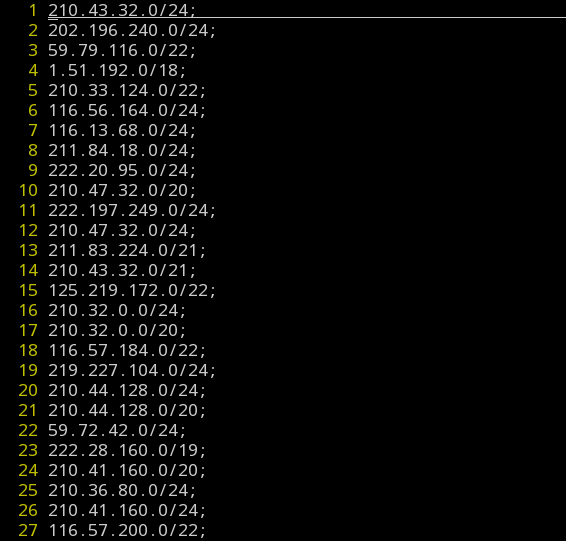
根据AS号查询IP段

he.net上可以直接看到任何AS所归属的IP段。可以写个脚本查询一下,默认是把curl屏蔽了的可以改一下UA。


#!/usr/bin/python
import urllib2
import sys
import os
import re
import string
class AS_TO_ACL:
    def __init__(self,asnum):
        self.asnum=asnum;
        self.url="http://bgp.he.net/AS%s#_prefixes"%(self.asnum)
        self.cidr=set();
    def http_client(self,url):
        request=urllib2.Request(url,headers={'User-agent':"Chrome 27.0"})
        try:
            response=urllib2.urlopen(request,timeout=5)
            info=response.info()
            data=response.read()
        except urllib2.HTTPError,error:
            print "%s error:%s" %(url,error.reason)
            return None
        except urllib2.URLError,error:
            print error.reason
            return None
        else:
            outdata=data
        return outdata
    def get_acl(self):
        htmldata=self.http_client(self.url)
        ip_reg=re.compile("/net/(\d+\.\d+.\d+\.\d+/\d+)")
        htmls=htmldata.split();
        for line in htmls:
            match=ip_reg.search(line)
            if match:
                ips=match.group(1)
                self.cidr.add(string.strip(ips))
        for ip in self.cidr:
            print "%s;\n"%(ip),
if len(sys.argv)&lt;2:
    print "error!"
    print "as_to_acl ASN"
    sys.exit(1)
query=AS_TO_ACL(sys.argv[1])
query.get_acl()

运行一下就可以把教育网的IP段都捞出来了。


python as_to_acl.py  4538

cert_ip

发表在 net | 留下评论

tc做网络延迟、丢包模拟

在生产环境上经常需要模拟一下应用间异地调用的场景,或者模拟一下协议栈优化在丢包的情况下是否有效果。可以使用netem来做。具体的直接看看的介绍就行。

Examples

Emulating wide area network delays

This is the simplest example, it just adds a fixed amount of delay to all packets going out of the local Ethernet.

# tc qdisc add dev eth0 root netem delay 100ms
Now a simple ping test to host on the local network should show an increase of 100 milliseconds. The delay is limited by the clock resolution of the kernel (HZ). On most 2.4 systems, the system clock runs at 100hz which allows delays in increments of 10ms. On 2.6, the value is a configuration parameter from 1000 to 100 hz.

Later examples just change parameters without reloading the qdisc

Real wide area networks show variability so it is possible to add random variation.

# tc qdisc change dev eth0 root netem delay 100ms 10ms
This causes the added delay to be 100ms ± 10ms. Network delay variation isn’t purely random, so to emulate that there is a correlation value as well.

# tc qdisc change dev eth0 root netem delay 100ms 10ms 25%
This causes the added delay to be 100ms ± 10ms with the next random element depending 25% on the last one. This isn’t true statistical correlation, but an approximation.

Delay distribution

Typically, the delay in a network is not uniform. It is more common to use a something like a normal distribution to describe the variation in delay. The netem discipline can take a table to specify a non-uniform distribution.

# tc qdisc change dev eth0 root netem delay 100ms 20ms distribution normal
The actual tables (normal, pareto, paretonormal) are generated as part of the iproute2 compilation and placed in /usr/lib/tc; so it is possible with some effort to make your own distribution based on experimental data.

Packet loss

Random packet loss is specified in the ‘tc’ command in percent. The smallest possible non-zero value is:

232 = 0.0000000232%

# tc qdisc change dev eth0 root netem loss 0.1%
This causes 1/10th of a percent (i.e 1 out of 1000) packets to be randomly dropped.

An optional correlation may also be added. This causes the random number generator to be less random and can be used to emulate packet burst losses.

# tc qdisc change dev eth0 root netem loss 0.3% 25%
This will cause 0.3% of packets to be lost, and each successive probability depends by a quarter on the last one.

Probn = .25 * Probn-1 + .75 * Random

Caveats

When loss is used locally (not on a bridge or router), the loss is reported to the upper level protocols. This may cause TCP to resend and behave as if there was no loss. When testing protocol reponse to loss it is best to use a netem on a bridge or router

Packet duplication

Packet duplication is specified the same way as packet loss.

# tc qdisc change dev eth0 root netem duplicate 1%

Packet corruption

Random noise can be emulated (in 2.6.16 or later) with the corrupt option. This introduces a single bit error at a random offset in the packet.

# tc qdisc change dev eth0 root netem corrupt 0.1%

Packet re-ordering

There are two different ways to specify reordering. The first method gap uses a fixed sequence and reorders every Nth packet. A simple usage of this is:

# tc qdisc change dev eth0 root netem gap 5 delay 10ms
This causes every 5th (10th, 15th, …) packet to go to be sent immediately and every other packet to be delayed by 10ms. This is predictable and useful for base protocol testing like reassembly.

The second form reorder of re-ordering is more like real life. It causes a certain percentage of the packets to get mis-ordered.

# tc qdisc change dev eth0 root netem delay 10ms reorder 25% 50%
In this example, 25% of packets (with a correlation of 50%) will get sent immediately, others will be delayed by 10ms.

Newer versions of netem will also re-order packets if the random delay values are out of order. The following will cause some reordering:

# tc qdisc change dev eth0 root netem delay 100ms 75ms
If the first packet gets a random delay of 100ms (100ms base – 0ms jitter) and the second packet is sent 1ms later and gets a delay of 50ms (100ms base – 50ms jitter); the second packet will be sent first. This is because the queue discipline tfifo inside netem, keeps packets in order by time to send.

Caveats

Mixing forms of reordering may lead to unexpected results
Any method of reordering to work, some delay is necessary.
If the delay is less than the inter-packet arrival time then no reordering will be seen.

Rate control

There is no rate control built-in to the netem discipline, instead use one of the other disciplines that does do rate control. In this example, we use Token Bucket Filter (TBF) to limit output.

# tc qdisc add dev eth0 root handle 1:0 netem delay 100ms
# tc qdisc add dev eth0 parent 1:1 handle 10: tbf rate 256kbit buffer 1600 limit 3000
# tc -s qdisc ls dev eth0
qdisc netem 1: limit 1000 delay 100.0ms
Sent 0 bytes 0 pkts (dropped 0, overlimits 0 )
qdisc tbf 10: rate 256Kbit burst 1599b lat 26.6ms
Sent 0 bytes 0 pkts (dropped 0, overlimits 0 )
Check on the options for buffer and limit as you might find you need bigger defaults than these (they are in bytes)

For more explanation about how to use classful queuing disciplines see: Linux Advanced Routing HOWTO – classes

Non FIFO queuing

Just like the previous example, any of the other queuing disciplines (GRED, CBQ, etc) can be used.

Delaying only some traffic

Here is a simple example that only controls traffic to one IP address.

# tc qdisc add dev eth0 root handle 1: prio
# tc qdisc add dev eth0 parent 1:3 handle 30: \
tbf rate 20kbit buffer 1600 limit 3000
# tc qdisc add dev eth0 parent 30:1 handle 31: \
netem delay 200ms 10ms distribution normal
# tc filter add dev eth0 protocol ip parent 1:0 prio 3 u32 \
match ip dst 65.172.181.4/32 flowid 1:3
The commands makes a simple priority queueing discipline, then a TBF is added to do rate control, then attaches a basic netem. Finally, a filter classifies all packets going to 65.172.181.4 as being priority 3. For more info on traffic classification see LARTC — filters

FAQ

How come first ping takes longer?

The first ICMP packet in a ping requires an ARP request/response as well.

How come TCP is so slow over netem?

When you run TCP over large Bandwidth Delay Product links, you need to do some TCP tuning to increase the maximum possible buffer space.

How can I use netem on incoming traffic?

You need to use the Intermediate Functional Block pseudo-device IFB . This network device allows attaching queuing discplines to incoming packets.

# modprobe ifb
# ip link set dev ifb0 up
# tc qdisc add dev eth0 ingress
# tc filter add dev eth0 parent ffff: \
protocol ip u32 match u32 0 0 flowid 1:1 action mirred egress redirect dev ifb0
# tc qdisc add dev ifb0 root netem delay 750ms
Another way is to use another machine as an Ethernet bridge , and apply netem to both Ethernet devices.

How to reorder packets based on jitter?

Starting with version 1.1 (in 2.6.15), netem will reorder packets if the delay value has lots of jitter.

If you don’t want this behaviour then replace the internal queue discipline tfifo with a pure packet fifo pfifo. The following example has lots of jitter, but the packets will stay in order.

# tc qdisc add dev eth0 root handle 1: netem delay 10ms 100ms
# tc qdisc add dev eth0 parent 1:1 pfifo limit 1000

How does the value of HZ impact Netem?

In the 2.6 line of kernels, HZ is a configurable parameter that takes values of either 100, 250, or 1000. Because it affects the granularity with which Netem is able to delay packets, it is most beneficial to set HZ to 1000, which will allow for delays in increments of 1ms. See this mailing list post for a more detailed discussion of the impact of HZ.

In kernel versions, 2.6.22 or later, netem will use high resolution timers, if they are enabled. This allows for finer granularity (sub-jiffie) resolution.

发表在 net | tc做网络延迟、丢包模拟已关闭评论

用Graphviz画图LVS的示意图

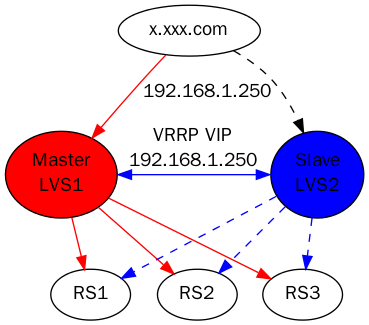
最近几天写文档比较多,天天都在画图。画了一个LVS的图。之前画Master和Slave的时候不能把这2个放一层,后来看到有subgraph这个属性,可以定义几个是同一个rank来做。


digraph G{
"x.xxx.com"-&gt;{"Master\nLVS1"}[label="192.168.1.250",color=red];
"x.xxx.com"-&gt;{"Slave\nLVS2"}[style=dashed];
"Master\nLVS1"-&gt;{"RS1";"RS3";"RS2"}[color=red,style="filled"];
"Slave\nLVS2"-&gt;{"RS1";"RS3";"RS2"}[color=blue,style=dashed];
 {"Master\nLVS1"[style=filled,fillcolor=red]}-&gt;{"Slave\nLVS2"[style=filled,fillcolor=blue]}  [dir=both,label="VRRP VIP\n192.168.1.250",color=blue];
subgraph {
rank = same; "Master\nLVS1"; "Slave\nLVS2";
}
}

lvs1

发表在 Script | 用Graphviz画图LVS的示意图已关闭评论

wordpress禁用google字体API

最近经常发现blog打开比较慢,发现是wordpress升级后需要使用http://fonts.googleapis.com/,google的任何服务在国内访问都麻烦的.最简单的就是装一个插件把这个关闭掉.
搜索插件:Disable Google Fonts,安装后即可解决问题.现在试了试速度终于正常了.

发表在 Admin | wordpress禁用google字体API已关闭评论

linux ssd优化

给自己的电脑换了一个三星的840 EVO,速度提升了很多很多,开机的时候从grub显示开始到进入gnome-shell基本10秒左右都能完成.打开chrome或者openoffice之类的也都非常快.目前各个系统对ssd的支持其实都比较完善了,什么4K对齐啥的都不是什么问题,基本不用自己去关心.
linux下我就做了一下开启trim支持(挂载项加discard参数即可)和禁用了noatime,对swap分区也需要开启discard


/dev/sda1 / ext4 defaults,noatime,discard,errors=remount-ro 0 1
# /home was on /dev/sda6 during installation
/dev/sda6 /home ext4 defaults,noatime,discard 0 2
# swap was on /dev/sda5 during installation
/dev/sda5 none swap sw,discard 0 0
发表在 fs | linux ssd优化已关闭评论