bind 9.10的Pre-fetch测试

bind 9.10里有个prefetch的特性。文档描述如下


When a query is received for cached data which is to expire shortly, named can refresh the data
from the authoritative server immediately, ensuring that the cache always has an answer available.

当DNS递归服务器接受到一个域名的查询请求时,如果这个域名本来已经有cache记录且马上要过期了。named会主动刷新这条记录。
实际的逻辑是 假如在0s的时候请求了qq.com,qq.com的TTL是600s。
如果设置了


prefetch  5  10;

那么在595-599的这段时间内,再次收到qq.com的查询请求,named会自己主动去递归一次。prefetch接受2个参数,第一个是触发namde主动递归的剩余TTL上限,第二个是只有TTL大于10的才做主动递归更新。

这个可以提高热域名的cache命中率,但是对请求量很小的冷域名的解析提升无用。

参考:
1. https://kb.isc.org/article/AA-01122

发表在 dns | 留下评论

arp_announce引发的1个ARP问题

最近配置服务器时遇到在dummy0上宣告的公网地址不能正常访问公网的问题。网络的基本结构为2个网卡分别上联2个交换机,跑OSPF。在dummy0上会单独宣告1个公网的地址。自己通过在zebra内修改路由表使得访问公网时设置自己宣告的公网地址为源IP。

以前这个方案实际线上跑了多次,一直OK。最近有一套服务器安装这样的配置会出现刚启动时是OK的,过段时间就歇菜了。简单地说实际的情况如下:
T1 (192.168.1.2 )–> 交换机A的Port X(192.168.1.1)
T2 (192.168.2.2 )–> 交换机B的Port X(192.168.2.1)
平时默认都走T1,公网的路由表默认学到的网关实际是T2的对端地址。
当本地公网地址不能出去的时候,我自己带源地址(架设公网地址是4.4.4.4)ping,发现发送的ARP请求都是这样


Request who-has 192.168.2.1 tell 4.4.4.4

此时交换机上发现4.4.4.4实际不是和自己一个网段的地址,不会进行回复。就使得这本地这个公网地址出不去。解决这个问题就是加内核参数


net.ipv4.conf.all.arp_announce=1

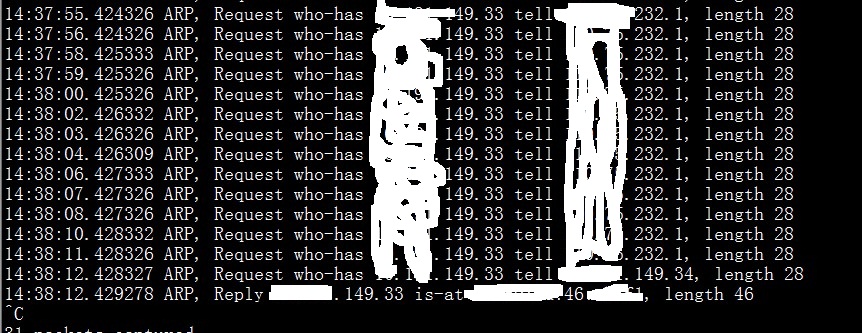
下面是fix后的情况,可以看到使用的是接口上的IP为源IP发的ARP请求。
arp

附上参数说明


rp_announce - INTEGER
    Define different restriction levels for announcing the local
    source IP address from IP packets in ARP requests sent on
    interface:
    0 - (default) Use any local address, configured on any interface
    1 - Try to avoid local addresses that are not in the target's
    subnet for this interface. This mode is useful when target
    hosts reachable via this interface require the source IP
    address in ARP requests to be part of their logical network
    configured on the receiving interface. When we generate the
    request we will check all our subnets that include the
    target IP and will preserve the source address if it is from
    such subnet. If there is no such subnet we select source
    address according to the rules for level 2.
    2 - Always use the best local address for this target.
    In this mode we ignore the source address in the IP packet
    and try to select local address that we prefer for talks with
    the target host. Such local address is selected by looking
    for primary IP addresses on all our subnets on the outgoing
    interface that include the target IP address. If no suitable
    local address is found we select the first local address
    we have on the outgoing interface or on all other interfaces,
    with the hope we will receive reply for our request and
    even sometimes no matter the source IP address we announce.

    The max value from conf/{all,interface}/arp_announce is used.

    Increasing the restriction level gives more chance for
    receiving answer from the resolved target while decreasing
    the level announces more valid sender's information.
发表在 net, OSPF | 留下评论

bind启动时提示953端口被使用

部署DNS的时候遇到个奇葩的问题,总是提示


couldn't add command channel 0.0.0.0#953: address in use

实际上系统上并没有进程使用953端口。查询了一下找了原因。就是portreserve的问题,关闭后OK。

根本的原因是自己打包了一个bind的RPM,会引入/etc/portreserve/named,这样当portreserve启动的时候就会占着53端口。
单独使用/etc/init.d/named启动的时候会执行portrelease 来释放53端口。


portrelease named
发表在 dns | 留下评论

配置OpenVPN只注入特定路由表

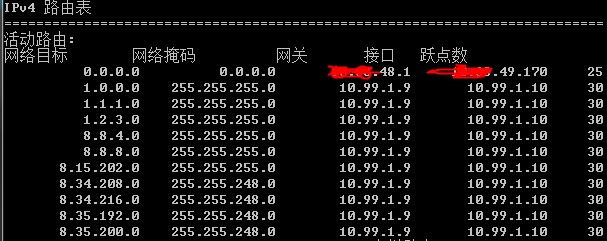
通过情况下大家配置VPN时,都会直接把默认网关指向服务端。但是这会影响访问公司内网资源,造成一些不便。如果只是希望走VPN访问部分外网资源,可以不让VPN客户端改默认的网关,通过加一些路由表使得到特定地址走VPN。

比如我在公司的时候只是需要访问一下google,可以在VPN服务端新增配置,其中把push redirect-gateway def1 bypass-dhcp给直接注释掉,新push了很多路由表到客户端。另外,在客户端也需要把redirect-gateway给注释掉。这样启动后可以看到只是注入特定的路由表,没有改默认路由。
vpn-route

附上服务端配置:

[bash]
port 600xxx
proto udp
dev tun
ca key/ca.crt
cert key/server.crt
key key/server.key # This file should be kept secret
dh key/dh1024.pem
server 10.99.1.0 255.255.255.0
ifconfig-pool-persist ipp.txt
push "dhcp-option DNS 208.67.220.220"
push "dhcp-option DNS 208.67.222.222"
#push redirect-gateway def1 bypass-dhcp
keepalive 10 30
comp-lzo
max-clients 60
user nobody
group nogroup
persist-key
persist-tun
status openvpn-google.log
verb 3
mute 20
duplicate-cn

## add google route rule
push "route 207.223.160.0 255.255.240.0 "
push "route 66.249.85.0 255.255.255.0 "
push "route 66.249.83.0 255.255.255.0 "
push "route 74.125.130.0 255.255.255.0 "
push "route 192.178.0.0 255.254.0.0 "
push "route 64.233.160.0 255.255.255.0 "
push "route 74.125.17.0 255.255.255.0 "
push "route 66.249.72.0 255.255.255.0 "
push "route 173.194.112.0 255.255.255.0 "
push "route 173.194.98.0 255.255.255.0 "
push "route 173.194.140.0 255.255.255.0 "
push "route 74.125.196.0 255.255.255.0 "
push "route 173.194.78.0 255.255.255.0 "
push "route 209.85.238.0 255.255.255.0 "
push "route 72.14.208.0 255.255.254.0 "
push "route 64.233.164.0 255.255.255.0 "
push "route 8.15.202.0 255.255.255.0 "
push "route 74.125.142.0 255.255.255.0 "
push "route 108.177.0.0 255.255.128.0 "
push "route 74.125.203.0 255.255.255.0 "
push "route 74.125.58.0 255.255.255.0 "
push "route 173.194.141.0 255.255.255.0 "
push "route 72.14.244.0 255.255.254.0 "
push "route 173.194.73.0 255.255.255.0 "
push "route 72.14.225.0 255.255.255.0 "
push "route 74.125.193.0 255.255.255.0 "
push "route 74.125.239.0 255.255.255.0 "
push "route 173.255.112.0 255.255.240.0 "
push "route 173.194.119.0 255.255.255.0 "
push "route 66.249.64.0 255.255.224.0 "
push "route 66.249.70.0 255.255.255.0 "
push "route 74.125.190.0 255.255.255.0 "
push "route 74.125.70.0 255.255.255.0 "
push "route 74.125.206.0 255.255.255.0 "
push "route 74.125.198.0 255.255.255.0 "
push "route 173.194.75.0 255.255.255.0 "
push "route 8.34.208.0 255.255.248.0 "
push "route 74.125.19.0 255.255.255.0 "
push "route 74.125.131.0 255.255.255.0 "
push "route 66.102.4.0 255.255.255.0 "
push "route 173.194.76.0 255.255.255.0 "
push "route 8.34.216.0 255.255.248.0 "
push "route 66.249.79.0 255.255.255.0 "
push "route 66.249.90.0 255.255.255.0 "
push "route 162.216.148.0 255.255.252.0 "
push "route 173.194.32.0 255.255.255.0 "
push "route 173.194.142.0 255.255.255.0 "
push "route 74.125.238.0 255.255.255.0 "
push "route 74.125.18.0 255.255.255.0 "
push "route 74.125.234.0 255.255.255.0 "
push "route 173.194.79.0 255.255.255.0 "
push "route 173.194.40.0 255.255.255.0 "
push "route 66.249.64.0 255.255.255.0 "
push "route 74.125.68.0 255.255.255.0 "
push "route 74.125.43.0 255.255.255.0 "
push "route 192.158.28.0 255.255.252.0 "
push "route 8.35.192.0 255.255.248.0 "
push "route 74.125.0.0 255.255.0.0 "
push "route 209.85.128.0 255.255.128.0 "
push "route 66.249.67.0 255.255.255.0 "
push "route 66.249.84.0 255.255.255.0 "
push "route 1.2.3.0 255.255.255.0 "
push "route 74.125.232.0 255.255.255.0 "
push "route 173.194.96.0 255.255.255.0 "
push "route 74.125.118.0 255.255.255.0 "
push "route 74.125.28.0 255.255.255.0 "
push "route 173.194.121.0 255.255.255.0 "
push "route 70.32.144.0 255.255.255.0 "
push "route 74.125.186.0 255.255.255.0 "
push "route 74.125.31.0 255.255.255.0 "
push "route 64.233.166.0 255.255.255.0 "
push "route 74.125.207.0 255.255.255.0 "
push "route 8.8.8.0 255.255.255.0 "
push "route 173.194.65.0 255.255.255.0 "
push "route 74.125.138.0 255.255.255.0 "
push "route 173.194.34.0 255.255.255.0 "
push "route 74.125.192.0 255.255.255.0 "
push "route 66.249.91.0 255.255.255.0 "
push "route 74.125.229.0 255.255.255.0 "
push "route 74.125.88.0 255.255.254.0 "
push "route 74.125.37.0 255.255.255.0 "
push "route 74.125.40.0 255.255.255.0 "
push "route 74.125.176.0 255.255.255.0 "
push "route 64.233.171.0 255.255.255.0 "
push "route 173.194.70.0 255.255.255.0 "
push "route 193.142.125.0 255.255.255.0 "
push "route 74.125.187.0 255.255.255.0 "
push "route 74.125.29.0 255.255.255.0 "
push "route 74.125.16.0 255.255.255.0 "
push "route 66.249.65.0 255.255.255.0 "
push "route 173.194.66.0 255.255.255.0 "
push "route 74.125.202.0 255.255.255.0 "
push "route 173.194.68.0 255.255.255.0 "
push "route 173.194.120.0 255.255.255.0 "
push "route 173.194.113.0 255.255.255.0 "
push "route 216.239.38.0 255.255.255.0 "
push "route 146.148.0.0 255.255.128.0 "
push "route 64.233.160.0 255.255.224.0 "
push "route 66.102.2.0 255.255.255.0 "
push "route 66.249.88.0 255.255.255.0 "
push "route 72.14.192.0 255.255.192.0 "
push "route 66.249.78.0 255.255.255.0 "
push "route 173.194.45.0 255.255.255.0 "
push "route 74.125.183.0 255.255.255.0 "
push "route 74.125.230.0 255.255.255.0 "
push "route 74.125.129.0 255.255.255.0 "
push "route 70.32.148.0 255.255.254.0 "
push "route 172.253.0.0 255.255.0.0 "
push "route 74.125.116.0 255.255.255.0 "
push "route 173.194.97.0 255.255.255.0 "
push "route 64.233.186.0 255.255.255.0 "
push "route 23.236.48.0 255.255.240.0 "
push "route 74.125.76.0 255.255.255.0 "
push "route 74.125.26.0 255.255.255.0 "
push "route 74.125.36.0 255.255.255.0 "
push "route 74.125.63.0 255.255.255.0 "
push "route 66.249.80.0 255.255.255.0 "
push "route 142.250.0.0 255.254.0.0 "
push "route 173.194.124.0 255.255.255.0 "
push "route 64.233.172.0 255.255.255.0 "
push "route 173.194.43.0 255.255.255.0 "
push "route 23.251.128.0 255.255.224.0 "
push "route 74.125.235.0 255.255.255.0 "
push "route 162.222.176.0 255.255.248.0 "
push "route 74.125.137.0 255.255.255.0 "
push "route 173.194.72.0 255.255.255.0 "
push "route 173.194.136.0 255.255.255.0 "
push "route 74.125.188.0 255.255.255.0 "
push "route 74.125.185.0 255.255.255.0 "
push "route 173.194.42.0 255.255.255.0 "
push "route 74.125.226.0 255.255.255.0 "
push "route 74.125.227.0 255.255.255.0 "
push "route 216.239.35.0 255.255.255.0 "
push "route 1.0.0.0 255.255.255.0 "
push "route 173.194.46.0 255.255.255.0 "
push "route 74.125.205.0 255.255.255.0 "
push "route 216.239.34.0 255.255.255.0 "
push "route 74.125.117.0 255.255.255.0 "
push "route 173.194.44.0 255.255.255.0 "
push "route 74.125.182.0 255.255.255.0 "
push "route 74.125.178.0 255.255.255.0 "
push "route 74.125.30.0 255.255.255.0 "
push "route 216.239.39.0 255.255.255.0 "
push "route 74.125.231.0 255.255.255.0 "
push "route 66.249.92.0 255.255.255.0 "
push "route 66.102.0.0 255.255.240.0 "
push "route 216.239.44.0 255.255.254.0 "
push "route 74.125.74.0 255.255.255.0 "
push "route 173.194.33.0 255.255.255.0 "
push "route 216.58.192.0 255.255.224.0 "
push "route 173.194.117.0 255.255.255.0 "
push "route 74.125.191.0 255.255.255.0 "
push "route 74.125.22.0 255.255.255.0 "
push "route 173.194.35.0 255.255.255.0 "
push "route 74.125.201.0 255.255.255.0 "
push "route 216.239.32.0 255.255.224.0 "
push "route 74.125.121.0 255.255.255.0 "
push "route 66.249.89.0 255.255.255.0 "
push "route 108.59.80.0 255.255.240.0 "
push "route 74.125.224.0 255.255.255.0 "
push "route 172.217.0.0 255.255.0.0 "
push "route 74.125.119.0 255.255.255.0 "
push "route 113.197.106.0 255.255.255.0 "
push "route 64.233.173.0 255.255.255.0 "
push "route 66.102.3.0 255.255.255.0 "
push "route 74.125.177.0 255.255.255.0 "
push "route 74.125.41.0 255.255.255.0 "
push "route 74.125.189.0 255.255.255.0 "
push "route 74.125.24.0 255.255.255.0 "
push "route 74.125.236.0 255.255.255.0 "
push "route 74.125.143.0 255.255.255.0 "
push "route 8.35.200.0 255.255.248.0 "
push "route 173.194.67.0 255.255.255.0 "
push "route 72.14.228.0 255.255.255.0 "
push "route 173.194.36.0 255.255.255.0 "
push "route 74.125.184.0 255.255.255.0 "
push "route 64.233.168.0 255.255.255.0 "
push "route 173.194.41.0 255.255.255.0 "
push "route 74.125.90.0 255.255.254.0 "
push "route 173.194.118.0 255.255.255.0 "
push "route 173.194.37.0 255.255.255.0 "
push "route 107.178.192.0 255.255.192.0 "
push "route 173.194.0.0 255.255.0.0 "
push "route 74.125.180.0 255.255.255.0 "
push "route 74.125.200.0 255.255.255.0 "
push "route 74.125.233.0 255.255.255.0 "
push "route 74.125.122.0 255.255.255.0 "
push "route 70.32.128.0 255.255.224.0 "
push "route 130.211.0.0 255.255.0.0 "
push "route 74.125.237.0 255.255.255.0 "
push "route 74.125.42.0 255.255.255.0 "
push "route 173.194.64.0 255.255.255.0 "
push "route 74.125.20.0 255.255.255.0 "
push "route 173.194.127.0 255.255.255.0 "
push "route 74.125.128.0 255.255.255.0 "
push "route 173.194.39.0 255.255.255.0 "
push "route 74.125.194.0 255.255.255.0 "
push "route 66.249.77.0 255.255.255.0 "
push "route 173.194.69.0 255.255.255.0 "
push "route 74.125.136.0 255.255.255.0 "
push "route 74.125.54.0 255.255.254.0 "
push "route 173.194.99.0 255.255.255.0 "
push "route 66.249.74.0 255.255.255.0 "
push "route 66.249.93.0 255.255.255.0 "
push "route 66.249.69.0 255.255.255.0 "
push "route 74.125.25.0 255.255.255.0 "
push "route 74.125.228.0 255.255.255.0 "
push "route 64.233.165.0 255.255.255.0 "
push "route 216.239.36.0 255.255.255.0 "
push "route 173.194.91.0 255.255.255.0 "
push "route 74.125.21.0 255.255.255.0 "
push "route 74.125.73.0 255.255.255.0 "
push "route 216.239.32.0 255.255.255.0 "
push "route 108.170.192.0 255.255.192.0 "
push "route 199.223.232.0 255.255.248.0 "
push "route 74.125.225.0 255.255.255.0 "
push "route 199.192.112.0 255.255.252.0 "
push "route 173.194.77.0 255.255.255.0 "
push "route 66.249.73.0 255.255.255.0 "
push "route 66.249.81.0 255.255.255.0 "
push "route 64.233.167.0 255.255.255.0 "
push "route 8.8.4.0 255.255.255.0 "
push "route 74.125.72.0 255.255.255.0 "
push "route 74.125.135.0 255.255.255.0 "
push "route 74.125.45.0 255.255.255.0 "
push "route 216.239.33.0 255.255.255.0 "
push "route 107.167.160.0 255.255.224.0 "
push "route 173.194.38.0 255.255.255.0 "
push "route 1.1.1.0 255.255.255.0 "
push "route 74.125.195.0 255.255.255.0 "
push "route 74.125.204.0 255.255.255.0 "
push "route 173.194.126.0 255.255.255.0 "
push "route 74.125.23.0 255.255.255.0 "
push "route 66.249.66.0 255.255.255.0 "
push "route 66.249.76.0 255.255.255.0 "
push "route 173.194.71.0 255.255.255.0 "
push "route 74.125.181.0 255.255.255.0 "
# add opendns route rule
push "route 208.67.0.0 255.255.0.0 "
[/bash]

客户端配置:
[bash]
client
dev tun
proto udp
remote xx.xx.xx.xx 60xxx
resolv-retry infinite
nobind
persist-key
persist-tun
ca openvzca.crt
cert openvz.crt
key openvz.key
ns-cert-type server
comp-lzo
verb 3
mute 20
keepalive 20 60
;redirect-gateway
max-routes 10000

[/bash]

发表在 net | 留下评论

一个因VLAN tag和MTU引发的线上故障

前段时间帮其他部门的同事排查了一个故障和MTU有点关系。同事找到我说线上的服务器访问有点问题,并直接给出了关键点:使用ping的时候 -s 1468能通,但是-s 1469就不通了。
简单看了一下是个虚拟机,再综合宿主机的情况看了下。就判断出是在虚拟机上的网卡加vlan tag引发的问题。因为我们习惯性的都是在宿主机上打vlan tag,单独建个网桥,并把虚拟机的网卡桥接到这个网桥上。让同事把对应的VM业务停掉后,按照我自己的方式重新修改了宿主机和VM的配置文件,启动后一切正常。

从原理上分析,vlan tag占用4个字节,以太网的MTU最大可以设置1500.当在VM内的包如果直接发了1469,那么就会造成1469+4(vlan tag)+20(ip头)+8(icmp头)>1500,就会被分片,可能在分配重组的时候丢掉了vlan 信息,造成通信异常。
解决方案无非2种。
1. 完全重新修改宿主机的配置,重新生成VM。vlan tag在宿主机上打.
2. 修改VM网卡的MTU设置,设置为1496.这样通过MSS协商,TCP的通信会协商MSS为1496-40=1456.可以保证TCP通信正常。

发表在 net | 留下评论

自动化配置ospf脚本

前面有提到过自己写的一个自动化在服务器上配置quagga跑ospf的脚本。简单说一下适用的环境
1. 服务器同时有千兆和万兆的接入,万兆接入交换机上起OSPF,互联地址每个网卡使用/30的一段地址。
2. ospf的验证需要和交换机相一致。
3. 使用dummy0宣告单独的万兆服务地址
使用的方式比较简单


sh config_ospf.sh eth4 eth5 192.168.1.1

当交换机上配置好ospf,就能自动抓包分析配置,在本地dummy0宣告192.168.1.1的地址了。


#!/bin/sh
#****************************************************************#
# ScriptName: config_ospf.sh
# Author: pm@gnuers.org
# Create Date: 2013-10-30 11:29
# Modify Author: pm@gnuers.org
# Modify Date: 2014-05-16 14:18
# Function:
#***************************************************************#
. /etc/profile
#DEVS=(eth4 eth5)
declare -A IPS
declare -A AREAS
declare -A MASKS
declare -A NETWORKS
declare -A HELLOTIMES
declare -A DEADTIMES
declare -A GATEWAYS
OSPF_PASS=OSPF—PASS-WORD
#if no bond0, set GIGADEV=()
GIGADEV=( bond0 )
INNET_GATEWAY="172.15.1.1"
NET=30
TMP=/tmp/autoconfig.$$

get_link_config(){
    killall -9 zebra ospfd
    for dev in ${DEVS[@]}
    do
        #tcpdump
        ifconfig $dev up
        echo "get $dev info"
        tcpdump  -i $dev  proto ospf -nn -v -c1 2>/dev/null >$TMP
        RIP=$(grep OSPFv2 $TMP |awk '{print $1}')
        if [ $RIP ];then
            LIP=$( echo $RIP|sed "s/.*\.//")
            LIP=$((LIP + 1))
            LIP=$(echo $RIP|sed -r "s/\.[0-9]*$/.$LIP/")
            AREAID=$(grep Area $TMP |awk '{print $4}'|tr -d ",")
            HELLO=$(grep "Hello Timer" $TMP|awk '{print $3}'|cut -ds -f1)
            DEAD=$(grep "Hello Timer" $TMP|awk '{print $6}'|cut -ds -f1)
            #MASK=$( grep Mask $TMP |awk '{print $8}' |tr -d ",")
            MASK="255.255.255.252"
            NETWORK=$(ipcalc -n $LIP/30|cut -d"=" -f2)
            IPS[$dev]=$LIP
            AREAS[$dev]=$AREAID
            MASKS[$dev]=$MASK
            NETWORKS[$dev]=$NETWORK
            DEADTIMES[$dev]=$DEAD
            HELLOTIMES[$dev]=$HELLO
            GATEWAYS[$dev]=$RIP
        fi
        areanum=$(echo ${AREAID[@]}|tr " " "\n"|sort -u|wc -l)
        if [ $areanum -ne 1 ];then
            echo "more than one area id,exit"
            exit
        else
            AREA=$(echo ${AREAID[@]}|tr " " "\n"|sort -u)
        fi
        rm -f $TMP
    done

}
auto_config_dev()
{
    for dev in ${!IPS[@]}
    do
        dev_conf="/etc/sysconfig/network-scripts/ifcfg-$dev"
        ifdown $dev
        echo "config $dev  ${NETWORKS[$dev]}/30 ${IPS[$dev]} ${MASKS[$dev]}"
        cat >$dev_conf<<EOF
DEVICE=$dev
BOOTPROTO=none
TYPE="Ethernet"
ONBOOT=yes
IPADDR=${IPS[$dev]}
NETMASK=${MASKS[$dev]}
EOF
    ifup $dev
    done

}
config_zebra(){
    conf=/etc/zebra.conf
    HOST_NAME=$(hostname)
    cat >$conf <<EOF
hostname $HOST_NAME
password  xxxxxxxxxxxxx
enable password  xxxxxxxxxxx
log syslog
log facility local4
log file /var/log/zebra.log

!
!
interface lo
!
EOF
for dev in  ${!IPS[@]}
do
    cat >>$conf <<EOF
interface $dev
    link-detect
    !
EOF
done
}
config_ospfd(){
    conf=/etc/ospfd.conf
    cat >$conf <<EOF
!
log syslog
log facility local5
log file /var/log/ospf.log
service password-encryption
password 8  xxxxxxxxxxxxxx
enable password 8 xxxxxxxxxxxxx

!
!
interface lo
!
EOF
for dev in  ${!IPS[@]}
do
    cat >>$conf <<EOF
interface $dev
    ip ospf authentication message-digest
    ip ospf message-digest-key 1 md5 $OSPF_PASS
    ip ospf network point-to-point
    ip ospf hello-interval ${HELLOTIMES[$dev]}
    ip ospf dead-interval ${DEADTIMES[$dev]}
EOF
done


    ROUTE_ID=$(hostname  -i)
    cat >>$conf <<EOF
router ospf
    ospf router-id $DUMMY_IP
    log-adjacency-changes
    ! Important: ensure reference bandwidth is consistent across all routers
    !auto-cost reference-bandwidth 100000
EOF

    for dev in  ${!IPS[@]}
    do
        echo "    network ${NETWORKS[$dev]}/30 area $AREA " >>$conf
    done
     cat >>$conf <<EOF
      network $DUMMY_IP/24 area $AREA
      area $AREA  nssa translate-candidate no-summary

!
line vty
!
EOF
}
config_route_rule(){
metric=100
rt=/etc/iproute2/rt_tables
for dev in  ${!IPS[@]}
do
        grep $dev $rt &>/dev/null
        if [ $? -ne 0 ];then
                echo "$metric route_$dev" >>$rt
                metric=$((metric+1))
        fi
        echo "table route_$dev default via ${GATEWAYS[$dev]} dev $dev" > /etc/sysconfig/network-scripts/route-$dev
        echo "from ${IPS[$dev]} table  route_$dev" > /etc/sysconfig/network-scripts/rule-$dev
done

}
config_giga_route_rule(){
metric=5
rt=/etc/iproute2/rt_tables
name=innet
for dev in  ${GIGADEV[@]}
do
        echo "config $dev route rule"
        grep $dev $rt &>/dev/null
        if [ $? -ne 0 ];then
                echo "$metric route_$dev" >>$rt
                metric=$((metric+1))
        fi
        innet_ip=$(ip addr show dev bond0|grep inet|awk '{print $2}'|cut -d/ -f1)
        echo "table route_$dev default via $INNET_GATEWAY dev $dev" > /etc/sysconfig/network-scripts/route-$dev
        echo "from $innet_ip table  route_$dev" > /etc/sysconfig/network-scripts/rule-$dev

done

}
config_dummy_dev(){
    dummy_conf="/etc/sysconfig/network-scripts/ifcfg-dummy0"
    echo "config dummy0 ip: $DUMMY_IP/32"
    cat >$dummy_conf <<EOF
IPADDR=$DUMMY_IP
NETMASK=255.255.255.255
DEVICE="dummy0"
BOOTPROTO="static"
ONBOOT="yes"
TYPE="ethernet"
EOF
 ifup dummy0
}
restart_ospf(){
    echo "restart ospf"
    killall -9 ospfd zebra &>/dev/null
    /sbin/zebra -u root -d -f /etc/zebra.conf
    /sbin/ospfd -u root -d -f /etc/ospfd.conf
}
check_quagga(){
    rpm -q quagga &>/dev/null
    if [ $? -ne 0 ];then
        yum install  quagga  -y

    else
        echo "quagga alreay been installed"
    fi
    groupadd  quagga &>/dev/null

}
add_rpfilter(){
cat >>/etc/sysctl.conf<<EOF
net.ipv4.conf.default.rp_filter = 0
net.ipv4.conf.bond0.rp_filter = 0
net.ipv4.conf.dummy0.rp_filter = 0
EOF

for dev in  ${!IPS[@]}
do
cat >>/etc/sysctl.conf<<EOF
net.ipv4.conf.$dev.rp_filter = 0
EOF
done
sysctl -p
}
add_rclocal(){
    rc=/etc/rc.local
    grep zebra $rc &>/dev/null
    if [ $? -ne 0 ];then
        echo "/sbin/zebra -u root -d -f  /etc/zebra.conf" >> $rc
    fi
    grep ospfd $rc &>/dev/null
    if [ $? -ne 0 ];then
        echo "/sbin/ospfd -u root -d -f  /etc/ospfd.conf" >> $rc
    fi

}
unbootbond(){
    sed -i 's/ONBOOT=yes/ONBOOT=no/' /etc/sysconfig/network-scripts/ifcfg-bond0
}
usage(){
    echo -e "help:\n\t./config_ospf.sh  \e[1;32meth4 eth5 dummy0_ip\e[m"
    exit 1

}
if [ $# -ne 3 ];then

    usage

else
    DEVS=( $1 $2 )
    DUMMY_IP=$3
    echo "try to config ${DEVS[@]} with $DUMMY_IP"
fi
check_quagga
get_link_config
#config_route_rule
config_giga_route_rule
auto_config_dev
config_zebra
config_ospfd
add_rpfilter
restart_ospf
config_dummy_dev
add_rclocal
unbootbond
发表在 OSPF | 留下评论

nginx做cache时,缓存时间的指定顺序

其实做cache的server,绝大部分都是优先根据站源header里的Expires或者Cache-control里的max-age时间来设置本地cache文件的有效期。只有当站源没有这2个参数或者使用了其他的参数忽略了站源header的时候,才是使用nginx内的 proxy_cache_valid设置缓存时间。基本的顺序如下
1. 后端有设置有效期的一些header
nginx-proxy根据 “X-Accel-Expires”,“Expires”,“Cache-Control”设置响应缓存的参数。这些header指定的有效期优先级高于proxy_cache_valid。
当然,也可以使用proxy_ignore_headers忽略部分后端设置的header,达到忽略后端服务器设置的目的,一般不建议这样做。

2. 后端没有设置Cache-control之类的
根据proxy_cache_valid设置的缓存时间cache.

3.根据 proxy_cache_path的inactive进行cache的过期.

发表在 nginx | 留下评论

使用route-map修改收到的路由

在quagga内,可以配置zebra使得对外部OSPF/BGP学习到的路由进行一些处理。比如学到了1段到192.168.0.0/16的路由,如果想自己单独指定到这段地址时使用特定IP做源IP,那么可以直接在配置


ip prefix-list INNET1 seq 5 permit 192.168.0.0/16 le 32
route-map Server2INNET1 permit 10
    match ip address prefix-list INNET1
    set src 10.10.7.6

这样当收到102.168.0.0/16这段路由时,实际注入kernel的时候会加上src,变成类似


192.168.0.0/16 dev eth0  proto kernel  scope link src 10.10.7.6  metric 11

此时如果服务器去访问192.168.0.0/16的地址时,便自动使用10.10.7.6这个IP做源IP。也可以直接默认的源IP改掉,这样默认都使用这个IP做源IP出去。


ip prefix-list DEFAULT seq 5 permit 0.0.0.0/0
!
route-map Server2default permit 10
    match ip address prefix-list DEFAULT
    set src 10.10.7.6

也可以在zebra内添加静态的路由,修改到特定目标网段的时使用的源IP


ip route 10.0.0.0/8 10.10.6.5
ip route 10.0.0.0/8 10.10.7.5
ip route 172.16.0.0/12 10.10.6.5
ip route 172.16.0.0/12 10.10.7.5

ip prefix-list static seq 5 permit 10.0.0.0/8
ip prefix-list static seq 10 permit 172.16.0.0/12
ip prefix-list default seq 5 permit 0.0.0.0/0

route-map rm1 permit 10
match ip address prefix-list default
set src 10.10.8.66
ip protocol ospf route-map rm1

route-map rm2 permit 10
match ip address prefix-list static
set src 10.10.8.2
ip protocol static route-map rm2

这样可以让默认的源IP是10.10.8.66,然后到到10.0.0.0/8和172.16.0.0/12使用源IP是 10.10.8.2.
参考:
http://www.admin-magazine.com/Articles/Routing-with-Quagga

发表在 net | 留下评论

nginx的合并回源

最近使用nginx做缓存,发现当大量客户端访问一个没有cache的文件时,回源的流量非常大,在站源上查看日志也看到确实有并发的请求。这个就是需要改成合并回源,当cache内没有数据的时候,只允许1个请求去站源请求数据,写到本地cache。nginx从1.1.12开始原生支持合并回源了。主要有2个配置项(proxy_cache_lock和proxy_cache_lock_timeout控制).


   proxy_cache_lock on;  #一次只允许 cache数据被1个请求更新
   proxy_cache_lock_timeout 15s; # 设置cache lock的时间
   proxy_cache_use_stale  error timeout invalid_header http_500 http_502 http_503 http_504 http_404; # 设置几种异常情况下任然使用过期的cache数据

需要注意的是对于缓存数据,是根据自己设置的proxy_cache_key进行识别的,别自己把一些非必要的变量设置在了 proxy_cache_key内,导致对应同一个URL都有不同的cache。
附上完整配置文件


user                    app root;
worker_processes            auto;
worker_cpu_affinity         auto;
worker_rlimit_nofile        100000;

error_log                   "pipe:/opt//install/cronolog/sbin/cronolog /home/app/webserver/logs/cronolog/%Y/%m/%Y-%m-%d-error_log" warn;
pid                         /home/app/webserver/logs/nginx.pid;

events {
    use                     epoll;
    worker_connections      20480;
}


http {
    include                 mime.types;
    default_type            application/octet-stream;
    root                    /home/app/webserver/htdocs;
    sendfile                on;
    tcp_nopush              on;
    server_tokens           off;
    keepalive_timeout       0;
    client_header_timeout   1m;
    send_timeout            1m;
    client_max_body_size    3m;
    log_format              proxyformat    "$remote_addr $request_time_usec $http_x_readtime [$time_local] \"$request_method http://$host$request_uri\" $status $body_bytes_sent \"$http_referer\" \"$http_user_agent\" $upstream_cache_status $upstream_addr $request_time $upstream_response_time";


    access_log              "pipe:/opt//install/cronolog/sbin/cronolog /home/app/webserver/logs/cronolog/%Y/%m/%Y-%m-%d-access_log" proxyformat;
    log_not_found           off;

    gzip                    on;
    gzip_http_version       1.0;
    gzip_comp_level         6;
    gzip_min_length         1024;
    gzip_proxied            any;
    gzip_vary               on;
    gzip_disable            msie6;
    gzip_buffers            96 8k;
    gzip_types              text/xml text/plain text/css application/javascript application/x-javascript application/rss+xml;
    beacon                  off;
    proxy_cache_path  /home/app/webserver/data/  levels=1:2   keys_zone=yum_zone:100m inactive=100h max_size=100G;
    # only one request at a time will be allowed to populate a new cache element
    proxy_cache_lock on;
    # lock time 15s
    proxy_cache_lock_timeout 15s;
    proxy_cache_use_stale  error timeout invalid_header http_500 http_502 http_503 http_504 http_404;

upstream yum_source {

    server 192.12.251.20:80;
    keepalive 2;
}
    server {
        listen              80 default_server;
        server_name         mirrors.xxx.net;
        index  index.html index.htm;
        proxy_set_header Connection "";
        proxy_http_version 1.1;
        proxy_intercept_errors on;
        proxy_set_header Host      $http_host;

        location ~* \.(xml|xm_|gz|sh|conf|tar|repo|html|bz2)$ {

            proxy_pass   http://yum_source;
            proxy_cache yum_zone;
            proxy_cache_min_uses 1;
            proxy_cache_methods GET HEAD;
            proxy_cache_key $scheme$proxy_host$request_uri$request_method;
            proxy_cache_valid  404      1m;
            proxy_cache_valid 200 302 5m;
            add_header  Cache-status $upstream_cache_status;
            add_header  Cache-Time  "5m";

        }
        location / {
            proxy_pass   http://yum_source;
            proxy_cache yum_zone;
            proxy_cache_min_uses 1;
            proxy_cache_methods GET HEAD;
            proxy_cache_key $scheme$proxy_host$request_uri$request_method;
            proxy_cache_valid  404      1m;
            proxy_cache_valid 200 302 48h;

            add_header  Cache-status $upstream_cache_status;
            add_header  Cache-Time  48h;
        }
    }

}
发表在 nginx | 留下评论

单机跑20G带宽

大家知道2个千兆网卡做bond,mode4的时候因为是两个网卡都会有流量,出口的带宽总和就是 网卡数量X单网卡带宽。
一般双网卡的机器我们的上联带宽就是2Gbps了。
如果2个网卡都是万兆的,当处于万兆pod内,就可以通过做bond来使得单机具备20G的出口带宽。但如果服务器是和上联的交换机跑ospf的,默认的情况下只能学到1条默认路由,出口的带宽就只有10G了。我们可以通过打开quagga的multipath,使得能同时学习到2条默认路由。
首先需要确认我们的内核是支持IP_ROUTE_MULTIPATH 的


#grep  CONFIG_IP_ROUTE_MULTIPATH  /boot/config-`uname -r`
CONFIG_IP_ROUTE_MULTIPATH=y

其次就是编译quagga的时候打开multipath了。


./configure    --disable-ipv6    --enable-multipath=2 -

启动后可以看到能学到2条metric值一样的路由


default  proto zebra  metric 11
     nexthop via 192.10.193.5  dev eth4 weight 1
     nexthop via 192.10.194.5  dev eth5 weight 1

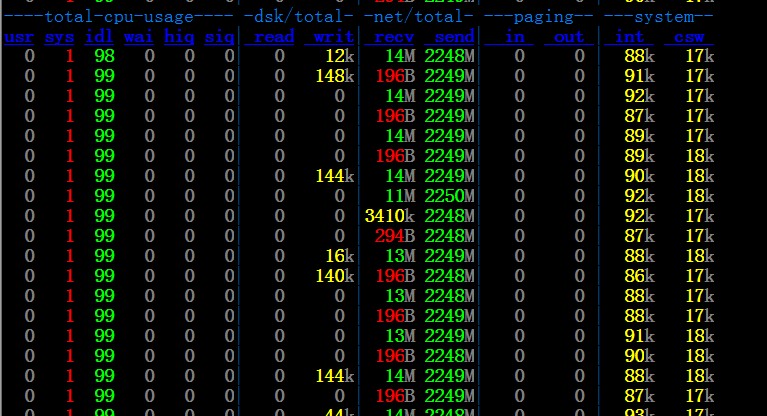
实际测试单机可以跑到18G左右的流量

yum

发表在 net | 留下评论