使用evolution-mapi接收exchange服务器的邮件

公司的邮件服务器是exchange的,在linux下办公就非常不方便。还好现在evolution的mapi插件可以比较好地连exchange 2007 server。
在debian里直接aptitude install evolution-mapi安装好后,在evolution里就可以选择mapi方式了。
填上exchange服务器的域名,自己的账户和domainname就行了。由于我的邮箱类型是BU\XXX@BU.com的形式,所以配置的时候就是
exchange.xx.com
username: XXX
domainname: BU
选上use secure connection
就行了。
具体的使用可以参考FAQ
http://www.go-evolution.org/MAPI_FAQ


@@@@@@@@@@@@@@@@@@@

现在我在debian下安装了一个virtulbox 跑了个windows 2003,安装了WPS和foxmail,用foxmail收邮件还是很方便的。

配置的时候填好exchange服务器,需要注意使用https代理服务器登录,填好msstd地址(与代理服务器相同),使用NTLM验证,然后还要注意第一次填写的帐号不能是BU\user,而是要写成user@BU的形式

发表在 System | 留下评论

使用iconv 转换编码

在linux下经常遇到编码问题,有时可以统一使用iconv把编码转换一下,使用方法如下:

Usage: iconv [OPTION…] [FILE…]
Convert encoding of given files from one encoding to another.

Input/Output format specification:
-f, –from-code=NAME       encoding of original text
-t, –to-code=NAME         encoding for output

Information:
-l, –list                 list all known coded character sets

Output control:
-c                         omit invalid characters from output
-o, –output=FILE          output file
-s, –silent               suppress warnings
–verbose              print progress information

-?, –help                 Give this help list
–usage                Give a short usage message
-V, –version              Print program version

e.g:

iconv -f gbk -t utf8 -o a.txt xx.txt

发表在 linux shell | 留下评论

openwrt wan 802.1x认证

公司的内部有线网络使用802.1x认证,自己搞了个DB120刷OpenWrt把无线转发给自己用。安装好OpenWrt后

主要是把wpad-mini卸载换成wpad,mini版本的不支持802.1x认证。其实wpad就是wpa_supplicant和hostapd的集合。

配置主要是2方面的,一方面是配置802.1x认证
 
1.配置文件
# /etc/802.conf
ctrl_interface_group=root
ctrl_interface=/var/run/wpa_supplicant
ap_scan=0
network={
        key_mgmt=IEEE8021X
        eap=PEAP
        phase2=”auth=MSCHAPv2″
        identity=”USER”
        password=”PASSWORD”
        eapol_flags=0
        priority=2
}
802.1x认证的脚本


 #!/bin/ash
 killall wpa_supplicant 2>/dev/null
 wpa_supplicant -B -D wired -i eth0 -c /etc/802.1x.conf
 sleep 5
 udhcpc -i eth0
其实最好的是wpa_supplicant不以deamon启动,直接看输出显示认证成功后重新获取IP。

2.lan下dhcp时指定内网的DNS服务器

修改一下/etc/config/dhcp配置文件

在config dhcp lan段添加

 list ‘dhcp_option’ ‘6,DNS1,DNS2′

6的含义是

root@OpenWrt:/etc/config# dnsmasq –help dhcp
Known DHCP options:
  1 netmask
  2 time-offset
  3 router
  6 dns-server
  7 log-server
  9 lpr-server
 13 boot-file-size
 15 domain-name
 16 swap-server
 17 root-path
 18 extension-path
 19 ip-forward-enable
 20 non-local-source-routing
 21 policy-filter
 22 max-datagram-reassembly
 23 default-ttl
 26 mtu
 27 all-subnets-local
 31 router-discovery
 32 router-solicitation
 33 static-route
 34 trailer-encapsulation
 35 arp-timeout
 36 ethernet-encap
 37 tcp-ttl
 38 tcp-keepalive
 40 nis-domain
 41 nis-server
 42 ntp-server
 44 netbios-ns
 45 netbios-dd
 46 netbios-nodetype
 47 netbios-scope
 48 x-windows-fs
 49 x-windows-dm
 60 vendor-class
 64 nis+-domain
 65 nis+-server
 66 tftp-server
 67 bootfile-name
 68 mobile-ip-home
 69 smtp-server
 70 pop3-server
 71 nntp-server
 74 irc-server
 77 user-class
 93 client-arch
 94 client-interface-id
 97 client-machine-id
119 domain-search
120 sip-server
121 classless-static-route
125 vendor-id-encap
255 server-ip-address


发表在 System | 留下评论

DNS性能测试

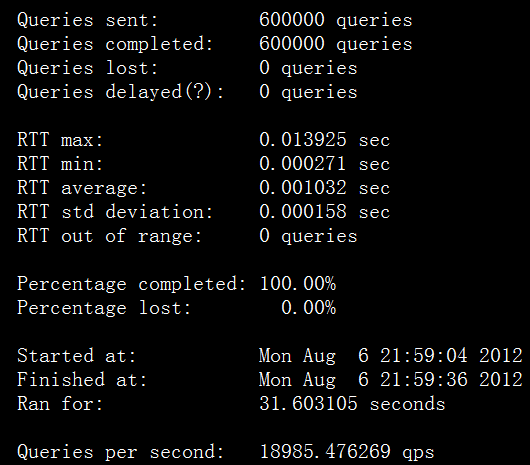
bind自带的queryperf可以比较方便的对DNS服务器进行性能测试,

queryperf的安装比较简单,直接在bind-9.x.x/contrib/queryperf下./configure && make就可以编译好。

README 里有比较详细的使用说明。在测试前需要准备一个域名列表。比如

xx1.dev.net  A

xx2.dev.net  A

xx3.dev.net  A

…………..

xxn.dev.net  A

然后使用queryperf -d dnsfile -s DNS_SERVER就能进行测试了。一般不开log的话QPS可以到10W,截图的是虚拟机上部署的bind,而且开了log。

====

测试了一下路由器上ar7240的CPU,dns查询的性能能到接近2K。

[text]
Statistics:

Parse input file: once
Ended due to: reaching end of file

Queries sent: 100000 queries
Queries completed: 99993 queries
Queries lost: 7 queries
Queries delayed(?): 0 queries

RTT max: 0.024000 sec
RTT min: 0.002103 sec
RTT average: 0.010198 sec
RTT std deviation: 0.001260 sec
RTT out of range: 0 queries

Percentage completed: 99.99%
Percentage lost: 0.01%

Started at: Wed Mar 13 16:43:14 2013
Finished at: Wed Mar 13 16:44:07 2013
Ran for: 52.792922 seconds

Queries per second: 1894.060723 qps
[/text]

发表在 System | 留下评论

使用perl脚本发送gtalk消息

gtalk是使用xmpp协议的,因此可以很方便地利用现有的库来登陆gtalk发送消息。下面是参考了网上资料写的一个perl版本的

[pl]

#!/usr/bin/perl
use strict;
use warnings;
use Net::XMPP;
use utf8;
binmode(STDIN, ‘:encoding(utf8)’);
binmode(STDOUT, ‘:encoding(utf8)’);
binmode(STDERR, ‘:encoding(utf8)’);
my $username = "USERNAME"; #用户名,不带@的
my $password = "PASSWORD"; #纯文本密码
my $resource = "perl_script";

my $gtalkserver = "talk.google.com";
my $gtalkport = 5222;
my $componentname = "gmail.com";
my $connectiontype = "tcpip";
my $tls = 1;
my $connect = Net::XMPP::Client->new;
#my $connect = Net::XMPP::Client->new(debuglevel=>2,debugfile=>"stdout",debugtime=>1);

#如果想打印出登陆中的消息信息,可以打开debug模式,把debug信息输出的标注输出。
my $status = $connect->Connect(hostname => $gtalkserver,
port => $gtalkport,
componentname => $componentname,
connectiontype => $connectiontype,
tls => $tls
);
if ( !(defined($status))) {
print "xmpp connect failed! ,$!\n";
exit(1);
}
#change hostname

my $sid = $connect->{SESSION}->{id};
$connect->{STREAM}->{SIDS}->{$sid}->{hostname}=$componentname ;

#authcenticate

my @login =$connect->AuthSend(
username => $username,
password => $password,
resource => $resource );
if ( $login[0] ne "ok" ){
print "login failed: $login[0] -$login[1]\n";
exit(2);

} else {
print "login successful!\n";
}
my $to=’MSG_TO@gmail.com’;
print "input txt:";
while (my $line=<STDIN>) {
chomp $line;
last if ($line eq "quit" );
$connect->MessageSend(
to => "$to",
resource =>$resource,
suject => "nagios",
body => "$line"
);
print "input continue ..\n";
print "input txt:";
}
$connect->Disconnect;

[/pl]
如果登录失败的话,可以开启debug看看,一般是需要把IO::Socket::SSL升级一下才行。

发表在 System | 留下评论

linux下绑定特定中断到指定CPU

如果大家用的万兆网卡跑linux或者nginx做大规模的负载均衡,那么肯定会遇到网卡中断占耗尽一个CPU的情况,会发现有一个ksoftirqd进程耗CPU非常厉害。这个时候就需要把万兆网卡的多个队列分别绑定到不同的核上。简单的在自己的笔记本上测试一下把单个中断绑定到指定CPU的方式。

1.先查看中断号

root@debian:/home/pm/downloads# cat /proc/interrupts
 CPU0 CPU1 CPU2 CPU3
 0: 55 0 0 0 IO-APIC-edge timer
 1: 9828 0 0 0 IO-APIC-edge i8042
 8: 1 0 0 0 IO-APIC-edge rtc0
 9: 64153 0 0 0 IO-APIC-fasteoi acpi
 12: 12812 0 0 0 IO-APIC-edge i8042
 16: 50287 0 0 0 IO-APIC-fasteoi mmc0, ehci_hcd:usb1
 23: 32 0 0 0 IO-APIC-fasteoi ehci_hcd:usb2
 40: 2053 0 0 0 PCI-MSI-edge eth0
 41: 84430 0 0 0 PCI-MSI-edge ahci
 42: 540 0 0 0 PCI-MSI-edge snd_hda_intel
43: 189429 3306 1140 185873 PCI-MSI-edge iwlwifi
 44: 367098 96565 0 0 PCI-MSI-edge i915
NMI: 389 212 369 216 Non-maskable interrupts
LOC: 686664 448243 658281 387582 Local timer interrupts
SPU: 0 0 0 0 Spurious interrupts
PMI: 389 212 369 216 Performance monitoring interrupts
IWI: 0 0 0 0 IRQ work interrupts
RES: 1618241 979307 1837671 950705 Rescheduling interrupts
CAL: 393 803 859 871 Function call interrupts
TLB: 68943 88659 91389 45605 TLB shootdowns
TRM: 0 0 0 0 Thermal event interrupts
THR: 0 0 0 0 Threshold APIC interrupts
MCE: 0 0 0 0 Machine check exceptions
MCP: 15 15 15 15 Machine check polls

2.分别测试把中断号43绑定到不同的CPU,各个 CPU 用二进制和十六进制表示就是:                 CPU              Binary          oct

CPU 0    00000001         1
CPU 1    00000010         2
CPU 2    00000100         4
CPU 3    00001000         8

所以

echo 8 > /proc/irq/43/smp_affinity就会把网卡中断绑定到CPU3上,同理1,2,8会把中断绑定到CPU0,CPU1,CPU3上。但把中断绑定到制定的核后,我们再cat /proc/interrupts查看的话会发现对于中断号43,只有CPU3对应的数字在增加。

root@debian:/home/pm/downloads# cat /proc/interrupts
 CPU0 CPU1 CPU2 CPU3
 0: 57 0 0 0 IO-APIC-edge timer
 1: 12224 0 0 0 IO-APIC-edge i8042
 8: 1 0 0 0 IO-APIC-edge rtc0
 9: 72086 0 0 0 IO-APIC-fasteoi acpi
 12: 13634 0 0 0 IO-APIC-edge i8042
 16: 61911 0 0 0 IO-APIC-fasteoi mmc0, ehci_hcd:usb1
 23: 32 0 0 0 IO-APIC-fasteoi ehci_hcd:usb2
 40: 2310 0 0 0 PCI-MSI-edge eth0
 41: 89086 0 0 0 PCI-MSI-edge ahci
 42: 540 0 0 0 PCI-MSI-edge snd_hda_intel

43: 189429 3306 1140 279511 PCI-MSI-edge iwlwifi

 44: 367098 146592 0 0 PCI-MSI-edge i915
NMI: 459 262 442 272 Non-maskable interrupts
LOC: 830429 549702 798508 469421 Local timer interrupts
SPU: 0 0 0 0 Spurious interrupts
PMI: 459 262 442 272 Performance monitoring interrupts
IWI: 0 0 0 0 IRQ work interrupts
RES: 1992918 1266807 2245210 1188155 Rescheduling interrupts
CAL: 393 804 860 872 Function call interrupts
TLB: 94270 118496 115458 47381 TLB shootdowns
TRM: 0 0 0 0 Thermal event interrupts
THR: 0 0 0 0 Threshold APIC interrupts
MCE: 0 0 0 0 Machine check exceptions
MCP: 17 17 17 17 Machine check polls
ERR: 0
MIS: 0

另外测试了一下直接把一个中断号绑定在2个核上比如 echo 6 >/proc/irq/43/smp_affinity , 但是结果表明不能同时把这个中断绑定到2个核。linux下有个软中断负载平衡的服务irqbalance。

发表在 Admin | 留下评论

vim,lftp,ssh,sshd配置

主要是每次重装了系统都得配置,记录一下。

vim 的配置:

syntax on

set nu
set nobackup
set cindent
set fileencodings=utf-8,gbk,ucs-bom,cp936
set incsearch ” Incremental search
set cursorline


lftp的配置添加:

set dns:order “inet6 inet”
debug 3 #可以显示详细的交互过程
set ftp:charset GBK
set file:charset UTF-8
alias gbk “set ftp:charset gbk;set file:charset UTF-8”
alias utf8 “set ftp:charset UTF-8;set file:charset UTF-8”

ssh配置: ~/.ssh/config

host *
ControlMaster auto
ControlPath ~/.ssh/%r@%h:%p
ControlPersist yes

/etc/ssh/ssh_config

ServerAliveInterval 10


发表在 Admin | 留下评论

gnome-shell设置关屏幕不休眠

gnome3用了也很长一段时间了,总体来说我是感觉使用gnome3不是太顺手,稳定性也有待提高。更关键的是很多以前有的小桌面插件现在也不能使用了,比如调节CPU频率的插件,要知道linux的电源管理本来就 比windows 7 搓很多,现在笔记本的用linux的待机时间就非常短。

话说昨天跑个fio测试一下IO性能,结果上厕所之前我把屏幕合上了,机器休眠了,今天开机就SB了。。文件系统修复了半天。。。

在gnome-tweak-tool和系统设置里都没有找到以前有的设置项。网上搜索了一下,可以这么搞

gsettings set org.gnome.settings-daemon.plugins.power  lid-close-battery-action “nothing”

gsettings set org.gnome.settings-daemon.plugins.power lid-close-ac-action “nothing”

设置好可以自己查看一下设置设置成功没有。

gsettings get org.gnome.settings-daemon.plugins.power  lid-close-battery-action

gsettings get org.gnome.settings-daemon.plugins.power lid-close-ac-action

其实也可以直接使用dconf-editor进行配置。
=============
update
现在的新版gnome3这个方法已经失效了,直接安装gnome Tweak Tool 可以设置的。

发表在 Admin | 留下评论

haproxy的命令行管理以及同一用户的server stick

haproxy虽然没有提供单独的管理工具,但是实际上可以通过一个unix socket进行实时的命令控制,比如简单的查询,权重设置,disable/enable某个服务器

clear counters : clear max statistics counters (add ‘all’ for all counters)
clear table : remove an entry from a table
help : this message
prompt : toggle interactive mode with prompt
quit : disconnect
show info : report information about the running process
show stat : report counters for each proxy and server
show errors : report last request and response errors for each proxy
show sess [id] : report the list of current sessions or dump this session
show table [id]: report table usage stats or dump this table’s contents
get weight : report a server’s current weight
set weight : change a server’s weight
set timeout : change a timeout setting
set maxconn : change a maxconn setting
set rate-limit : change a rate limiting value
disable : put a server or frontend in maintenance mode
enable : re-enable a server or frontend which is in maintenance mode
shutdown : kill a session or a frontend (eg:to release listening ports)
要使用这个unix socket需要在global段配置
stats socket /opt/haproxy/etc/haproxy.stats level admin

然后就能通过

echo “show sess ” | socat unix-connect:./haproxy.stats stdio

来运行命令了。

比如

echo “set weight std1/ap2 50” | socat unix-connect:./haproxy.stats stdio

把bankend std1里的server ap2 的权重设置为50,至于权重的获取就是

# echo “get weight std1/ap2 ” | socat unix-connect:./haproxy.stats stdio
50 (initial 10)

disable某个服务器

echo ” disable server std1/ap2 ” | socat unix-connect:./haproxy.stats stdio

enbale某个服务器

echo ” enable server std1/ap2 ” | socat unix-connect:./haproxy.stats stdio
获取session信息
echo ” show sess” | socat unix-connect:./haproxy.stats stdio
另外还发现haproxy有几个 stick store-request, stick-table , stick match 也很有用。可以多个bankend共享一个表。

frontend st1
bind 0.0.0.0:1808
default_backend std1
frontend st2
bind 0.0.0.0:2808
default_backend std2

backend std1
balance roundrobin
mode tcp
server ser1 server1.net:80 weight 10
server ser2 server2.net:80 weight 10
stick on src table std2
backend std2
balance roundrobin
mode tcp
server ser2 server2.net:8080 weight 10
server ser1 server1.net:8080 weight 10

stick on src

stick-table type ip size 200k expire 30s

echo “show table std2 ” | socat unix-connect:./haproxy.stats stdio可以查看到对应的信息

如果不使用简写形式stick on src的话

就这样写:

backend std1
balance roundrobin
mode tcp
server ser1 server1.net:80 weight 10 check id 3
server ser2 server2.net:80 weight 10 check id 4
stick match src table std2
stick store-request src table std2
backend std2
balance roundrobin
mode tcp
server ser2 server2.net:8080 weight 10 check id 4
server ser1 server1.net:8080 weight 10 check id 3
stick match src table std2
stick store-request src table std2
stick-table type ip size 200k expire 30s

这个可以参考文档:

Examples :
# The following form …
stick on src table pop if !localhost

# …is strictly equivalent to this one :
stick match src table pop if !localhost
stick store-request src table pop if !localhost
# Use cookie persistence for HTTP, and stick on source address for HTTPS as
# well as HTTP without cookie. Share the same table between both accesses.
backend http
mode http
balance roundrobin
stick on src table https
cookie SRV insert indirect nocache
server s1 192.168.1.1:80 cookie s1
server s2 192.168.1.1:80 cookie s2

backend https
mode tcp
balance roundrobin
stick-table type ip size 200k expire 30m
stick on src
server s1 192.168.1.1:443
server s2 192.168.1.1:44

发表在 Haproxy | 留下评论

/bin/sh和/bin/bash的区别

经常我们写脚本的时候是直接

#!/bin/bash

这样写,但是运行的时候是直接sh xx.sh这样运行的。细心一点会发现有的脚本使用bash xx.sh能允许但是不能使用sh xxx.sh允许。比如shellhacks里面的

1.6.1. Logging and Monitoring with Tee
Sometimes you want to capture all standard output 
to a log file while monitoring the output yourself. 
We can use the exec I/O redirection to do this also 
along with process substitution:
exec > >(tee -a ${0##*/}.log)
If you wanted to redirect stderr to a different file:
exec 2> >(tee -a ${0##*/}.err)

这是我们可以在脚本开头set -o 打印出两种运行情况的区别。sh xx.sh的时候是开启了posix兼容,而禁用了bash的一些基本特性。
可以在脚本开头set +o  posix,强制关闭posix兼容。这样在两种情况下脚本允许的结果都是相同的。不过我在debian下测试有点问题,主要是debian下的sh实际是链接到dash去了。

发表在 linux shell | 留下评论