ssl证书有效性检测

因为公司的业务原因,所以基本上全站都是使用https。然后又因为各种各样的问题造成有的域名不能使用通配符证书,只能使用单独的证书,这样就造成了网络配置上同一个应用要配置多个公网IP以便绑定不同的证书(很多浏览器不支持SNI,所以只能配置多个IP了)。今天简单写了一个脚本,测试了一下可以把某个机房全站应用的公网IP对于的证书都检查一遍。

脚本如下:

[pl]

#!/usr/bin/env perl
#===============================================================================
#
# FILE: comcheck.pl
#
# USAGE: perl comcheck.pl host_list
#
# DESCRIPTION: test ssl cert
#
# OPTIONS: —
# REQUIREMENTS: —
# BUGS: —
# NOTES: —
# AUTHOR: @GNUer

# VERSION: 1.0
# CREATED: 2012年09月18日 09时48分21秒
# REVISION: —
#===============================================================================

use strict;
use warnings;
use utf8;
use IO::Socket::SSL;
my %vips;
if ( !-f $ARGV[0] ) {
&help;
}
open my $HOSTS, "<$ARGV[0]" or die "open $ARGV[0]\n";
while ( my $line = <$HOSTS> ) {
if ( $line =~ /\s*([\d\.]+)\s+(.*)\s*#/ ) {
my $tdms = $2;
my $ip = $1;
my @dms = split( /\s+/, $tdms );
foreach (@dms) {
$vips{$_} = $ip;
}
}
}
close $HOSTS;

foreach my $name ( sort keys %vips ) {
my $ip = $vips{$name};
&check_cert_com( $ip, $name );
}

sub check_cert_com() {
my $vip = shift;
my $hostname = shift;
chomp $hostname;
chomp $vip;
my $sock = IO::Socket::SSL->new(
PeerAddr => $vip,
PeerPort => ‘443’,
Proto => ‘tcp’,
SSL_verify_mode => 0x00, #does no authentication.
Timeout => 3,

#You may combine 0x01 (verify peer),
# 0x02 (fail verification if no peer certificate exists; ignored for clients)
# 0x04 (verify client once) to change the default.
SSL_hostname => $hostname, # specifiy the hostname used for SNI
SSL_verifycn_name => $hostname, #Set the name which is used in verification of hostname
SSL_ca_path => "/etc/ssl/certs/",

);

if ( !( ref $sock eq "IO::Socket::SSL" ) ) {
print "connect $hostname failed\n";
return 1;
}
if ( $sock->verify_hostname( $hostname, ‘http’ ) ) {
print "$hostname verification ok\n";
return 0;
}
else {
print STDERR "$hostname verify failed\n";
}
my $comname = $sock->peer_certificate("commonName");
my $tname = $hostname;
my $tcom = $comname;
$tname =~ s/\.xxx.com//g;
$tcom =~ s/\.xxx.com//g;
if ( $tcom eq "*" && $tname !~ /\./ ) {
;
print "$hostname $comname\n";
}
elsif ( $tname eq $tcom ) {
;
# print "$hostname eq $comname\n";
}
else {

print STDERR "$vip \e[1;32m$hostname\e[m error cert:\e[1;31m $comname\e[m\n";
}
$sock->close();

}

sub help() {
print "perl comcheck.pl hostlist\n";
exit 0;
}

[/pl]

输入文件的格式如下:

12.75.123.70 app1.xxx.com #appxxx
12.75.123.20 app2.xxx.com #appxxx
12.75.123.76 app3.xxx.com #appxxx
12.75.123.42 app41.xxx.com app42.xxx.com air.xxx.com #appxxx
12.75.123.43 app5xxx.com #appxxx

如果只看错误的话可以

perl certcheck.pl host >/dev/null
发表在 Perl Script | 留下评论

LVS负载均衡之DR模式

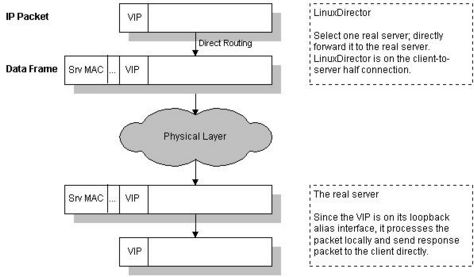
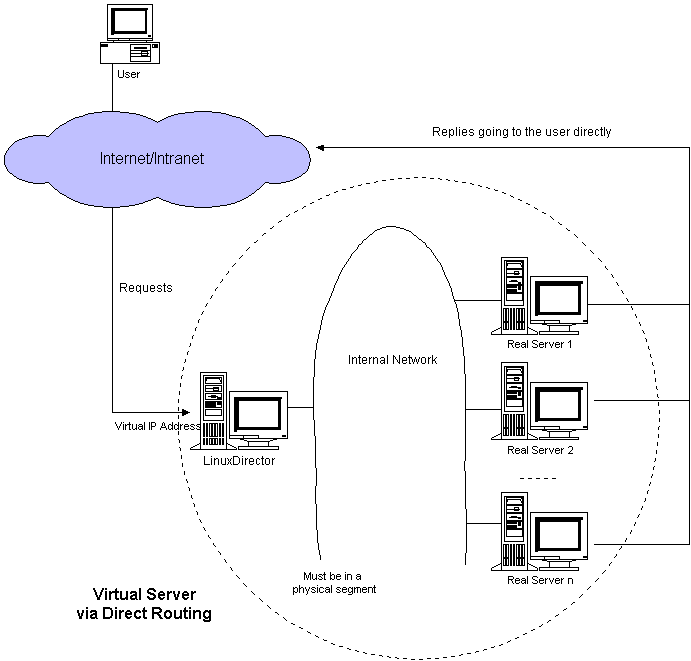
继续上一篇文章是直接写的TUN模式,现在简单的试试DR模式,其实    DR模式的配置和TUN模式的配置基本类似的。主要就是把keepalived里面的TUN改成DR就行,然后RS上绑定VIP的脚本稍微修改一下,直接把VIP绑定在loopback地址上。DR模式的原理示意图如下


DR模式下RS的配置脚本有一点不同

##############################
#DR mode Realserver
#############################
VIP=10.253.3.21
case “$1” in
start)
        NO=0
        for IP in $VIP
        do
                NO=$((NO+1))
               ip addr add $IP/32 br $IP label lo:$NO dev lo
        done
        echo “1” >/proc/sys/net/ipv4/conf/lo/arp_ignore
        echo “2” >/proc/sys/net/ipv4/conf/lo/arp_announce
        echo “1” >/proc/sys/net/ipv4/conf/all/arp_ignore
        echo “2” >/proc/sys/net/ipv4/conf/all/arp_announce
        echo “RealServer Start OK”
         ;;
stop)
        NO=0
        for IP in $VIP
        do
                NO=$((NO+1))
                ip addr del $IP/32 br $IP label lo:$NO dev lo
        done
        echo “0” >/proc/sys/net/ipv4/conf/lo/arp_ignore
        echo “0” >/proc/sys/net/ipv4/conf/lo/arp_announce
        echo “0” >/proc/sys/net/ipv4/conf/all/arp_ignore
        echo “0” >/proc/sys/net/ipv4/conf/all/arp_announce
        echo “RealServer Stoped”
        ;;
 *)
        echo “Usage: $0 {start|stop}”
        exit 1
 esac
        
        exit 0


其实总体来说我还是比较倾向于流量比较小的网站直接使用nginx或者haproxy。使用lvs的配置虽然不麻烦,但是排查问题的时候还是相对麻烦,不抓包很难搞。

发表在 keepalived | 留下评论

LVS负载均衡之tun模式

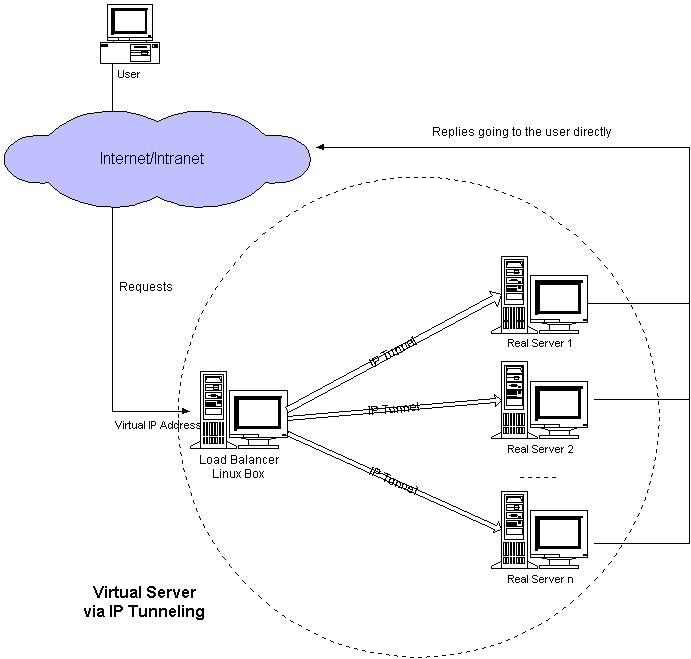
lvs常用的模式就三种,分别是DR、TUN和NAT。其中DR模式的性能最好,但需要Director和RS至少能有在同一VLAN下直接连接,比较适合一个CDN节点下的使用,作为顶层的负载设备对haproxy集群进行负载均衡,haproxy集群通过url hash提高缓存的命中率。NAT模式因为进出的流量都要通过Director,所以如果不使用万兆网卡的本身的网络是瓶颈,而且NAT也会比较耗性能一些,还需要把RS的网关指向Director,实用的价值不是太大,不过现在淘宝做的fullnat还比较好,把部署的架构难度降低了,但是官方的内核和keepalived都还没有合并进去,而且也只有2.6.32 rhel版本内核才能跑,广泛实用性也不是很大。TUN模式其实是从DR模式演化来的,主要是解决了Director和RS跨网段的情况。


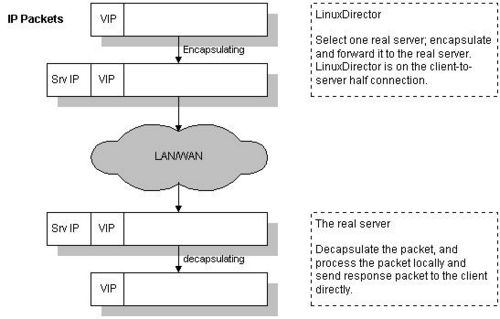
其结构比较简单,当用户发出来包达到Director的时候,会把请求的包封装进一个IPIP包,然后发给一个RS,RS接受到包后解包还原成原始的包,然后再进行进一步的处理。需要注意的是Director上不是用内核的ipip处理函数进行标准的封转。

LVS-Tun is an LVS original. It is based on LVS-DR. The LVS code encapsulates the original packet (CIP->VIP) inside an ipip packet of DIP->RIP, which is then put into the OUTPUT chain, where it is routed to the realserver. (There is no tunl0 device on the director; ip_vs() does its own encapsulation and doesn’t use the standard kernel ipip code. This possibly is the reason why PMTU on the director does not work for LVS-Tun – see MTU.) The realserver receives the packet on a tunl0 device (seeneed tunl0 device) and decapsulates the ipip packet, revealing the original CIP->VIP packet.

以上是LVS   HOWTO上的原文。

简单的配置一下tun模式的双机互备结构,如果机器不够就把备机撤掉。

1.先进行简单的安装,在2台服务器上编译keepalived安装。

wget http://www.keepalived.org/software/keepalived-1.2.7.tar.gz
tar zxvf keepalived-1.2.7.tar.gz
cd keepalived-1.2.7
./configure –prefix=/opt/keepalived && make -j 10 && make install

2.主备 Director的配置

主机的配置如下:

! Configuration File for keepalived

!global_defs {
!  notification_email {
!  
acassen@firewall.loc
!     failover@firewall.loc
!     sysadmin@firewall.loc
!   }
!   notification_email_from
Alexandre.Cassen@firewall.loc
!   smtp_server 192.168.200.1
!   smtp_connect_timeout 30
!   router_id LVS_DEVEL
!}

vrrp_instance VI_1 {
    state MASTER
    interface eth1 #vrrp通信使用的网卡,一定是内部可以和其他服务器通信的网卡。
    virtual_router_id 51
    priority 100
    advert_int 1
    authentication {
        auth_type PASS
        auth_pass 1111
    }
    virtual_ipaddress {
 10.253.85.250 dev eth1 label eth1:1 #如果有双网卡这里也可以写    10.253.85.250 dev eth0 label eth0:1

    }
}

virtual_server  10.253.85.250 80 {
    delay_loop 6
    lb_algo rr #随机轮询
    lb_kind TUN #DR模式
    nat_mask 255.255.255.0
    persistence_timeout 0  #为了方便测试故意关闭会话的保持,根据自己需要来设置
    protocol TCP
    alpha #alpah模式是新增的RS都是down,检测后再开启
    ha_suspend #非MASTER不进行健康检查。
    real_server  10.253.26.1 80{
        weight 1
  TCP_CHECK {
     connect_port 80
            connect_timeout 3
            nb_get_retry 3
            delay_before_retry 3
        }
    }
    real_server  10.253.26.2 80{
        weight 1
  TCP_CHECK {
     connect_port 80
            connect_timeout 3
            nb_get_retry 3
            delay_before_retry 3
        }
    }
    real_server  10.253.26.3 80{
        weight 1
  TCP_CHECK {
     connect_port 80
            connect_timeout 3
            nb_get_retry 3
            delay_before_retry 3
        }
    }
}

备机的配置:

! Configuration File for keepalived

!global_defs {
!  notification_email {
!   acassen@firewall.loc
!     failover@firewall.loc
!     sysadmin@firewall.loc
!   }
!   notification_email_from Alexandre.Cassen@firewall.loc
!   smtp_server 192.168.200.1
!   smtp_connect_timeout 30
!   router_id LVS_DEVEL
!}

vrrp_instance VI_1 {
    state BACKUP
    interface eth1
    virtual_router_id 51
    priority 99
    advert_int 1
    authentication {
        auth_type PASS
        auth_pass 1111
    }
    virtual_ipaddress {
 10.253.85.250 dev eth1 label eth1:1
    }
}

virtual_server  10.253.85.250 80 {
    delay_loop 6
    lb_algo rr
    lb_kind TUN
    nat_mask 255.255.255.0
    persistence_timeout 0
    protocol TCP
    alpha
    ha_suspend
    real_server  10.253.26.1 80{
        weight 1
  TCP_CHECK {
     connect_port 80
            connect_timeout 3
            nb_get_retry 3
            delay_before_retry 3
        }
    }
    real_server  10.253.26.2 80{
        weight 1
  TCP_CHECK {
     connect_port 80
            connect_timeout 3
            nb_get_retry 3
            delay_before_retry 3
        }
    }
    real_server  10.253.26.3 80{
        weight 1
  TCP_CHECK {
     connect_port 80
            connect_timeout 3
            nb_get_retry 3
            delay_before_retry 3
        }
    }
}
主备都直接启动起来:

 /opt/keepalived/sbin/keepalived -f /opt/keepalived/etc/keepalived/keepalived_tun.conf -D

3. 三台RS上绑定好VIP,脚本如下

#!/bin/bash
VIP=’10.253.85.250′
case $1 in
start)
modprobe -r ipip
modprobe ipip
ip link set tunl0 up
ip link set tunl0 arp off
for IP in $VIP
do
        NO=$((NO+1))
        ip addr add $IP/32 br $IP label tunl0:$NO dev tunl0
        ip route add $IP/32 dev tunl0
done
echo 1 > /proc/sys/net/ipv4/conf/tunl0/arp_ignore
echo 2 > /proc/sys/net/ipv4/conf/tunl0/arp_announce
echo 0 > /proc/sys/net/ipv4/conf/tunl0/rp_filter
echo 1 > /proc/sys/net/ipv4/conf/all/arp_ignore
echo 2 > /proc/sys/net/ipv4/conf/all/arp_announce
;;
stop)
echo 0 > /proc/sys/net/ipv4/conf/tunl0/arp_ignore
echo 0 > /proc/sys/net/ipv4/conf/tunl0/arp_announce
echo 1 > /proc/sys/net/ipv4/conf/tunl0/rp_filter
echo 0 > /proc/sys/net/ipv4/conf/all/arp_ignore
echo 0 > /proc/sys/net/ipv4/conf/all/arp_announce
modprobe -r ipip
;;
*)
echo “$0: Usage: $0 {start|stop|status}”
exit 1
;;
esac


4. 停止keepalived 需要向主进程发送TERM信号。

ps -C keepalived u |awk ‘{print $2}’|sort|head -n 1|xargs kill -TERM

可以先把备机启动,然后启动主机的时候看到VIP被备机踢出,并在主机上绑定,当主机挂掉的时候也会再切换到备机上面。

如果不希望主机恢复后VIP从备机切换回主机,可以做成双备的模式,都是BACKUP模式,然后设置  nopreempt。  nopreempt的说明如下:

           # VRRP will normally preempt a lower priority
           # machine when a higher priority machine comes
           # online.  “nopreempt” allows the lower priority
           # machine to maintain the master role, even when
           # a higher priority machine comes back online.
           # NOTE: For this to work, the initial state of this
           # entry must be BACKUP.
  

我分别对RS和VIP进行了一下压测。

直接压测RS的结果如下:

Webbench – Simple Web Benchmark 1.5
Copyright (c) Radim Kolar 1997-2004, GPL Open Source Software.

Benchmarking: GET http://10.253.26.2/
1000 clients, running 30 sec.

Speed=465536 pages/min, 1838409 bytes/sec.
Requests: 232710 susceed, 58 failed.

直接压测VIP的结果如下:

Webbench – Simple Web Benchmark 1.5
Copyright (c) Radim Kolar 1997-2004, GPL Open Source Software.

Benchmarking: GET http://10.253.85.250/
1000 clients, running 30 sec.

Speed=1637384 pages/min, 6467578 bytes/sec.
Requests: 818692 susceed, 0 failed.

简单的看似乎是通过VIP的QPS和三个RS的和基本差不多。


发表在 keepalived | 留下评论

vncserver安装配置

因为工作需要,经常需要远程登陆windows的机器,windows的跳板机又经常不是太稳定,经常遇到登陆不了的问题。所有就打算使用vnc来登陆一个linux的机器,把这个linux机器上安装rdp 客户端来做windows的跳板机。简单的在 centos下配置了一下还是比较简单,其他发行版原理也类似。

1.vnc的安装
yum install gnome-session dbus-x11.x86_64 dbus.x86_64 rdesktop.x86_64 gnome-terminal.x86_64 firefox vnc-server.x86_64

2.系统的vnc配置 (/etc/sysconfig/vncservers)
VNCSERVERS=”4:admin 5:root” #每个用户都需要添加在这里面,4和5分别表示display的id,每个用户监控的端口不同
##用vnc客户端就分别是5904和5905,用网页打开就分别是5804和5805
VNCSERVERARGS[2]=”-geometry 1024×768

3.每个用户的vnc配置,直接以新增一个用户vnctest为例进行配置
useradd vnctest -m
su vnctest
vncpasswd 输入密码
修改用户的vnc配置文件
运行 vncserver 自动生成 xstartup
可以看到目录下生成的文件是: test1.net:3.log 等
就vncserver -kill :3
杀掉本用户的这个服务,修改配置
unset SESSION_MANAGER
exec /etc/X11/xinit/xinitrc

[ -x /etc/vnc/xstartup ] && exec /etc/vnc/xstartup
[ -r $HOME/.Xresources ] && xrdb $HOME/.Xresources
xsetroot -solid grey
vncconfig -iconic &
gnome-session &

然后在
#/etc/sysconfig/vncservers 修改配置
VNCSERVERS=”4:admin 5:root 6:vnctest”
再/etc/init.d/vncserver restart 重启服务就行了

也可以直接在vnctest用户下执行 vncserver :6
这时可以使用 vnc client连接 test1.net:5906

4.远程linux服务器上登陆windows服务器
rdesktop -z -a 32 -g “1024×768” -u Administrator 10.1.0.51

发表在 Admin | 留下评论

mfs试用

晚上闲着不想做其他的就测试了一下mfs,觉得还是比较简单的。主要就是把master服务器安装好,然后安装metalog服务器再安装chunkserver服务器。
简单地记录了一下。
需要安装fuse-libs.x86_64 fuse-devel.x86_64 fuse.x86_64(注意挂载机器上要加载fuse模块)
从http://pro.hit.gemius.pl/hitredir/id=p4CVHPOzkVa0JJIK.m0Ee6dyHZEgoQb1KaiPmVK29EX.M7/url=moosefs.org/tl_files/mfscode/mfs-1.6.26.tar.gz
直接搞了6个测试机器来装,在一台编译好后直接拷贝到另外几个机器上去了。
1.master配置
基本不需要修改,主要是根据配置文件的范例看看有没有需要改的。
mfsexports.cfg根据自己的需求来改
10.xx.xx.0/24 / rw,mapall=admin:admin,password=test,maxtrashtime=2m
#设置2分钟回收被删除的文件空间

然后把$DIR/var/mfs下的 metadata.mfs.empty复制一份为 metadata.mfs就可以启动了。
chown admin:admin /opt/mfs/var/mfs
/opt/mfs/sbin/mfsmaster start
2.metalog的配置
cp mfsmetalogger.cfg.dist mfsmetalogger.cfg
然后修改master的host
MASTER_HOST = 10.xx.xx.xx
启动metalog服务
/opt/mfs/sbin/mfsmetalogger start

3.chunkserver的配置[test3,test4,test5]
cp mfschunkserver.cfg.dist mfschunkserver.cfg
里面主要修改master的host
MASTER_HOST = 10.xx.xx.xx
cp mfshdd.cfg.dist mfshdd.cfg
里面主要修改一下mfs的路径
/home/admin/mfs
然后启动chunkserver
/opt/mfs/sbin/mfschunkserver start

4.客户端挂载[test6]

/opt/mfs/bin/mfsmount /home/admin/testmfs -H 10.253.85.205 -p
/opt/mfs/bin/mfsmount -m /home/admin/meta/ -H 10.253.85.205 -p
输入密码即可

速度测试
$ dd if=/dev/zero of=testmfs/bigfile count=1024 bs=1024000
1024+0 records in
1024+0 records out
1048576000 bytes (1.0 GB) copied, 11.3596 seconds, 92.3 MB/s
本地磁盘测试

$ dd if=/dev/zero of=bigfile count=1024 bs=1024000
1024+0 records in
1024+0 records out
1048576000 bytes (1.0 GB) copied, 4.5809 seconds, 229 MB/s

测试在客户端上进行删除后文件实际上没有被删除掉。

设置每个目录的份数:

/opt/mfs/bin/mfssetgoal -r 1 /home/admin/testmfs/test1

/opt/mfs/bin/mfsgetgoal -r /home/admin/testmfs/test1
/home/admin/testmfs/test1:
directories with goal 1 : 1
/opt/mfs/bin/mfssetgoal -r 3 /home/admin/testmfs/test2

$ /opt/mfs/bin/mfsgetgoal -r /home/admin/testmfs/test2
/home/admin/testmfs/test2:
directories with goal 3 :

测试:
分别向test1和test2写入1G的文件,可以统计出chunkserver上的空间分别减少了1G和3G。
当设置的份数增加的时候写入的速度也慢了很多。
$ dd if=/dev/zero of=test1/bb count=1024 bs=1024000
1024+0 records in
1024+0 records out
1048576000 bytes (1.0 GB) copied, 11.7595 seconds, 89.2 MB/s

$ dd if=/dev/zero of=test2/bb4 count=1024 bs=1024000
1024+0 records in
1024+0 records out
1048576000 bytes (1.0 GB) copied, 18.9833 seconds, 55.2 MB/s

可以使用mfsfileinfo 查看每个文件分每个份数

删除后的文件可以在
meta目录下看到
可以直接
mv ‘00000003|bigfile2’ undel/ 这样恢复文件
各在删除test1和test2下删除1G的文件后总空间2分钟后减少了4G

启动顺序:masterserver->chunkserver->metalogserver
/opt/mfs/sbin/mfsmaster start
/opt/mfs/sbin/mfschunkserver start
/opt/mfs/sbin/mfsmetalogger start

关闭顺序chunkserver->metalogserver->masterserver
/opt/mfs/sbin/mfschunkserver -s
/opt/mfs/sbin/mfsmetalogger -s
/opt/mfs/sbin/mfsmaster -s

发表在 System | 留下评论

haproxy ssl测试

haproxy终于还是打算直接支持ssl了,目前是放出了一个测试版本的。简单的测试了一下,现在是可以跑起来的。

[text]

global
log 127.0.0.1 local1 notice
maxconn 40960
uid 99
gid 99
nbproc 4
daemon
stats socket /opt/haproxyssl/haproxy.stats level admin

defaults
log global
mode http
option dontlognull
retries 3
option redispatch
maxconn 2000
contimeout 5000
clitimeout 50000
srvtimeout 50000
frontend https
bind-process 1,2
bind :443 ssl /opt/haproxyssl/cert2/mulapp.crt
default_backend http
backend http
bind-process 3
mode http
server pp1 127.0.0.1:80 weight 10 check inter 2000 rise 2 fall 4
listen stats 0.0.0.0:8000
maxconn 10
bind-process 4
mode http
stats refresh 30s
stats uri /stats
stats realm haproxy
stats auth admin:admin

[/text]

目前还没有证书的文档说明具体怎么用,只是邮件列表有提到,就照着配置了一下。可以使用bind-process把负责接收请求和ssl加解密的单独绑定到特定的进程。bind后面的ssl指令是指定ssl证书的,需要注意的是证书的格式是和stunnel用的类似的。对于证书链的配置是把依次把服务器证书,…,根证书追加到文件,然后再 把key追加到最后,我也试过直接把key放最前面也是可以的,看来是可以自动识别出来的。


发表在 Haproxy | 留下评论

convert putty key to openssh key

有的合作方给的是putty生成的私钥,为了方便使用需要把putty格式的转化成openssh格式的
pm@debian:~$ puttygen –help
PuTTYgen unidentified build, Jun 22 2012 15:52:56
Usage: puttygen ( keyfile | -t type [ -b bits ] )
[ -C comment ] [ -P ] [ -q ]
[ -o output-keyfile ] [ -O type | -l | -L | -p ]
-t specify key type when generating (rsa, dsa, rsa1)
-b specify number of bits when generating key
-C change or specify key comment
-P change key passphrase
-q quiet: do not display progress bar
-O specify output type:
private output PuTTY private key format
private-openssh export OpenSSH private key
private-sshcom export ssh.com private key
public standard / ssh.com public key
public-openssh OpenSSH public key
fingerprint output the key fingerprint
-o specify output file
-l equivalent to `-O fingerprint’
-L equivalent to `-O public-openssh’
-p equivalent to `-O public’

1.如果对方给的ppk是带密码的,可以使用puttygen把秘密去掉
puttygen xxx.ppk -P
输入原有的密码后,新密码为空就行了。
2.把ppk格式的转化成openssh的
puttygen xxx.ppk -o xxx.txt -O private-openssh
这样就可以把xxx.ppk导出为 openssh 的私钥xxx.txt

发表在 System | 留下评论

使用SquashFS 来压缩usr目录

usr目录下都是一些小的文件,因此当时du -ms /usr 的时候就可以看到花的时间非常得长,我们可以把usr目录压缩成一个squashfs只读文件系统,可以大大降低在usr目录下频繁读取小文件时耗的时间

pm@debian:~$ time du -ms /usr
3231 /usr

real 0m38.376s
user 0m0.124s
sys 0m0.892

这个是我du一下usr目录花的时间,当把/usr目录换成压缩的squashfs的时候大概只需要1秒多。具体的操作可以参考这里

 mksquashfs  /usr /path/readusr
这样就可以压缩好usr目录了。然后修改一下fstab

/path/readusr /usr squashfs ro,defaults 0 0

mount -a就可以直接挂载上了,需要说明的是这个时候/usr分区不能写入的,即系统不能升级等,只有特定的场景才能用上。

发表在 Admin | 留下评论

使用dnsmasq解决多套测试环境的host绑定

线上线下的多套环境,线上环境N多个机房,每个机房几百个公网IP,机房建设前期的需要给测试提供host列表。为方便在新机房启用前测试快速切换到不同的环境,就试用了一下dnsmasq,觉得还是不错的。

centos5.8自带的版本比较老,就直接下载的源码包编译了一下,编译后只拷出来了dnsmasq程序本身。新搞了个目录按照下面的格式存放。

bin/dnsmasq

dnsmasq.conf

dnsmasq.hosts

failquery.pl

restart.sh
resolv.conf

主配置文件如下

#dnsmasq.conf

user=pm
no-hosts
addn-hosts=/home/pm/dnsmasq/dnsmasq.hosts
resolv-file=/home/admin/dnsmasq/resolv.conf
cache-size=1500
local-ttl=10
max-ttl=10
log-queries

restart.sh
#resolv.conf
nameserver 192.15.48.1
nameserver 192.15.48.2
[bash]

#!/bin/bash
PRE=/home/pm/dnsmasq
killall dnsmasq    &>/dev/null

$PRE/bin/dnsmasq  -x $PRE/dnsmasq.pid  -C $PRE/dnsmasq.conf -8 $PRE/dns.log -D
killall -0 dnsmasq && echo "dnsmasq start ok" || echo "dnsmasq start failed" [/bash]

每次改了配置直接运行一下restart脚本就行了。

因为开启了日志记录,所以随便写了个perl脚本分析日志,可以查看到测试同学访问时我配置的host文件是不是又漏掉的。

[pl]

#!/usr/bin/perl
use strict;
use warnings;
my %error;
my %lack;
my $reg=qr/xxx.com|yyyy.com/;#只分析这两个域的域名
my $DNSLOG="/home/pm/dnsmasq/dns.log";
open my $LOG,"<$DNSLOG" or die "open dns log failed!\n";
while (my $line=<$LOG>){
 if($line=~/NXDOMAIN/){
  if($line=~/]:\s+\w+\s+([\w\.]+)\s+/){
   my $do=$1;
   $error{$do}++ if ( $do=~/$reg/) ;
  }
 }
 if($line=~/forwarded/){
  if($line=~/]:\s+\w+\s+([\w\.]+)\s+/){
   my $do=$1;
   $lack{$do}++ if ($do=~/$reg/);
  }
 }

}

close $LOG;

my @t=keys%error;
delete @lack{@t};
if( keys%lack >0){
 print "\e[31mhosts lack some domains:\e[m\n";
 print  "\e[1;33m",join("\n",keys%lack),"\e[m\n**************\n"
}
if( keys%error >0){
 print "\e[32msome query domains not exist:\e[m\n";
 print join("\n",keys%error),"\n**************\n"
}[/pl]

发表在 System | 留下评论

linux下多标签的ssh客户端

对于系统管理员来说在windows下使用securecrt和xshell其实还是比较方便的。撇开其他的不说,在linux下使用gnome-terminal的时候如果不用screen得手动开一堆标签,使用screen也有很多限制,比如复制一下的时候按ctrl +a +[去进入copy/paste模式, 按2次enter选择要复制的段,然后再ctrl+a+] 把缓冲区的内容复制出来,其实还是不是太方便的,尤其是有时执行命令的时候屏幕滚动输出的同时想直接复制一下,用鼠标还是比较方便的。今天试用了一下pac和gnome connetion manager,都还是比较好用的。
相对来所pac的功能比较多一些,gcm里面不能指定字符集编码是个遗憾,因为线上服务器都是用的GBK的编码。为了达到在xshell下clone session不重复输入密码的效果。需要简单的配置一下ssh,其实就是在.ssh下新建config文件,填入
host *
ControlMaster auto
ControlPath ~/.ssh/master-%r@%h:%p

这样我们在gnome-terminal下如果已经ssh登陆了一个机器的时候再新开窗户ssh登陆这个机器时就不用输入密码了。

附上pac和gcm的链接地址:
http://kuthulu.com/gcm/?module=download
http://sourceforge.net/projects/pacmanager/

发表在 System | 留下评论