使用bash_completion进行个性化补全

线上的应用和服务器都非常多,有的应用的英文名字又很长,所以自动补全还是比较有价值的。晚上简单配置了一下。
安装好bash_completion后,在主目录下新建.bash_completion.然后写入
[bash]
# .bash_completion

_getserver() {
local APPSERVER cur
local SACONF
SACONF="/mnt/server.conf"
COMPREPLY=()
_get_comp_words_by_ref cur
if [ -f $SACONF ];then
APPSERVER=$( awk -F, ‘{app[$1]++; idc[$4]++} END{for(a in app){print a"server"; for(i in idc ){print a"server_"i}}}’ $ASACONF )
else
APPSERVER=""
fi

COMPREPLY=( $( compgen -W "$APPSERVER" — "$cur" ) )
}

_ssh() {
local APPSERVER cur
local SACONF
SACONF="/mnt/server.conf"
COMPREPLY=()
_get_comp_words_by_ref cur
if [ -f $SACONF ];then
APPSERVER=$( awk -F, ‘{server[$2]++ } END{for(a in server){print a}}’ $SACONF )
else
APPSERVER=""
fi
COMPREPLY=( $( compgen -W "$APPSERVER" — "$cur" ) )
}

#complete for getserver
complete -F _getserver getserver

#complete for ssh
complete -F _ssh ssh
[/bash]
如果需要对其他的命令补全可以类似进行扩展。其中COMPREPLY 是Bash的内置变量,一个数组,返回结果到这里去后,bash就是读取这个变量作为自动完成的匹配组合的。compgen -W “$HOST” — “$cur” 命令根据当前的输入”$cur” 返回$HOST中匹配的部分。compgen也是内置命令的。_get_comp_words_by_ref 是预定义函数,会从COMP_WORDS 和COMP_CWORD两个预定义变量中去读取当前输入信息。COMP_WORDS表示当前命令输入参数的单词数组,COMP_CWORD表示当前光标的位置

发表在 linux shell | 留下评论

处理缺少动态链接库的通用方法

在公司里,SA习惯把很多包直接拷贝到其他的机器上,因为缺少包管理工具做依赖性的检查。经常遇到开发找我解决一些缺失动态连接库引起的问题。
其实解决起来也很简单ldd查看一下到底少什么库,再google一下对应的库是属于什么包的,然后装上就OK了。已今天遇到的mod_ssl.so不能加载的问题为例。
[text]
# ldd mod_ssl.so
linux-gate.so.1 => (0xffffe000)
libssl.so.4 => not found
libcrypto.so.4 => not found
libgssapi_krb5.so.2 => /usr/lib/libgssapi_krb5.so.2 (0xf7f31000)
libkrb5.so.3 => /usr/lib/libkrb5.so.3 (0xf7e9b000)
libcom_err.so.2 => /lib/libcom_err.so.2 (0xf7e97000)
libk5crypto.so.3 => /usr/lib/libk5crypto.so.3 (0xf7e71000)
libresolv.so.2 => /lib/libresolv.so.2 (0xf7e5e000)
libdl.so.2 => /lib/libdl.so.2 (0xf7e5a000)
libz.so.1 => /usr/lib/libz.so.1 (0xf7e47000)
libpthread.so.0 => /lib/libpthread.so.0 (0xf7e2f000)
libc.so.6 => /lib/libc.so.6 (0xf7ce8000)
libkrb5support.so.0 => /usr/lib/libkrb5support.so.0 (0xf7cdf000)
libkeyutils.so.1 => /lib/libkeyutils.so.1 (0xf7cdc000)
/lib/ld-linux.so.2 (0x00a3e000)
libselinux.so.1 => /lib/libselinux.so.1 (0xf7cc4000)
libsepol.so.1 => /lib/libsepol.so.1 (0xf7c7e000)
[/text]
搜了一下这个是老的openssl0.97上的库,yum安装一下就解决了。
[text]
yum install openssl097a.x86_64 openssl097a.i386
[/text]
其实回想我在刚接触linux的时候,在上面装Matlab是个很痛苦的事情,经常找很多库,尤其是那个时候用的fedora,国内的yum源又特别慢,包还特别少。所以就对这个事情特别擅长了,后面自己也玩过一点点嵌入式的东西,所以对这些大致有了了解。附上 man ldd

LDD(1) LDD(1)

NAME
ldd – print shared library dependencies

SYNOPSIS
ldd [OPTION]… FILE…

DESCRIPTION
ldd prints the shared libraries required by each program or shared
library specified on the command line.

OPTIONS
–version
Print the version number of ldd.

-v –verbose
Print all information, including e.g. symbol versioning informa-
tion.

-u –unused
Print unused direct dependencies.

-d –data-relocs
Perform relocations and report any missing objects (ELF only).

-r –function-relocs
Perform relocations for both data objects and functions, and
report any missing objects or functions (ELF only).

–help Usage information.

发表在 OS | 留下评论

nginx开启对gzip的cache节省资源

虚拟机的网络性能大部分不好,使用nginx的时候经常会因为带宽的限制跑不到更高的QPS。这个时候可以开启gzip压缩,使得带宽占有成倍的减少。
但是开启gzip压缩后有个很大的问题是CPU的消耗非常大。对于普通的精态页面可以考虑配置2个server,其中一个代理另外一个,并且开启cache。
简单使用ab压测对比了一下,效果还可以。ab只支持HTTP 1.0,所以在nginx里需要配置一下
gzip_http_version 1.0
并且ab压测的时候使用添加HEADER ‘Accept-Encoding: gzip’。
[text]
ab -c 50 -t 60 -H ‘Accept-Encoding: gzip’ http://xxx.net/index.html
[/text]

配置大修改大致如下:
[text]
http {

proxy_cache_path /home/admin/temp levels=1:2 keys_zone=one:10m inactive=5m max_size=100m;
gzip_http_version 1.0;#这个只是为了方便ab测试,线上的话可以关闭这个,防止有古董浏览器不支持gzip。
gzip on;
……….

server {
listen 8888;
server_name localhost;
charset gbk;
gzip on;
gzip_comp_level 9;
gzip_http_version 1.0;
location / {
root /home/admin/webpages/;
index index.html;
}
}
upstream indexpage {
server 127.0.0.1:8888;
keepalive 10;
}

server {
listen 80;
server_name localhost;
charset gbk;
location =/index.html {
proxy_set_header Host $http_host;
proxy_set_header X-Forwarded-By $server_addr:$server_port;
proxy_set_header X-Forwarded-For $remote_addr;
proxy_set_header Connection "";
proxy_http_version 1.1;
proxy_intercept_errors on;
proxy_connect_timeout 5s;
proxy_read_timeout 10s;
proxy_send_timeout 10s;
proxy_buffer_size 16k;
proxy_buffers 8 64k;
proxy_busy_buffers_size 128k;
proxy_pass http://indexpage;
proxy_cache_methods GET HEAD;
proxy_cache_min_uses 2;
proxy_cache_valid 302 1m;
proxy_cache_valid 200 2m;
proxy_cache_key "$scheme$host$request_uri$http_accept_encoding";
proxy_cache one;

}

}
[/text]
需要注意缓存的key把$http_accept_encoding加上,这样可以分别对gzip压缩过和没有压缩过的进行缓存,防止引起其他的问题,也有的是通过判断$http_accept_encoding并且对后端传递该header,实际上直接把这个加到cache_key更简单些。
测试一下的结果如下

Document Length: 11155 bytes
Total transferred: 567657498 bytes
HTML transferred: 557757300 bytes
Requests per second: 5123.96 [#/sec] (mean)
Time per request: 9.758 [ms] (mean)
Time per request: 0.195 [ms] (mean, across all concurrent requests)
Transfer rate: 56809.65 [Kbytes/sec] received

普通的不开启gzip的情况

Document Length: 52873 bytes

Concurrency Level: 50
Time taken for tests: 23.403494 seconds
Complete requests: 50000
Failed requests: 0
Write errors: 0
Total transferred: 2654793231 bytes
HTML transferred: 2643841260 bytes
Requests per second: 2136.43 [#/sec] (mean)
Time per request: 23.403 [ms] (mean)
Time per request: 0.468 [ms] (mean, across all concurrent requests)
Transfer rate: 110777.09 [Kbytes/sec] received

普通开启gzip后性能会大幅降低,而且还只是默认的level 1压缩。

Document Path: /index.html
Document Length: 13000 bytes

Concurrency Level: 50
Time taken for tests: 58.518396 seconds
Complete requests: 50000
Failed requests: 0
Write errors: 0
Total transferred: 659900000 bytes
HTML transferred: 650000000 bytes
Requests per second: 854.43 [#/sec] (mean)
Time per request: 58.518 [ms] (mean)
Time per request: 1.170 [ms] (mean, across all concurrent requests)
Transfer rate: 11012.49 [Kbytes/sec] received

测试环境:
单核的虚拟机上跑的,2G内存。。

发表在 nginx | 留下评论

也说说nginx日志里的400,408错误

今天看某群里有同学说做ssl卸载的nginx上有很多408错误日志。然后我也看了下我们服务器上果然有好多的,比例还不小,好几个百分点呢。HTTP状态码的还以可以简单参考http://en.wikipedia.org/wiki/List_of_HTTP_status_codes

400 Bad Request

The request cannot be fulfilled due to bad syntax

408 Request Timeout
The server timed out waiting for the request.[2] According to W3 HTTP specifications: “The client did not produce a request within the time that the server was prepared to wait. The client MAY repeat the request without modifications at any later time.”
408错误是由于由于client方在设置的时间内(client_header_timeout和client_body_timeout,nginx下默认都是60s)没有发送完请求造成的。

其实主要是因为现在的浏览器,比如chrome的话在打开页面是会并发开10个左右的请求,其实只有一个是实际会用的,其他的几个请求虽然用不上,但是浏览器也不管,最后会因为达到超时的时间被server短断掉。为此我专门抓包测试了一下。在自己的VPS上开2个窗口,一个用来抓包,另外一个观察日志。
抓包的时候过滤一下,只看SYN和FIN包的,然后chrome浏览器里打开自己的blog。
tcpdump -i venet0 host 218.109.58.145 and ‘tcp[tcpflags] & (tcp-syn|tcp-fin) !=0 ‘ -n
[text]
tcpdump: verbose output suppressed, use -v or -vv for full protocol decode
listening on venet0, link-type LINUX_SLL (Linux cooked), capture size 65535 bytes
15:05:46.564166 IP 218.109.58.145.63349 > 184.82.227.17.443: Flags [S], seq 1769258416, win 8192, options [mss 1452,nop,nop,sackOK], length 0
15:05:46.564202 IP 184.82.227.17.443 > 218.109.58.145.63349: Flags [S.], seq 1090238511, ack 1769258417, win 5840, options [mss 1460,nop,nop,sackOK], length 0
15:05:46.579764 IP 218.109.58.145.63350 > 184.82.227.17.443: Flags [S], seq 2476535492, win 8192, options [mss 1452,nop,nop,sackOK], length 0
15:05:46.579790 IP 184.82.227.17.443 > 218.109.58.145.63350: Flags [S.], seq 1079878779, ack 2476535493, win 5840, options [mss 1460,nop,nop,sackOK], length 0
15:05:46.580418 IP 218.109.58.145.63351 > 184.82.227.17.443: Flags [S], seq 3924057720, win 8192, options [mss 1452,nop,nop,sackOK], length 0
15:05:46.580444 IP 184.82.227.17.443 > 218.109.58.145.63351: Flags [S.], seq 1076802158, ack 3924057721, win 5840, options [mss 1460,nop,nop,sackOK], length 0
15:05:46.583872 IP 218.109.58.145.63352 > 184.82.227.17.443: Flags [S], seq 1351188747, win 8192, options [mss 1452,nop,nop,sackOK], length 0
15:05:46.583897 IP 184.82.227.17.443 > 218.109.58.145.63352: Flags [S.], seq 1085259777, ack 1351188748, win 5840, options [mss 1460,nop,nop,sackOK], length 0
15:05:46.591067 IP 218.109.58.145.63353 > 184.82.227.17.443: Flags [S], seq 3937887977, win 8192, options [mss 1452,nop,nop,sackOK], length 0
15:05:46.591094 IP 184.82.227.17.443 > 218.109.58.145.63353: Flags [S.], seq 1089841397, ack 3937887978, win 5840, options [mss 1460,nop,nop,sackOK], length 0
15:05:46.592480 IP 218.109.58.145.63354 > 184.82.227.17.443: Flags [S], seq 1123849790, win 8192, options [mss 1452,nop,nop,sackOK], length 0
15:05:46.592504 IP 184.82.227.17.443 > 218.109.58.145.63354: Flags [S.], seq 1090612586, ack 1123849791, win 5840, options [mss 1460,nop,nop,sackOK], length 0
15:05:46.593123 IP 218.109.58.145.63355 > 184.82.227.17.443: Flags [S], seq 4065204445, win 8192, options [mss 1452,nop,nop,sackOK], length 0
15:05:46.593149 IP 184.82.227.17.443 > 218.109.58.145.63355: Flags [S.], seq 1080746021, ack 4065204446, win 5840, options [mss 1460,nop,nop,sackOK], length 0
15:05:46.831197 IP 218.109.58.145.63357 > 184.82.227.17.443: Flags [S], seq 3474172840, win 8192, options [mss 1452,nop,nop,sackOK], length 0
15:05:46.831235 IP 184.82.227.17.443 > 218.109.58.145.63357: Flags [S.], seq 1084428126, ack 3474172841, win 5840, options [mss 1460,nop,nop,sackOK], length 0
15:05:54.366066 IP 184.82.227.17.443 > 218.109.58.145.63349: Flags [F.], seq 22377, ack 810, win 8576, length 0
15:05:57.138228 IP 218.109.58.145.63357 > 184.82.227.17.443: Flags [F.], seq 1, ack 1, win 17520, length 0
15:05:57.138506 IP 184.82.227.17.443 > 218.109.58.145.63357: Flags [F.], seq 1, ack 2, win 5840, length 0
15:05:57.780671 IP 218.109.58.145.63349 > 184.82.227.17.443: Flags [F.], seq 810, ack 22378, win 17483, length 0
15:06:46.859866 IP 184.82.227.17.443 > 218.109.58.145.63350: Flags [F.], seq 6079, ack 389, win 7504, length 0
15:06:46.860807 IP 184.82.227.17.443 > 218.109.58.145.63351: Flags [F.], seq 6079, ack 389, win 7504, length 0
15:06:46.861809 IP 184.82.227.17.443 > 218.109.58.145.63352: Flags [F.], seq 6079, ack 389, win 7504, length 0
15:06:46.864806 IP 184.82.227.17.443 > 218.109.58.145.63353: Flags [F.], seq 6079, ack 389, win 7504, length 0
15:06:46.865888 IP 184.82.227.17.443 > 218.109.58.145.63355: Flags [F.], seq 6079, ack 389, win 7504, length 0
15:06:46.866803 IP 184.82.227.17.443 > 218.109.58.145.63354: Flags [F.], seq 6079, ack 389, win 7504, length 0
15:06:47.756153 IP 218.109.58.145.63350 > 184.82.227.17.443: Flags [F.], seq 389, ack 6080, win 17250, length 0
15:06:47.756168 IP 218.109.58.145.63355 > 184.82.227.17.443: Flags [F.], seq 389, ack 6080, win 17250, length 0
15:06:47.756569 IP 218.109.58.145.63353 > 184.82.227.17.443: Flags [F.], seq 389, ack 6080, win 17250, length 0
15:06:47.757960 IP 218.109.58.145.63351 > 184.82.227.17.443: Flags [F.], seq 389, ack 6080, win 17250, length 0
15:06:47.758234 IP 218.109.58.145.63352 > 184.82.227.17.443: Flags [F.], seq 389, ack 6080, win 17250, length 0
15:06:47.759712 IP 218.109.58.145.63354 > 184.82.227.17.443: Flags [F.], seq 389, ack 6080, win 17250, length 0
15:06:48.361787 IP 218.109.58.145.63350 > 184.82.227.17.443: Flags [F.], seq 389, ack 6080, win 17250, length 0

[/text]

nginx日志里
[text]
– – 218.109.58.145:63185 – – [10/Mar/2013:15:03:40 +0000] gnuers.org "GET / HTTP/1.1" 200 15929 "-" "Mozilla/5.0 (Windows NT 6.1) AppleWebKit/537.17 (KHTML, like Gecko) Chrome/24.0.1312.52 Safari/537.17" "-" "unix:/var/run/php5-fpm.sock" 1.449 0.289
– – 218.109.58.145:63186 – – [10/Mar/2013:15:03:49 +0000] localhost "-" 400 0 "-" "-" "-" "-" 0.000 –
– – 218.109.58.145:63179 – – [10/Mar/2013:15:04:39 +0000] localhost "-" 408 0 "-" "-" "-" "-" 59.999 –
– – 218.109.58.145:63180 – – [10/Mar/2013:15:04:39 +0000] localhost "-" 408 0 "-" "-" "-" "-" 60.000 –
– – 218.109.58.145:63181 – – [10/Mar/2013:15:04:39 +0000] localhost "-" 408 0 "-" "-" "-" "-" 59.991 –
– – 218.109.58.145:63182 – – [10/Mar/2013:15:04:39 +0000] localhost "-" 408 0 "-" "-" "-" "-" 59.991 –
– – 218.109.58.145:63183 – – [10/Mar/2013:15:04:39 +0000] localhost "-" 408 0 "-" "-" "-" "-" 59.992 –
– – 218.109.58.145:63184 – – [10/Mar/2013:15:04:39 +0000] localhost "-" 408 0 "-" "-" "-" "-" 60.000 –
– – 218.109.58.145:63349 – – [10/Mar/2013:15:05:49 +0000] gnuers.org "GET / HTTP/1.1" 200 15929 "-" "Mozilla/5.0 (Windows NT 6.1) AppleWebKit/537.17 (KHTML, like Gecko) Chrome/24.0.1312.52 Safari/537.17" "-" "unix:/var/run/php5-fpm.sock" 2.525 0.271
– – 218.109.58.145:63357 – – [10/Mar/2013:15:05:57 +0000] localhost "-" 400 0 "-" "-" "-" "-" 0.000 –
– – 218.109.58.145:63350 – – [10/Mar/2013:15:06:46 +0000] localhost "-" 408 0 "-" "-" "-" "-" 59.991 –
– – 218.109.58.145:63351 – – [10/Mar/2013:15:06:46 +0000] localhost "-" 408 0 "-" "-" "-" "-" 59.987 –
– – 218.109.58.145:63352 – – [10/Mar/2013:15:06:46 +0000] localhost "-" 408 0 "-" "-" "-" "-" 59.988 –
– – 218.109.58.145:63353 – – [10/Mar/2013:15:06:46 +0000] localhost "-" 408 0 "-" "-" "-" "-" 59.991 –
– – 218.109.58.145:63355 – – [10/Mar/2013:15:06:46 +0000] localhost "-" 408 0 "-" "-" "-" "-" 59.992 –
– – 218.109.58.145:63354 – – [10/Mar/2013:15:06:46 +0000] localhost "-" 408 0 "-" "-" "-" "-" 59.993 –
[/text]
从日志和抓包的记录可以看到,浏览器一起并发了9个请求,其中的大部分在1分钟后被nginx执行了主动关闭。这个问题其实是因为客户端的原因造成的。所以千万不要看到很多错误日志就觉得有大问题了。

PS:如果是用的tengine的话,可以加 log_empty_request off部记录这样的408请求。

参考文章:
http://forum.nginx.org/read.php?2,225349,225375
https://blog.xjpvictor.info/2012/11/nginx-log-400-408/

发表在 net, nginx | 留下评论

nginx和httpd 2.4.4简单对比

其实之前http 2.4.1刚出来的时候就很多做对比的了。 大部分分测试表明对于静态文件而已,nginx的性能还是会稍微好些,但是event模式下的httpd比之前的性能是提升得太多太多了。httpd安装起来比较麻烦,尤其是在老掉牙的机器上。

httpd 2.4.4在RHEL 4.8的安装过程大概这样的:

1. 下载最新的httpd 2.4.4解压,然后再下载apr-1.4.6.tar.bz2和apr-util-1.5.1.tar.bz2放到httpd目录下的srclib,解压后把文件夹更名为apr和apr-util.
2.安装新版的pcre,我直接在sourceforge.net上下载的.然后编译安装pcre
./configure –prefix=/opt/install/pcre-8.32 –enable-pcre32 –enable-jit –enable-utf –enable-pcre16

3.配置httpd编译
./configure –prefix=/opt/install/httpd-2.4.4 –enable-rewrite –enable-cache –enable-ssl –enable-static-ab –enable-ssl –with-included-apr –with-pcre=/opt/install/pcre-8.32/ –with-mpm=event

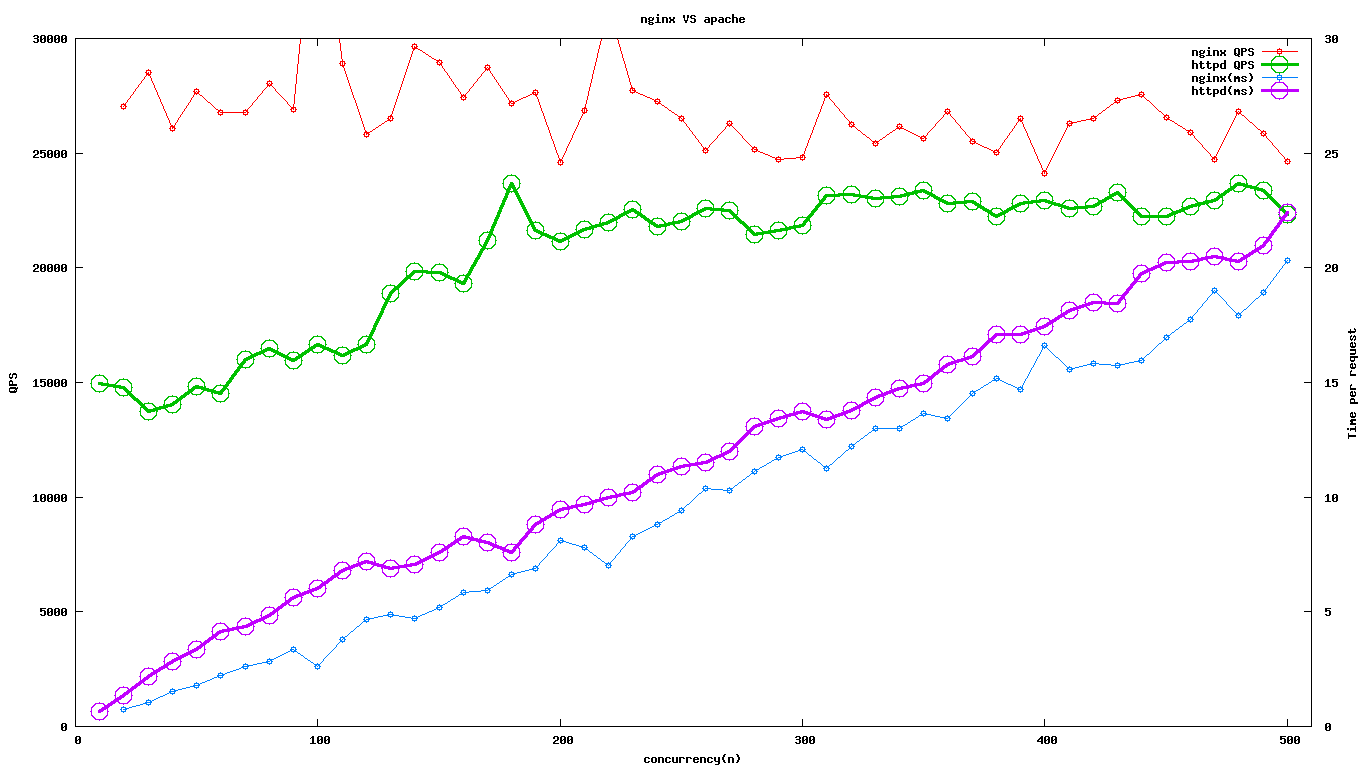
安装好后简单做了一个测试,0.6k的小页面。

[text]
nginx 10 25858.43 0.387
httpd 10 14952.54 0.669
nginx 20 27045.38 0.739
httpd 20 14793.54 1.352
nginx 30 28513.76 1.052
httpd 30 13755.20 2.181
nginx 40 26083.62 1.534
httpd 40 14023.01 2.852
nginx 50 27685.62 1.806
httpd 50 14813.10 3.375
nginx 60 26779.80 2.240
httpd 60 14539.48 4.127
nginx 70 26792.31 2.613
httpd 70 15989.91 4.378
nginx 80 28039.97 2.853
httpd 80 16502.71 4.848
nginx 90 26900.55 3.346
httpd 90 15947.58 5.643
nginx 100 38173.08 2.620
httpd 100 16635.71 6.011
nginx 110 28921.72 3.803
httpd 110 16162.35 6.806
nginx 120 25804.12 4.650
httpd 120 16637.97 7.212
nginx 130 26505.68 4.905
httpd 130 18882.23 6.885
nginx 140 29669.50 4.719
httpd 140 19844.80 7.055
nginx 150 28969.08 5.178
httpd 150 19787.36 7.581
nginx 160 27424.76 5.834
httpd 160 19325.51 8.279
nginx 170 28747.23 5.914
httpd 170 21197.41 8.020
nginx 180 27160.77 6.627
httpd 180 23673.76 7.603
nginx 190 27627.75 6.877
httpd 190 21609.25 8.793
nginx 200 24602.16 8.129
httpd 200 21169.24 9.448
nginx 210 26838.70 7.825
httpd 210 21666.67 9.692
nginx 220 31374.85 7.012
httpd 220 21994.93 10.002
nginx 230 27740.35 8.291
httpd 230 22525.72 10.211
nginx 240 27235.49 8.812
httpd 240 21815.80 11.001
nginx 250 26522.97 9.426
httpd 250 22031.17 11.348
nginx 260 25099.80 10.359
httpd 260 22568.75 11.520
nginx 270 26291.50 10.269
httpd 270 22478.80 12.011
nginx 280 25170.07 11.124
httpd 280 21437.80 13.061
nginx 290 24715.85 11.733
httpd 290 21608.02 13.421
nginx 300 24808.90 12.092
httpd 300 21850.39 13.730
nginx 310 27543.54 11.255
httpd 310 23166.22 13.382
nginx 320 26233.97 12.198
httpd 320 23188.51 13.800
nginx 330 25436.90 12.973
httpd 330 23033.17 14.327
nginx 340 26146.07 13.004
httpd 340 23096.69 14.721
nginx 350 25621.51 13.660
httpd 350 23384.09 14.967
nginx 360 26820.90 13.422
httpd 360 22797.59 15.791
nginx 370 25497.89 14.511
httpd 370 22911.63 16.149
nginx 380 25046.86 15.172
httpd 380 22242.29 17.085
nginx 390 26514.52 14.709
httpd 390 22806.97 17.100
nginx 400 24104.89 16.594
httpd 400 22924.32 17.449
nginx 410 26306.69 15.585
httpd 410 22585.88 18.153
nginx 420 26518.78 15.838
httpd 420 22691.66 18.509
nginx 430 27305.07 15.748
httpd 430 23292.43 18.461
nginx 440 27557.12 15.967
httpd 440 22258.63 19.768
nginx 450 26536.61 16.958
httpd 450 22237.17 20.236
nginx 460 25901.85 17.759
httpd 460 22664.55 20.296
nginx 470 24743.76 18.995
httpd 470 22935.42 20.492
nginx 480 26813.46 17.901
httpd 480 23693.59 20.259
nginx 490 25869.61 18.941
httpd 490 23374.27 20.963
nginx 500 24618.19 20.310
httpd 500 22318.36 22.403
[/text]

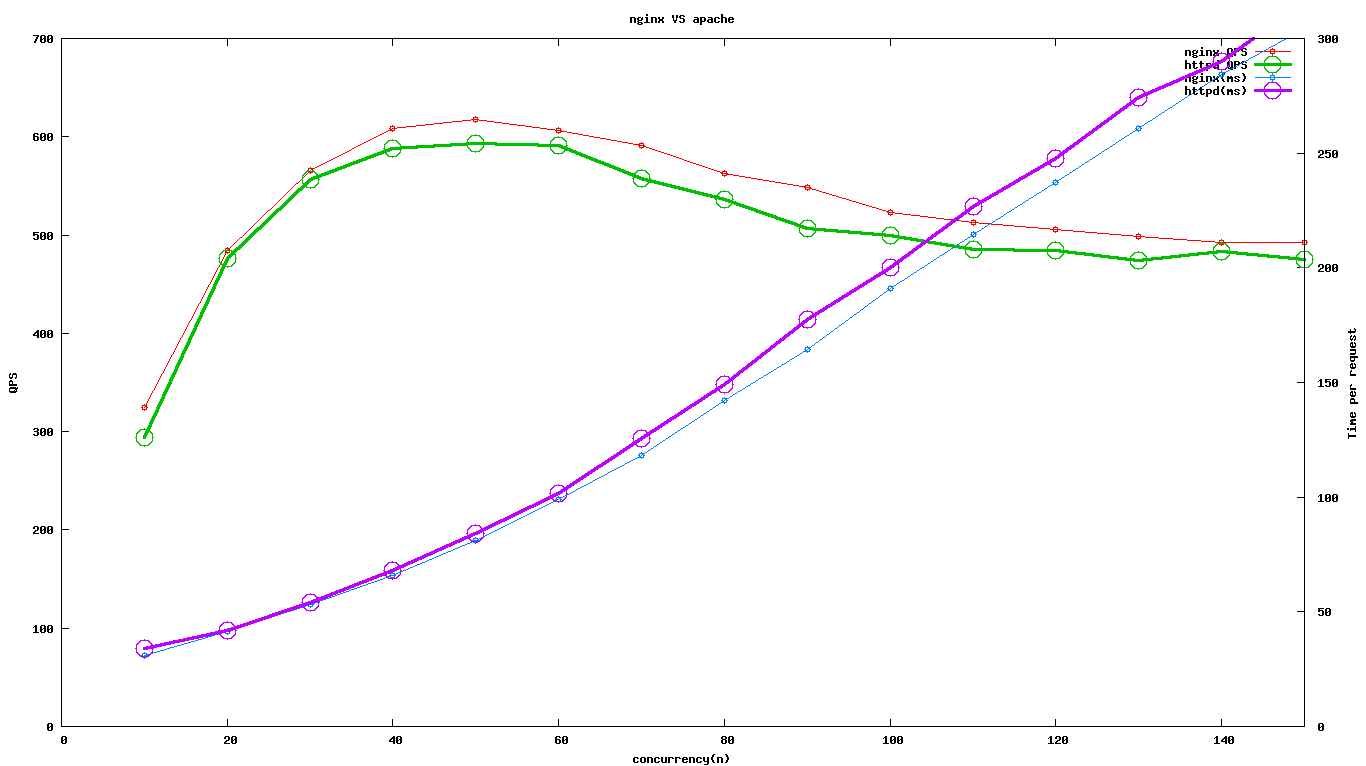
从图可以看出httpd 2.4.4在高并发的还是略逊于nginx。nginx_httpd0 (3)

发表在 nginx | 留下评论

nginx和apache在java应用上的对比

今天有专门测试对比了一下nginx和apache在jboss上次代理的性能。apache是通过jk模块使用ajp协议把请求转给java,nginx的测试是直接把jboss上开启一个HTTP 1.1端口服务进行测试。找开发写了一个简单的页面,对页面的处理就是sleep 4ms,jboss里配置的都是最多能启动400个线程。

apache的关键配置如下
[text]
Timeout 180
KeepAlive On
MaxKeepAliveRequests 100
KeepAliveTimeout 60

<IfModule worker.c>
StartServers 10
ServerLimit 50
MaxClients 1500
MinSpareThreads 50
MaxSpareThreads 200
ThreadsPerChild 50
MaxRequestsPerChild 10000
</IfModule>

$ cat workers.properties
# mod_jk(Apache Tomcat)

worker.list=local

worker.local.type=ajp13
worker.local.host=localhost
worker.local.port=7001
worker.local.lbfactor=50
worker.local.cachesize=100
worker.local.cache_timeout=600
worker.local.socket_keepalive=1
worker.local.recycle_timeout=300
[/text]
nginx的配置如下:

[text]
upstream jboss {
server 127.0.0.1:7002;
keepalive 10;
}
server {
listen 1080;
server_name localhost;
charset gbk;
proxy_set_header Host $http_host;
proxy_set_header X-Forwarded-By $server_addr:$server_port;
proxy_set_header X-Forwarded-For $remote_addr;
proxy_set_header Connection "";
proxy_http_version 1.1;
location / {
rewrite ^/?$ /index.html permanent;
index index.html index.htm;
proxy_pass http://jboss;
proxy_intercept_errors on;
proxy_connect_timeout 5s;
proxy_read_timeout 10s;
proxy_send_timeout 5s;
proxy_buffer_size 16k;
proxy_buffers 8 64k;
proxy_busy_buffers_size 128k;
}
[/text]

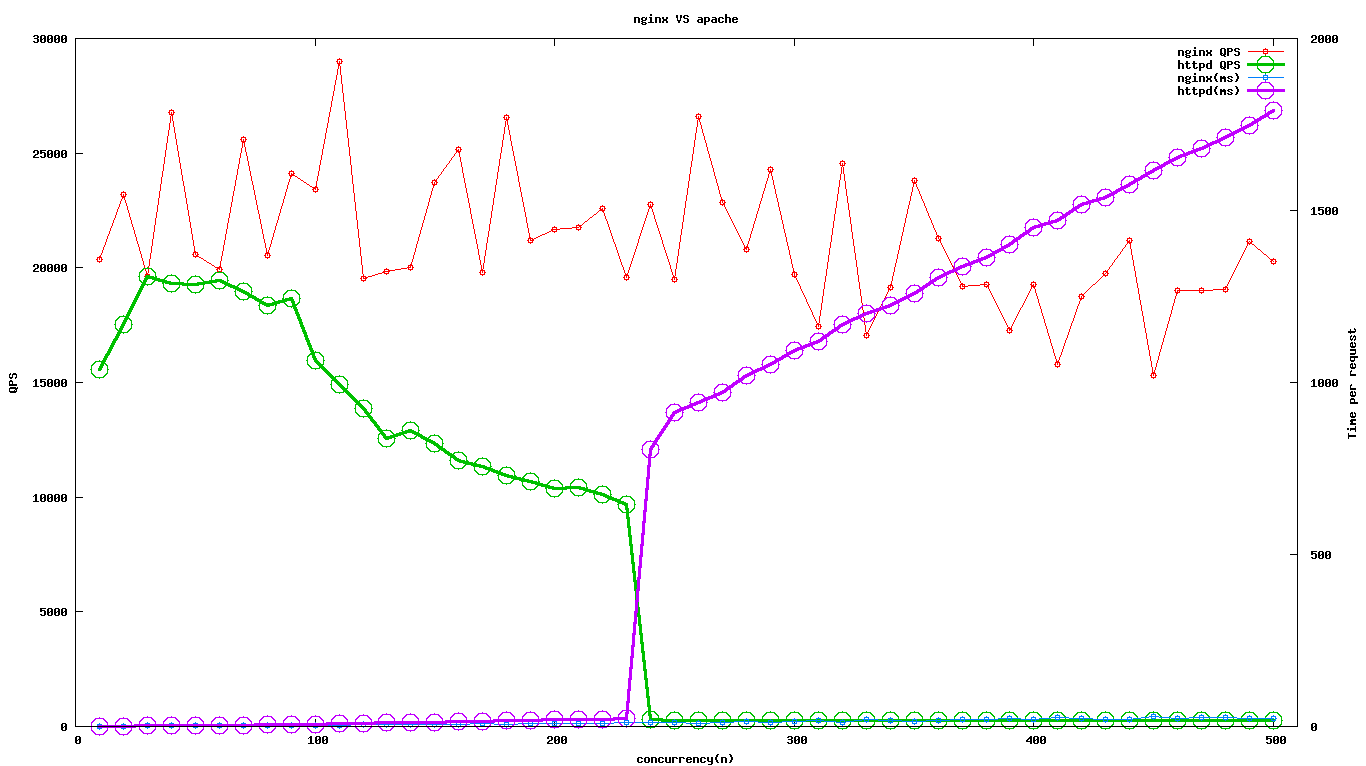
测试的结果表明对于普通的java应用,nginx的延迟会稍微地点,QPS会稍微能跑的高点点。
nginx_httpd_1ms1

但是整体来说,性能的瓶颈点还是在后端的java上面,使用nginx的整体性能上提升不大,不过因为nginx使用的非阻塞IO模型,nginx的不会像apache一样因为总体的连接数达到上线而不能处理。后来又单独测试了一下nginx和apache在处理一个普通的静态页面时对比,为了不使得测试的受限制于带宽,页面大小搞了个663字节的,不过最后的结果我觉得还是因为把虚拟机的带宽快跑满了。

nginx_httpd0

nginx的峰值大概时26588.81/s,带宽用了130Mbps左右。从图书可以看出随着并发数的增加nginx的响应时间也有所提升,不过不大,apache的就飙的很夸张了,QPS大幅度下降,延迟飙升特别大。

机器配置:
processor : 0
model name : Intel(R) Xeon(R) CPU E5620 @ 2.40GHz
processor : 1
model name : Intel(R) Xeon(R) CPU E5620 @ 2.40GHz
processor : 2
model name : Intel(R) Xeon(R) CPU E5620 @ 2.40GHz
processor : 3
model name : Intel(R) Xeon(R) CPU E5620 @ 2.40GHz

$ free -m
total used free shared buffers cached
Mem: 2000 1401 598 0 11 1220
-/+ buffers/cache: 169 1830
Swap: 1953 4 1948

发表在 nginx | 留下评论

apache配置双向ssl认证

一. CA自签

1.建立 CA 目录结构
mkdir -p ./demoCA/{private,newcerts}
touch ./demoCA/index.txt
echo 01 > ./demoCA/serial
# 生成 CA 的 RSA 密钥对
openssl genrsa -des3 -out ./demoCA/private/cakey.pem 2048
# 生成 CA 证书请求
openssl req -new -x509 -days 3650 -key ./demoCA/private/cakey.pem -out careq.pem
#复制一份证书
cp cacert.pem ca.crt
二.生成和签发服务器、客户端证书
#修改openssl配置文件
/etc/pki/tls/openssl.cnf
设置好
dir = /root/ssl/demoCA (生成CA的路径)
# 生成服务器的 RSA 密钥对
openssl genrsa -des3 -out server.key
运行时会提示输入密码,此密码用于加密key文件(参数des3便是指加密算法,当然也可以选用其他你认为安全的算法.),以后每当需读取此文件(通过openssl提供的命令或API)都需输入口令.如果觉得不方便,也可以去除这个口令。
去除key文件口令的命令:
openssl rsa -in server.key -out server.key
# 生成服务器证书请求
openssl req -new -days 3650 -key server.key -out server.csr
# 使用 CA 签发服务器证书
openssl ca -in server.csr -out server.crt -days 3650
也可以直接指定好根证书的和其私钥的路径
openssl ca -in server.csr -out server.crt -cert ./demoCA/cacert.pem -keyfile ./demoCA/private/cakey.pem

*生成用户的 RSA 密钥对
openssl genrsa -des3 -out user.key
*生成用户证书请求
openssl req -new -days 3650 -key user.key -out user.csr
*使用 CA 签发用户证书
openssl ca -in user.csr -out user.crt
三.导出用户证书client.pfx供浏览器使用
openssl pkcs12 -export -clcerts -in user.cert -inkey user.key -out client.pfx

四.apache的ssl配置
ServerName free51.test.net
LogLevel info
SSLEngine on
SSLCipherSuite ALL:!ADH:!EXPORT56:RC4+RSA:+HIGH:+MEDIUM:+LOW:+SSLv2:+EXP:+eNULL
SSLCertificateFile /opt/install/httpd/conf/sslcrt/server.crt
#SSLCertificateFile 指定服务器使用的证书。该指令用于指定服务器持有的X.509证书(PEM编码),其中还可以包含对应的RSA或DSA私钥。如果其中包含的私钥已经使用密语加密,那么在 Apache启动的时候将会提示输入密语。如果服务器同时使用了RSA和DSA两种证书,那么该指令可以使用两次来分别指定两种证书的位置。
SSLCertificateKeyFile /opt/install/httpd/conf/sslcrt/server.key
#SSLCertificateKeyFile 指定了服务器私钥文件。如果SSLCertificateFile指定的服务器证书文件中不包含相应的私钥,那么就必须使用该指令,否则就不需要使用。我们反对在服务器证书中包含私钥,正确的做法应该是将证书和私钥分开在不同的文件中。如果私钥文件已经使用密语加密,那么在Apache启动的时候将会提示输入密语。如果服务器同时使用了RSA和DSA两种证书,那么该指令可以使用两次来分别指定两种私钥的位置。
SSLCertificateChainFile /opt/install/httpd/conf/sslcrt/ca.crt #如果有很久级证书就好好配这个。
#SSLCertificateChainFile指定了一个多合一的CA证书:由直接签发服务器证书的CA证书开始,按证书链顺序回溯,一直到根CA的证书结束,这一系列的CA证书(PEM格式)就构成了服务器的证书链。这个指令也可以由SSLCACertificatePath指令代替,或者两个一起使用,用于明确的创建服务器的证书链。这个证书链将被与服务器证书一起发送给客户端。这有利于避免在执行客户端认证时多个CA证书之间出现混淆或冲突。因为虽然将服务器证书链上的某个CA证书放到SSLCACertificatePath目录中对于证书链结构没什么影响,但是由这个CA签发的客户端证书也会在执行客户端认证的时候同时被认可,这通常不是你期望的结果。
SSLCACertificateFile /opt/install/httpd/conf/sslcrt/ca.crt
#SSLCACertificateFile 该指令用于客户端认证。这个指令指定了一个多合一的CA证书,只有持有这些CA所签发证书的客户端才允许访问。这个所谓”多合一”证书文件其实就是将多个PEM格式的证书按照优先级顺序放置在同一个文件中而已。这个指令也可以由SSLCACertificatePath指令代替,或者两个一起使用。
SSLVerifyClient require
#要求进行客户端认证。
SSLVerifyDepth 1
SSLOptions +StdEnvVars

五、ssl链接测试

openssl s_client -connect 10.12.22:443 -showcerts -state -CAfile CA.crt
可以使用这个的命令来查看ssl通信的过程

发表在 Web server | 留下评论

常用的证书格式转换

1.从pfx格式的证书提取出密钥和证书
set OPENSSL_CONF=openssl.cnf
openssl pkcs12 -in my.pfx -nodes -out server.pem
openssl rsa -in server.pem -out server.key
openssl x509 -in server.pem -out server.crt
PEM格式的证书与DER格式的证书的转换
openssl x509 -in cert.pem -inform PEM -out cert.der -outform DER
openssl x509 -in ca.cer -inform DER -out ca.pem -outform PEM
几种典型的密码交换信息文件格式:
DER-encoded certificate: .cer, .crt
PEM-encoded message: .pem
PKCS#12 Personal Information Exchange: .pfx, .p12
PKCS#10 Certification Request: .p10
PKCS#7 cert request response: .p7r
PKCS#7 binary message: .p7b
.cer/.crt是用于存放证书,它是2进制形式存放的,不含私钥。
.pem跟crt/cer的区别是它以Ascii来表示。
pfx/p12用于存放个人证书/私钥,他通常包含保护密码,2进制方式
p10是证书请求
p7r是CA对证书请求的回复,只用于导入
p7b以树状展示证书链(certificate chain),同时也支持单个证书,不含私钥

算法
base64不是加密算法,但也是SSL经常使用的一种算法,它是编码方式,用来把asc码和二进制码转来转去的。

openssl x509部分命令
打印出证书的内容:
openssl x509 -in cert.pem -noout -text
打印出证书的系列号
openssl x509 -in cert.pem -noout -serial
打印出证书的拥有者名字
openssl x509 -in cert.pem -noout -subject
以RFC2253规定的格式打印出证书的拥有者名字
openssl x509 -in cert.pem -noout -subject -nameopt RFC2253
在支持UTF8的终端一行过打印出证书的拥有者名字
openssl x509 -in cert.pem -noout -subject -nameopt oneline -nameopt -escmsb
打印出证书的MD5特征参数
openssl x509 -in cert.pem -noout -fingerprint
打印出证书的SHA特征参数
openssl x509 -sha1 -in cert.pem -noout -fingerprint
把PEM格式的证书转化成DER格式
openssl x509 -in cert.pem -inform PEM -out cert.der -outform DER
把一个证书转化成CSR
openssl x509 -x509toreq -in cert.pem -out req.pem -signkey key.pem
给一个CSR进行处理,颁发字签名证书,增加CA扩展项
openssl x509 -req -in careq.pem -extfile openssl.cnf -extensions v3_ca -signkey key.pem -out cacert.pem
给一个CSR签名,增加用户证书扩展项
openssl x509 -req -in req.pem -extfile openssl.cnf -extensions v3_usr -CA cacert.pem -CAkey key.pem -CAcreateserial

发表在 Admin | 留下评论

如何监听非本地IP

做HA的时候,如果每个机器上同时需要监听多个IP的同一个端口。那么肯定是需要写死监听的IP和端口。
比如在haproxy里面:
[text]
frontend free
bind 10.17.10.4:80
default_backend test1
frontend free
bind 10.17.10.5:80
default_backend test2

backend test1
mode http
balance leastconn
option httpchk
cookie SERVERID insert indirect nocache maxidle 10m maxlife 8h
option forwardfor header ORIG_CLIENT_IP
option httpclose
server free174 10.253.4.16:8080 weight 10 rise 3 fall 5 check inter 2000 cookie apm1174
server free173 10.253.4.15:8080 weight 10 rise 3 fall 5 check inter 2000 cookie apm1173

backend test2
mode http
balance leastconn
option httpchk
cookie SERVERID insert indirect nocache maxidle 10m maxlife 8h
option forwardfor header ORIG_CLIENT_IP
option httpclose
server free174 10.253.3.16:8080 weight 10 rise 3 fall 5 check inter 2000 cookie apm1174
server free173 10.253.3.15:8080 weight 10 rise 3 fall 5 check inter 2000 cookie apm1173

[/text]
主机和备机都要同时先启动好haproxy,但是备机在未获得这个IP前是无法启动haproxy的。这时可以通过修改内核参数来绑定非本地地

[text]
echo 1 > /proc/sys/net/ipv4/ip_nonlocal_bind
[/text]

发表在 Haproxy | 留下评论

startssl证书申请

其实早就想申请一个ssl证书,不过觉得有点麻烦就没有搞。今天申请了一下,简单说一下:
1. 直接在http://www.startssl.com/上点一下StartSSL Free(Class 1),把自己的基本资料填写好,提交好后邮箱会马上收到一个验证码。
2.收到验证码后需要给自己创建一个证书,直接点几下就行了。最后证书会安装到浏览器内。
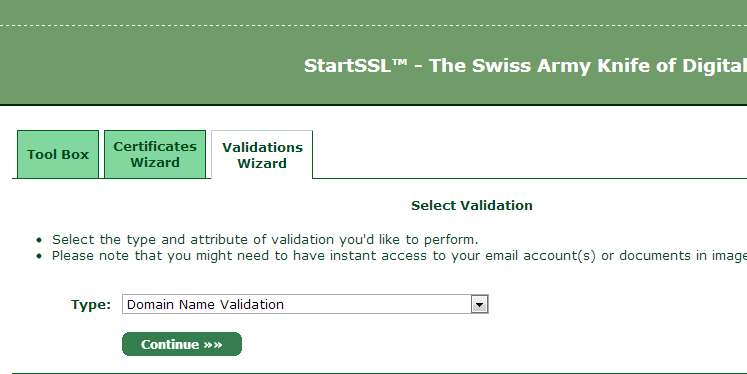
3.验证域名的所有权
QQ截图20130309183424
然后输入自己的域名,之后会自动查询域名的注册时留下的邮箱,并且会向邮箱发送一个验证码,输入后就可以完成对这个域名的认证了。

4.签发自己的证书后把证书,私钥,证书链和ca都放自己的机器上。nginx下的证书链配置是证书在最前面,然后逐级追加中间ca,最后是把ca加在最后面。

新建一个server段,加配置
[text]
ssl on;
ssl_certificate cert/server.crt;
ssl_certificate_key cert/server.key;

ssl_session_timeout 5m;
ssl_session_cache shared:sslcache:1m;
ssl_protocols SSLv3 TLSv1 TLSv1.1 TLSv1.2;
ssl_ciphers HIGH:!aNULL:!MD5;
ssl_prefer_server_ciphers on
[/text]

1

发表在 nginx | 留下评论