lvs常用的模式就三种,分别是DR、TUN和NAT。其中DR模式的性能最好,但需要Director和RS至少能有在同一VLAN下直接连接,比较适合一个CDN节点下的使用,作为顶层的负载设备对haproxy集群进行负载均衡,haproxy集群通过url hash提高缓存的命中率。NAT模式因为进出的流量都要通过Director,所以如果不使用万兆网卡的本身的网络是瓶颈,而且NAT也会比较耗性能一些,还需要把RS的网关指向Director,实用的价值不是太大,不过现在淘宝做的fullnat还比较好,把部署的架构难度降低了,但是官方的内核和keepalived都还没有合并进去,而且也只有2.6.32 rhel版本内核才能跑,广泛实用性也不是很大。TUN模式其实是从DR模式演化来的,主要是解决了Director和RS跨网段的情况。
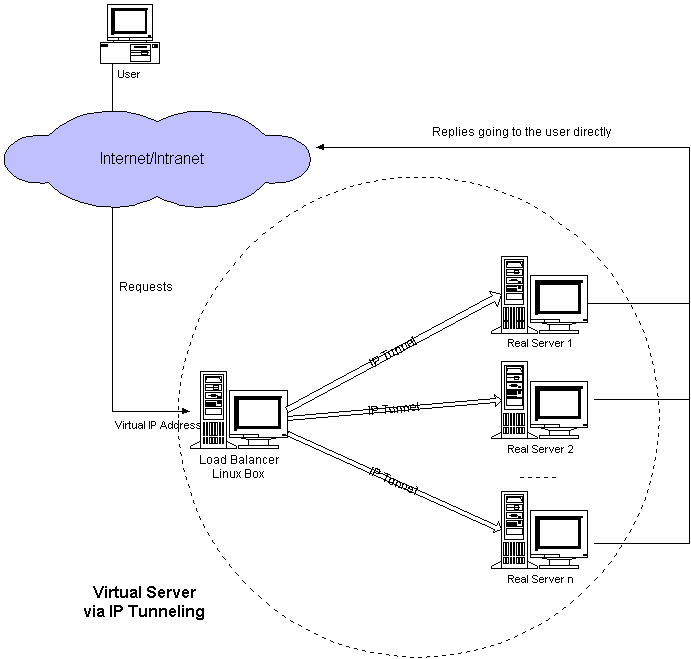
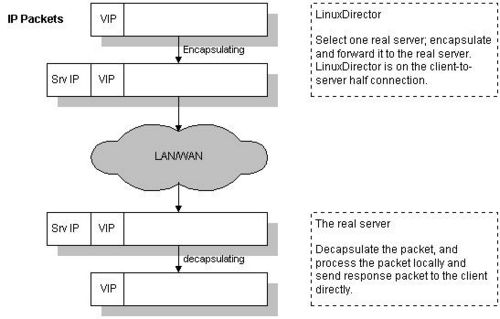
其结构比较简单,当用户发出来包达到Director的时候,会把请求的包封装进一个IPIP包,然后发给一个RS,RS接受到包后解包还原成原始的包,然后再进行进一步的处理。需要注意的是Director上不是用内核的ipip处理函数进行标准的封转。
LVS-Tun is an LVS original. It is based on LVS-DR. The LVS code encapsulates the original packet (CIP->VIP) inside an ipip packet of DIP->RIP, which is then put into the OUTPUT chain, where it is routed to the realserver. (There is no tunl0 device on the director;
ip_vs() does its own encapsulation and doesn’t use the standard kernel ipip code. This possibly is the reason why PMTU on the director does not work for LVS-Tun – seeMTU.) The realserver receives the packet on a tunl0 device (seeneed tunl0 device) and decapsulates the ipip packet, revealing the original CIP->VIP packet.
简单的配置一下tun模式的双机互备结构,如果机器不够就把备机撤掉。
1.先进行简单的安装,在2台服务器上编译keepalived安装。
wgethttp://www.keepalived.org/software/keepalived-1.2.7.tar.gztar zxvf keepalived-1.2.7.tar.gzcd keepalived-1.2.7./configure –prefix=/opt/keepalived &&
make -j 10 &&
make install
2.主备 Director的配置
主机的配置如下:
! Configuration File for keepalived
!global_defs {!  notification_email {[email protected][email protected][email protected]!   }!   [email protected]!   smtp_server 192.168.200.1!   smtp_connect_timeout 30!   router_id LVS_DEVEL!}
[[email protected]](mailto:[email protected])
[[email protected]](mailto:[email protected])
备机的配置:
! Configuration File for keepalived
!global_defs {!  notification_email {[email protected][email protected][email protected]!   }!   [email protected]!   smtp_server 192.168.200.1!   smtp_connect_timeout 30!   router_id LVS_DEVEL!}
[[email protected]](mailto:[email protected])
[[email protected]](mailto:[email protected])
- 三台RS上绑定好VIP,脚本如下
#!/bin/bashVI
P=’10.253.85.250′case $1 instart)modprobe -r ipipmodprobe ipipip link
set tunl0 upip link
set tunl0 arp off
for IP in $VIPdoNO=$((NO+1))ip addr add $IP/32 br $IP label tunl0:$NO dev tunl0ip route add $IP/32 dev tunl0
done
echo 1 > /proc/sys/net/ipv4/conf/tunl0/arp_ignore
echo 2 > /proc/sys/net/ipv4/conf/tunl0/arp_announce
echo 0 > /proc/sys/net/ipv4/conf/tunl0/rp_fi
lter
echo 1 > /proc/sys/net/ipv4/conf/all/arp_ignore
echo 2 > /proc/sys/net/ipv4/conf/all/arp_announce;
;
stop)
echo 0 > /proc/sys/net/ipv4/conf/tunl0/arp_ignore
echo 0 > /proc/sys/net/ipv4/conf/tunl0/arp_announce
echo 1 > /proc/sys/net/ipv4/conf/tunl0/rp_fi
lter
echo 0 > /proc/sys/net/ipv4/conf/all/arp_ignore
echo 0 > /proc/sys/net/ipv4/conf/all/arp_announcemodprobe -r ipip;
;
*)
echo “$0: Usage: $0 {start|stop|status}”exit 1;
;
esac
4. 停止keepalived 需要向主进程发送TERM信号。
ps -C keepalived u |awk ‘{print $2}’|sort|head -n 1|xargs kill -TERM
可以先把备机启动,然后启动主机的时候看到VIP被备机踢出,并在主机上绑定,当主机挂掉的时候也会再切换到备机上面。
如果不希望主机恢复后VIP从备机切换回主机,可以做成双备的模式,都是BACKUP模式,然后设置  nopreempt。  nopreempt的说明如下:
```bash
# VRRP will normally preempt a lower priority# machine when a higher priority machine comes# online.  “nopreempt” allows the lower priority# machine to maintain the master role, even when# a higher priority machine comes back online.# NOTE: For this to work, the initial state of this# entry must be BACKUP.
我分别对RS和VIP进行了一下压测。 直接压测RS的结果如下: Webbench – Simple Web Benchmark 1.5Copyright (c) Radim Kolar 1997-2004, GPL Open Source Software.
[http://10.253.26.2/](http://10.253.26.2/)
```bash
Speed=465536 pages/min, 1838409 bytes/sec.Requests: 232710 susceed, 58 failed.
直接压测VIP的结果如下:
Webbench – Simple Web Benchmark 1.5Copyright (c) Radim Kolar 1997-2004, GPL Open Source Software.
Speed=1637384 pages/min, 6467578 bytes/sec.Requests: 818692 susceed, 0 failed.
简单的看似乎是通过VIP的QPS和三个RS的和基本差不多。