如何监听非本地IP
做HA的时候,如果每个机器上同时需要监听多个IP的同一个端口。那么肯定是需要写死监听的IP和端口。比如在haproxy里面:frontend freebind 10.17.10.4:80default_backend test1frontend freebind 10.17.10.5:80default_backend test2 echo 1 > /proc/sys/net/ipv4/ip_nonlocal_bind
做HA的时候,如果每个机器上同时需要监听多个IP的同一个端口。那么肯定是需要写死监听的IP和端口。比如在haproxy里面:frontend freebind 10.17.10.4:80default_backend test1frontend freebind 10.17.10.5:80default_backend test2 echo 1 > /proc/sys/net/ipv4/ip_nonlocal_bind
负载均衡与高可用本来是个很大的话题,可以做的方式多种多样,我只是把自己熟悉一点的简单讲一些。 bind1. 其实最原始的负载均衡就是在DNS上直接做多个A记录,这样用户解析网站域名的时候就会随机解析为我们设置的一个A记录的IP。但我们不能改变2个IP被解析的概率,如果2个机器的负载能力不同,那这种方式就欠妥了。2. 既然直接A记录不好控制比例,那么我们可以通过bind的view来根据查询源IP做解析。比如把网通的用户解析为网通机房的IP,把电信的用户解析为电信IP,具体的策略设置非常灵活,根据实际情况而定。对于DNS服务器自身的高可用和负载均衡可以使用keepalived打包完成。如果有条件的可以多个DNS机器跑OSPF集群解决。 LVS 一般大家使用keepalived来管理lvs,并能借助keepalived支持的vrrp协议实现HA。对于CDN节点这种类型的话,非常适用与LVS(DR)+[haproxy+squid],因为单个几点的机器比较少,网络结构不会太负载,而流量又会非常大。直接在一个万兆交换机下挂10多个机器,其中2个做LVS(主/备),另外的所有机器同时部署haproxy和squid,所有机器的squid配置都一样,同时上面跑的haproxy的配置也都一样,backend里面把所有的机器都加进去,这样可以做采用URL hash算法来提高缓存的命中率。但是需要注意此种模式,交换机下的流量会比较大,比不使用haproxy会翻倍,一定要保证交换机的背板带宽够用。LVS相对其他很多负载均衡软件的优势时可以支持UDP,而且DR模式和TUN模式的时候对于大部分业务类型只有用户的请求经过LVS机器,后端服务器响应的内容都是直接返回给用户,所以不会像NAT模式进出的流量都要经过LVS。但是DR和TUN都需要给后端机器绑VIP,比较麻烦。而NAT模式又需要其他机器把LVS机器作为网关,也限制了其使用的范围。相对来说淘宝改的FULLNAT模式部署起来对环境的要求比较低,但是短时间内不会合并到trunk,使用RHEL以外发行版的同学基本不能使用。而且后端机器要获取客户端的IP需要单独安装一个toa的内核模块,因为做了snat后他们只能在一个tcp头的保留字段插入客户的真实IP。 haproxyhaproxy其实是和很成熟的负载均衡软件,4/7通吃,调度算法也非常丰富,配置项目非常多,文档支持也很好,现在也支持了ssl加密了。haproxy因为之前一直采用的tunnel-like模式,所以现在对后端机器开不了keepalive,缺一个非常非常重要的特性。或许在2013年能搞出来。 nginxnginx作为现在最火的webserver,在做代理方面也非常流行,做ssl加密非常方便,配置比起haproxy更加简单和灵活。但是整体而言,不能做4层的反向代理是个遗憾。负载算法方面nginx的不像haproxy有那么多,不过其实一般大家用的最多的还是简单的轮询,流量特别大的网站都是不可能使用wlc算法的,不然机器启动就直接被打暴了。 haproxy和nginx的高可用都需要借助keepalived来做(需要注意改内核参数使备机能直接监听非本地的IP)。当然,如果单个nginx或者haproxy撑不住,也可以使用2层结构,第一层跑LVS,下面一层跑haproxy或者nginx,不过此时VIP都是绑定在第一层的LVS上面。lvs上频繁修改配置reload还是需要注意,不小心搞挂了就悲剧了。 经常见很多论坛,就两三个机器在折腾LVS,问比如遇到RS上不能访问VIP,或者Director上访问不了VIP这些确实比较蛋疼的问题,基本都是没有仔细搞清楚lvs原理,也没有好好看文档的,对于这种我是建议直接跑个haproxy或者nginx就搞定了。
公司有很多windows的服务器,因此就有了windows的跳板机机器。但是因为很多很多蛋疼的问题,造成现在直接A记录搞的经常有问题。我自己其实在测试环境测试过用haproxy做负载均衡的,比较简单。直接贴配置文件吧``` globallog 127.0.0.1 local0maxconn 40960pidfile /opt/haproxy/haproxy.pidnbproc 1uid 99gid 99daemon defaultslog globalmode tcpoption dontlognullretries 3option redispatchcontimeout 5000clitimeout 50000srvtimeout 50000listen stat *:8000mode httpoption httplogmaxconn 1000stats refresh 60sstats uri /statsstats realm GNUerstats auth admin:adminfrontend windowbind *:3389default_backend windowsrsbackend windowsrsmode tcpbalance leastconnserver windows1 10.15.0.51:3389 weight 10 check inter 2000 rise 2 fall 4server windows2 10.15.1.109:3389 weight 10 check inter 2000 rise 2 fall 4frontend window_1bind *:3390default_backend window_rs1backend window_rs1mode tcpbalance leastconnserver windows1 10.15.0.51:3389 weight 10 check inter 2000 rise 2 fall 4frontend window_2bind *:3391default_backend window_rs2backend window_rs2mode tcpbalance leastconnserver windows2 10.15.1.109:3389 weight 10 check inter 2000 rise 2 fall 4 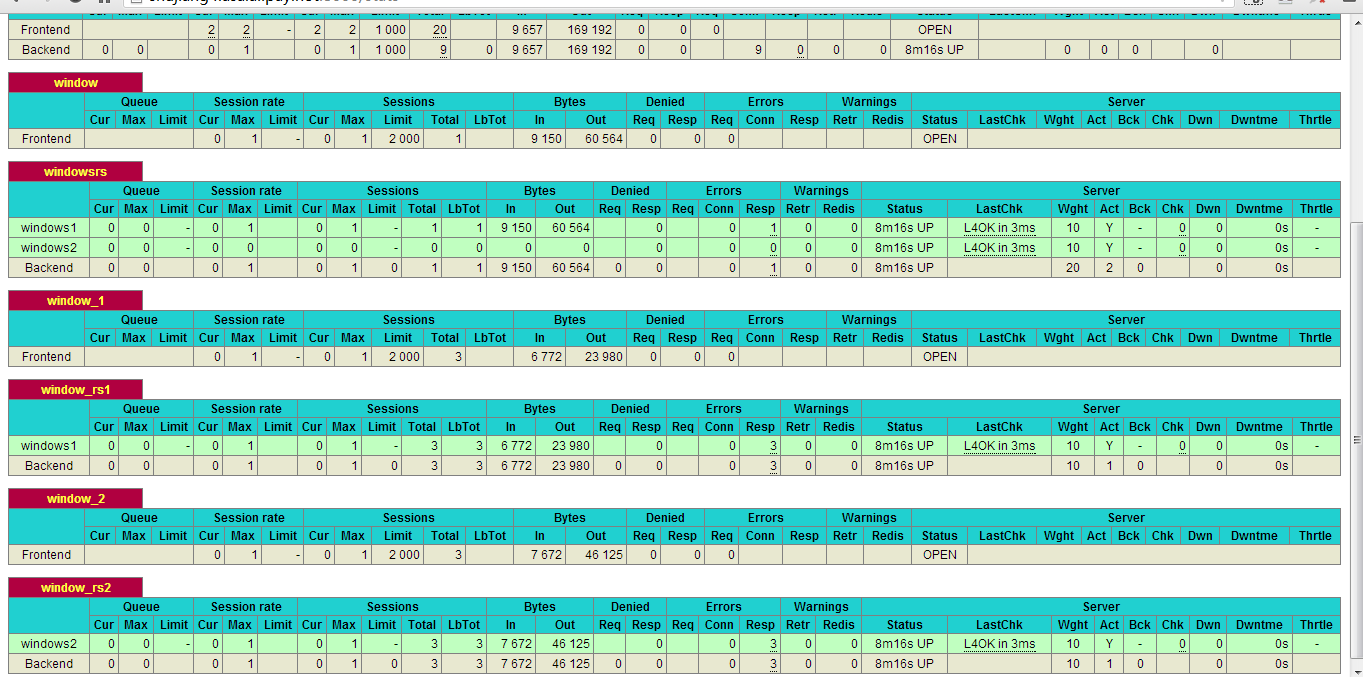
由于代理服务器上开启了长连接后,可以减少每次与后端服务器的三次握手,提高后端服务器的效率。所以nginx在1.1.4版本中终于增加了upstream对keepalive的支持,而haproxy原本对后端是支持长连接的(但是这个时候由于不能把client的IP加到header转发给后端服务器造成会丢失客户端的IP)。今天简单测试了一下。基本的结构是A:Client –> nginx(proxy) –>nginx(server)B:Client –> haproxy(proxy) –>nginx(server) 对比的结构 Client –>nginx(server) 先测试一下client直接和server端能否保持住长连接,我是直接在server端抓包观察,确定OK后再进行nginx和haproxy的测试。 nginx proxy的配置如下: server { location / {root html; proxy_set_header Connection ""; proxy_http_version 1.1; proxy_intercept_errors on; proxy_set_header Host $http_host; proxy_set_header ORIG_CLIENT_IP $remote_addr; index index.html,index.htm; proxy_pass http://httpd; } 0172.189.085.161.50970-0172.189.085.156.01080: GET /index.html HTTP/1.10172.189.085.156.01080-0172.189.085.161.50970: HTTP/1.1 304 Not Modified0172.189.085.161.50971-0172.189.085.156.01080: GET /favicon.ico HTTP/1.10172.189.085.156.01080-0172.189.085.161.50971: HTTP/1.1 404 Not Found0172.189.085.161.50972-0172.189.085.156.01080: GET /index.html HTTP/1.10172.189.085.156.01080-0172.189.085.161.50972: HTTP/1.1 304 Not Modified0172.189.085.161.50973-0172.189.085.156.01080: GET /favicon.ico HTTP/1.10172.189.085.156.01080-0172.189.085.161.50973: HTTP/1.1 404 Not Found0172.189.085.161.50974-0172.189.085.156.01080: GET /index.html HTTP/1.10172.189.085.156.01080-0172.189.085.161.50974: HTTP/1.1 304 Not Modified0172.189.085.161.50975-0172.189.085.156.01080: GET /favicon.ico HTTP/1.10172.189.085.156.01080-0172.189.085.161.50975: HTTP/1.1 404 Not Found0172.189.085.161.50976-0172.189.085.156.01080: GET /index.html HTTP/1.10172.189.085.156.01080-0172.189.085.161.50976: HTTP/1.1 304 Not Modified0172.189.085.161.50977-0172.189.085.156.01080: GET /favicon.ico HTTP/1.10172.189.085.156.01080-0172.189.085.161.50977: HTTP/1.1 404 Not Found0172.189.085.161.50978-0172.189.085.156.01080: GET /index.html HTTP/1.10172.189.085.156.01080-0172.189.085.161.50978: HTTP/1.1 304 Not Modified0172.189.085.161.50979-0172.189.085.156.01080: GET /favicon.ico HTTP/1.10172.189.085.156.01080-0172.189.085.161.50979: HTTP/1.1 404 Not Found0172.189.085.161.50980-0172.189.085.156.01080: GET /index.html HTTP/1.10172.189.085.156.01080-0172.189.085.161.50980: HTTP/1.1 304 Not Modified0172.189.085.161.50981-0172.189.085.156.01080: GET /favicon.ico HTTP/1.10172.189.085.156.01080-0172.189.085.161.50981: HTTP/1.1 404 Not Found0172.189.085.161.50982-0172.189.085.156.01080: GET /index.html HTTP/1.10172.189.085.156.01080-0172.189.085.161.50982: HTTP/1.1 304 Not Modified0172.189.085.161.50983-0172.189.085.156.01080: GET /favicon.ico HTTP/1.10172.189.085.156.01080-0172.189.085.161.50983: HTTP/1.1 404 Not Found0172.189.085.161.50984-0172.189.085.156.01080: GET /index.html HTTP/1.10172.189.085.156.01080-0172.189.085.161.50984: HTTP/1.1 304 Not Modified0172.189.085.161.50985-0172.189.085.156.01080: GET /favicon.ico HTTP/1.10172.189.085.156.01080-0172.189.085.161.50985: HTTP/1.1 404 Not Found0172.189.085.161.50986-0172.189.085.156.01080: GET /index.html HTTP/1.10172.189.085.156.01080-0172.189.085.161.50986: HTTP/1.1 304 Not Modified0172.189.085.161.50987-0172.189.085.156.01080: GET /favicon.ico HTTP/1.10172.189.085.156.01080-0172.189.085.161.50987: HTTP/1.1 404 Not Found0172.189.085.161.50988-0172.189.085.156.01080: GET /index.html HTTP/1.10172.189.085.156.01080-0172.189.085.161.50988: HTTP/1.1 304 Not Modified0172.189.085.161.50989-0172.189.085.156.01080: GET /favicon.ico HTTP/1.10172.189.085.156.01080-0172.189.085.161.50989: HTTP/1.1 404 Not Found0172.189.085.161.50990-0172.189.085.156.01080: GET /index.html HTTP/1.10172.189.085.156.01080-0172.189.085.161.50990: HTTP/1.1 304 Not Modified0172.189.085.161.50991-0172.189.085.156.01080: GET /favicon.ico HTTP/1.10172.189.085.156.01080-0172.189.085.161.50991: HTTP/1.1 404 Not Found0172.189.085.161.50992-0172.189.085.156.01080: GET /index.html HTTP/1.10172.189.085.156.01080-0172.189.085.161.50992: HTTP/1.1 304 Not Modified0172.189.085.161.50993-0172.189.085.156.01080: GET /favicon.ico HTTP/1.10172.189.085.156.01080-0172.189.085.161.50993: HTTP/1.1 404 Not Found0172.189.085.161.50994-0172.189.085.156.01080: GET /index.html HTTP/1.10172.189.085.156.01080-0172.189.085.161.50994: HTTP/1.1 304 Not Modified0172.189.085.161.50995-0172.189.085.156.01080: GET /favicon.ico HTTP/1.10172.189.085.156.01080-0172.189.085.161.50995: HTTP/1.1 404 Not Found0172.189.085.161.50996-0172.189.085.156.01080: GET /index.html HTTP/1.10172.189.085.156.01080-0172.189.085.161.50996: HTTP/1.1 304 Not Modified0172.189.085.161.50997-0172.189.085.156.01080: GET /favicon.ico HTTP/1.10172.189.085.156.01080-0172.189.085.161.50997: HTTP/1.1 404 Not Found server { ```bash location / {root html;proxy_set_header Connection "";proxy_http_version 1.1;proxy_intercept_errors on;proxy_set_header Host $http_host;proxy_set_header ORIG_CLIENT_IP $remote_addr;index index.html,index.htm;proxy_pass http://httpd;} 0172.189.085.161.50998-0172.189.085.156.01080: GET /index.html HTTP/1.10172.189.085.156.01080-0172.189.085.161.50998: HTTP/1.1 304 Not Modified0172.189.085.161.50998-0172.189.085.156.01080: GET /favicon.ico HTTP/1.10172.189.085.156.01080-0172.189.085.161.50998: HTTP/1.1 404 Not Found0172.189.085.161.50998-0172.189.085.156.01080: GET /index.html HTTP/1.10172.189.085.156.01080-0172.189.085.161.50998: HTTP/1.1 304 Not Modified0172.189.085.161.50998-0172.189.085.156.01080: GET /favicon.ico HTTP/1.10172.189.085.156.01080-0172.189.085.161.50998: HTTP/1.1 404 Not Found0172.189.085.161.50998-0172.189.085.156.01080: GET /index.html HTTP/1.10172.189.085.156.01080-0172.189.085.161.50998: HTTP/1.1 304 Not Modified0172.189.085.161.50998-0172.189.085.156.01080: GET /favicon.ico HTTP/1.10172.189.085.156.01080-0172.189.085.161.50998: HTTP/1.1 404 Not Found0172.189.085.161.50998-0172.189.085.156.01080: GET /index.html HTTP/1.10172.189.085.156.01080-0172.189.085.161.50998: HTTP/1.1 304 Not Modified0172.189.085.161.50998-0172.189.085.156.01080: GET /favicon.ico HTTP/1.10172.189.085.156.01080-0172.189.085.161.50998: HTTP/1.1 404 Not Found0172.189.085.161.50998-0172.189.085.156.01080: GET /index.html HTTP/1.10172.189.085.156.01080-0172.189.085.161.50998: HTTP/1.1 304 Not Modified 然后我又测试了一下haproxy。主要是之前对haproxy的理解有点误区。一方面doc里面说了 ```bash A last improvement in the communications is the pipelining mode. It still useskeep-alive, but the client does not wait for the first response to send thesecond request. This is useful for fetching large number of images composing apage : [CON] [REQ1] [REQ2] … [RESP1] [RESP2] [CLO] … ...
haproxy终于还是打算直接支持ssl了,目前是放出了一个测试版本的。简单的测试了一下,现在是可以跑起来的。 [测试版本](http://haproxy.1wt.eu/download/1.5/src/snapshot/haproxy-ss-20120904.tar.gz)globallog 127.0.0.1 local1 noticemaxconn 40960uid 99gid 99nbproc 4daemonstats socket /opt/haproxyssl/haproxy.stats level admin ```bash defaultslog globalmode httpoption dontlognullretries 3option redispatchmaxconn 2000contimeout 5000clitimeout 50000srvtimeout 50000frontend httpsbind-process 1,2bind :443 ssl /opt/haproxyssl/cert2/mulapp.crtdefault_backend httpbackend httpbind-process 3mode httpserver pp1 127.0.0.1:80 weight 10 check inter 2000 rise 2 fall 4listen stats 0.0.0.0:8000maxconn 10bind-process 4mode httpstats refresh 30sstats uri /statsstats realm haproxystats auth admin:admin 目前还没有证书的文档说明具体怎么用,只是邮件列表有提到,就照着配置了一下。可以使用bind-process把负责接收请求和ssl加解密的单独绑定到特定的进程。bind后面的ssl指令是指定ssl证书的,需要注意的是证书的格式是和stunnel用的类似的。对于证书链的配置是把依次把服务器证书,…,根证书追加到文件,然后再 把key追加到最后,我也试过直接把key放最前面也是可以的,看来是可以自动识别出来的。
haproxy虽然没有提供单独的管理工具,但是实际上可以通过一个unix socket进行实时的命令控制,比如简单的查询,权重设置,disable/enable某个服务器 clear counters : clear max statistics counters (add ‘all’ for all counters)clear table : remove an entry from a tablehelp : this messageprompt : toggle interactive mode with promptquit : disconnectshow info : report information about the running processshow stat : report counters for each proxy and servershow errors : report last request and response errors for each proxyshow sess [id] : report the list of current sessions or dump this sessionshow table [id]: report table usage stats or dump this table’s contentsget weight : report a server’s current weight set weight : change a server’s weight set timeout : change a timeout setting set maxconn : change a maxconn setting set rate-limit : change a rate limiting valuedisable : put a server or frontend in maintenance modeenable : re-enable a server or frontend which is in maintenance modeshutdown : kill a session or a frontend (eg:to release listening ports)要使用这个unix socket需要在global段配置stats socket /opt/haproxy/etc/haproxy.stats level admin 然后就能通过 ...